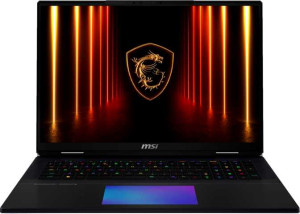
MSI Titan 18 HX AI A2XW (2025) 18"
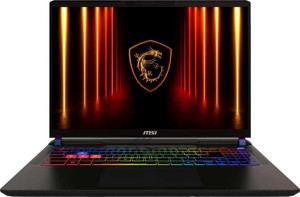
MSI Vector 16 HX AI A2XW (2025) 16" (Ultra 9 275HX / RTX 5080 Laptop / 32GB RAM / 2TB)

MSI Titan 18 HX AI A2XW (2025) 18" MSI Vector 16 HX AI A2XW (2025) 16" (Ultra 9 275HX / RTX 5080 Laptop / 32GB RAM / 2TB)

Common Features

  • Both products are gaming laptops.
  • Neither product uses a fanless design.
  • Both products have a backlit keyboard.
  • Neither product is weather-sealed or splashproof.
  • Neither product has a rugged build.
  • Both products have 24 CPU threads.
  • Both products use flash storage.
  • Both products have an NVMe SSD.
  • Both products support DirectX 12 Ultimate.
  • Both products use multithreading.
  • Both products support a maximum memory amount of 96GB.
  • Both products support ray tracing.
  • Both products support DLSS.
  • Both products have stereo speakers.
  • Both products have a 3.5 mm audio jack.
  • Both products support multi-display technology.
  • Both products have OpenCL version 3.
  • Both products have OpenGL version 4.6.
  • Both products support ECC memory.

Main Differences

  • MSI Titan 18 HX AI A2XW (2025) 18″ weighs 3600 g, while MSI Vector 16 HX AI A2XW (2025) 16″ weighs 2700 g.
  • MSI Titan 18 HX AI A2XW (2025) 18″ has a volume of 2976.672 cm³, while MSI Vector 16 HX AI A2XW (2025) 16″ has a volume of 2230.536 cm³.
  • MSI Titan 18 HX AI A2XW (2025) 18″ is 404 mm wide, while MSI Vector 16 HX AI A2XW (2025) 16″ is 357 mm wide.
  • MSI Titan 18 HX AI A2XW (2025) 18″ has a height of 307 mm, while MSI Vector 16 HX AI A2XW (2025) 16″ has a height of 284 mm.
  • MSI Titan 18 HX AI A2XW (2025) 18″ has a thickness of 24 mm, while MSI Vector 16 HX AI A2XW (2025) 16″ has a thickness of 22 mm.
  • MSI Titan 18 HX AI A2XW (2025) 18″ has an 18″ screen size, while MSI Vector 16 HX AI A2XW (2025) 16″ has a 16″ screen size.
  • MSI Titan 18 HX AI A2XW (2025) 18″ has a resolution of 3840 x 2400 px, while MSI Vector 16 HX AI A2XW (2025) 16″ has a resolution of 2560 x 1600 px.
  • MSI Titan 18 HX AI A2XW (2025) 18″ has a pixel density of 251 ppi, while MSI Vector 16 HX AI A2XW (2025) 16″ has a pixel density of 188 ppi.
  • MSI Titan 18 HX AI A2XW (2025) 18″ features an LCD, Mini-LED display, while MSI Vector 16 HX AI A2XW (2025) 16″ features an LCD, LED-backlit, IPS display.
  • MSI Titan 18 HX AI A2XW (2025) 18″ has a 120Hz refresh rate, while MSI Vector 16 HX AI A2XW (2025) 16″ has a 240Hz refresh rate.
  • MSI Titan 18 HX AI A2XW (2025) 18″ has 96GB of RAM, while MSI Vector 16 HX AI A2XW (2025) 16″ has 32GB of RAM.
  • MSI Titan 18 HX AI A2XW (2025) 18″ has 6144GB of internal storage, while MSI Vector 16 HX AI A2XW (2025) 16″ has 2048GB of internal storage.
  • MSI Titan 18 HX AI A2XW (2025) 18″ has a CPU speed of 8 x 2.8 & 16 x 2.1 GHz, while MSI Vector 16 HX AI A2XW (2025) 16″ has a CPU speed of 8 x 2.7 & 16 x 2.1 GHz.
  • MSI Titan 18 HX AI A2XW (2025) 18″ has 24GB of VRAM, while MSI Vector 16 HX AI A2XW (2025) 16″ has 16GB of VRAM.
  • MSI Titan 18 HX AI A2XW (2025) 18″ achieves 31.8 TFLOPS in floating-point performance, while MSI Vector 16 HX AI A2XW (2025) 16″ achieves 23.04 TFLOPS.
  • MSI Titan 18 HX AI A2XW (2025) 18″ has a texture rate of 496.9 GTexels/s, while MSI Vector 16 HX AI A2XW (2025) 16″ has a texture rate of 384 GTexels/s.
  • MSI Titan 18 HX AI A2XW (2025) 18″ has a pixel rate of 193.9 GPixel/s, while MSI Vector 16 HX AI A2XW (2025) 16″ has a pixel rate of 144 GPixel/s.
  • MSI Titan 18 HX AI A2XW (2025) 18″ has a GPU clock speed of 990 MHz, while MSI Vector 16 HX AI A2XW (2025) 16″ has a GPU clock speed of 975 MHz.
  • MSI Titan 18 HX AI A2XW (2025) 18″ has a turbo clock speed of 5.5GHz, while MSI Vector 16 HX AI A2XW (2025) 16″ has a turbo clock speed of 5.4GHz.
  • MSI Titan 18 HX AI A2XW (2025) 18″ has a GPU turbo of 1515 MHz, while MSI Vector 16 HX AI A2XW (2025) 16″ has a GPU turbo of 1500 MHz.
  • MSI Titan 18 HX AI A2XW (2025) 18″ achieves a PassMark result of 62297, while MSI Vector 16 HX AI A2XW (2025) 16″ achieves a PassMark result of 56426.
  • MSI Titan 18 HX AI A2XW (2025) 18″ has 3 USB 3.2 Gen 2 ports (USB-A), while MSI Vector 16 HX AI A2XW (2025) 16″ has 2 USB 3.2 Gen 2 ports (USB-A).
  • MSI Titan 18 HX AI A2XW (2025) 18″ has an RJ45 port, while MSI Vector 16 HX AI A2XW (2025) 16″ does not have an RJ45 port.
  • MSI Titan 18 HX AI A2XW (2025) 18″ has a 99 Wh battery, while MSI Vector 16 HX AI A2XW (2025) 16″ has a 90 Wh battery.
Specs Comparison
MSI Titan 18 HX AI A2XW (2025) 18"

MSI Titan 18 HX AI A2XW (2025) 18"

MSI Vector 16 HX AI A2XW (2025) 16" (Ultra 9 275HX / RTX 5080 Laptop / 32GB RAM / 2TB)

MSI Vector 16 HX AI A2XW (2025) 16" (Ultra 9 275HX / RTX 5080 Laptop / 32GB RAM / 2TB)

Design:
Type Gaming Gaming
weight 3600 g 2700 g
Uses a fanless design
Has a backlit keyboard
volume 2976.672 cm³ 2230.536 cm³
width 404 mm 357 mm
height 307 mm 284 mm
thickness 24 mm 22 mm
is weather-sealed (splashproof)
has a rugged build

The MSI Titan 18 HX AI A2XW (2025) 18″ and MSI Vector 16 HX AI A2XW (2025) 16″ are both gaming laptops, though they differ in several key design aspects.

When it comes to weight, the Titan 18 is heavier, weighing 3600 g, compared to the Vector 16, which is 2700 g. This makes the Vector 16 more portable. Both laptops use a non-fanless design and feature a backlit keyboard, but they differ in size. The Titan 18 has a larger volume of 2976.672 cm³, while the Vector 16’s volume is smaller at 2230.536 cm³. Additionally, the Titan 18 has a width of 404 mm, height of 307 mm, and thickness of 24 mm, while the Vector 16 is more compact with a width of 357 mm, height of 284 mm, and thickness of 22 mm.

Neither laptop is weather-sealed (splashproof) nor has a rugged build. Overall, the Titan 18 is larger and heavier, offering more space inside, while the Vector 16 is more compact and lightweight.

Display:
screen size 18" 16"
resolution 3840 x 2400 px 2560 x 1600 px
pixel density 251 ppi 188 ppi
Display type LCD, Mini-LED LCD, LED-backlit, IPS
has a touch screen
refresh rate 120Hz 240Hz
has anti-reflection coating
supported displays 4 4

The MSI Titan 18 HX AI A2XW (2025) 18″ and MSI Vector 16 HX AI A2XW (2025) 16″ both feature high-quality displays, though with some notable differences in size, resolution, and refresh rate.

The Titan 18 has a larger 18″ screen with a resolution of 3840 x 2400 px, offering a pixel density of 251 ppi. In contrast, the Vector 16 has a smaller 16″ display with a resolution of 2560 x 1600 px and a lower pixel density of 188 ppi. Both displays are non-touch, and while the Titan 18 uses an LCD Mini-LED display, the Vector 16 features an LCD LED-backlit IPS display. When it comes to refresh rate, the Titan 18 supports 120Hz, while the Vector 16 boasts a faster 240Hz refresh rate.

Both laptops support up to 4 displays, and neither has an anti-reflection coating. Overall, the Titan 18 offers a higher resolution and larger screen, while the Vector 16 provides a faster refresh rate for smoother motion.

Performance:
RAM 96GB 32GB
RAM speed 6400 MHz 6400 MHz
Uses flash storage
internal storage 6144GB 2048GB
CPU speed 8 x 2.8 & 16 x 2.1 GHz 8 x 2.7 & 16 x 2.1 GHz
CPU threads 24 threads 24 threads
VRAM 24GB 16GB
floating-point performance 31.8 TFLOPS 23.04 TFLOPS
GDDR version GDDR7 GDDR7
texture rate 496.9 GTexels/s 384 GTexels/s
pixel rate 193.9 GPixel/s 144 GPixel/s
Is an NVMe SSD
DirectX version DirectX 12 Ultimate DirectX 12 Ultimate
GPU clock speed 990 MHz 975 MHz
uses multithreading
maximum memory amount 96GB 96GB
DDR memory version 5 5
turbo clock speed 5.5GHz 5.4GHz
GPU turbo 1515 MHz 1500 MHz
memory slots 2 2
PCI Express (PCIe) version 4 4
semiconductor size 4 nm 4 nm
has XeSS (XMX)
Supports 64-bit

The MSI Titan 18 HX AI A2XW (2025) 18″ and MSI Vector 16 HX AI A2XW (2025) 16″ both deliver strong performance, though they differ in several key areas of hardware specifications.

In terms of RAM, the Titan 18 has a substantial 96GB, compared to the Vector 16’s 32GB, though both have a RAM speed of 6400 MHz. Both devices use flash storage with NVMe SSDs, but the Titan 18 offers significantly more storage, with 6144GB versus the Vector 16’s 2048GB. The Titan 18 also has a higher floating-point performance of 31.8 TFLOPS, compared to 23.04 TFLOPS on the Vector 16, and its VRAM is also larger at 24GB, while the Vector 16 comes with 16GB. The texture rate on the Titan 18 is 496.9 GTexels/s, compared to the Vector 16’s 384 GTexels/s, and the Titan 18 also has a higher pixel rate of 193.9 GPixel/s versus 144 GPixel/s on the Vector 16.

Both laptops feature CPUs with 24 threads, a turbo clock speed near 5.5GHz (Titan 18 at 5.5GHz, Vector 16 at 5.4GHz), and the same semiconductor size of 4 nm. The Titan 18 has a slightly higher GPU clock speed at 990 MHz, while the Vector 16’s is 975 MHz. Both laptops support multithreading and PCIe version 4. While the Titan 18 has a higher GPU turbo speed of 1515 MHz, the Vector 16’s GPU turbo is 1500 MHz. Neither laptop supports XeSS (XMX), and both support 64-bit architecture.

Benchmarks:
PassMark result 62297 56426
PassMark result (single) 4784 4723

The MSI Titan 18 HX AI A2XW (2025) 18″ and MSI Vector 16 HX AI A2XW (2025) 16″ both show strong performance in benchmark tests, with the Titan 18 leading in both overall and single-threaded scores.

The Titan 18 achieved a PassMark result of 62297, surpassing the Vector 16's result of 56426. For single-threaded performance, the Titan 18 also scores higher, with 4784 compared to the Vector 16's 4723.

While both laptops perform well, the Titan 18 holds a noticeable advantage in these benchmark scores.

Connectivity:
USB 3.2 Gen 2 ports (USB-C) 0 0
USB 3.2 Gen 2 ports (USB-A) 3 2
USB 4 20Gbps ports 0 0
USB 4 40Gbps ports 2 2
Thunderbolt 4 ports 0 0
USB 3.2 Gen 1 ports (USB-C) 0 0
USB 3.2 Gen 1 ports (USB-A) 0 0
Thunderbolt 3 ports 0 0
has an HDMI output
Has USB Type-C
supports Wi-Fi
Wi-Fi version Wi-Fi 7 (802.11be), Wi-Fi 6E (802.11ax), Wi-Fi 6 (802.11ax), Wi-Fi 5 (802.11ac), Wi-Fi 4 (802.11n) Wi-Fi 7 (802.11be), Wi-Fi 6E (802.11ax), Wi-Fi 6 (802.11ax), Wi-Fi 5 (802.11ac), Wi-Fi 4 (802.11n)
has an external memory slot
Bluetooth version 5.4 5.4
RJ45 ports 1 0
HDMI ports 1 1
HDMI version HDMI 2.1 HDMI 2.1
DisplayPort outputs 0 0
has AirPlay
mini DisplayPort outputs 0 0
has a VGA connector

The MSI Titan 18 HX AI A2XW (2025) 18″ and MSI Vector 16 HX AI A2XW (2025) 16″ offer similar connectivity options, though with some differences in port configurations.

Both laptops feature USB 4 40Gbps ports, USB Type-C, HDMI outputs, and support for Wi-Fi 7, Wi-Fi 6E, Wi-Fi 6, Wi-Fi 5, and Wi-Fi 4. However, the Titan 18 has three USB 3.2 Gen 2 USB-A ports, compared to the Vector 16's two. The Titan 18 also includes one RJ45 port, while the Vector 16 does not have any. Both laptops offer Bluetooth 5.4, an HDMI 2.1 port, and an external memory slot. Neither laptop has DisplayPort outputs, mini DisplayPort outputs, or a VGA connector. Both support AirPlay.

In summary, the Titan 18 offers slightly more USB-A ports and an RJ45 port, while the Vector 16 lacks an RJ45 port but offers similar connectivity in other areas.

Battery:
battery size 99 Wh 90 Wh
Has sleep-and-charge USB ports
Has a MagSafe power adapter

The MSI Titan 18 HX AI A2XW (2025) 18″ and MSI Vector 16 HX AI A2XW (2025) 16″ both come with sleep-and-charge USB ports, but they differ in battery size.

The Titan 18 is equipped with a larger 99 Wh battery, while the Vector 16 has a slightly smaller 90 Wh battery. Neither laptop includes a MagSafe power adapter.

Overall, the Titan 18 has a larger battery, while both models share similar charging features and lack MagSafe compatibility.

Features:
release date February 2025 February 2025
has stereo speakers
has a socket for a 3.5 mm audio jack
supports ray tracing
supports DLSS
has Dolby Atmos
Stylus included
Has a fingerprint scanner
number of microphones 1 1
Uses 3D facial recognition
video recording (main camera) 1080 x 30 fps 1080 x 30 fps
has voice commands
has a front camera
Has S/PDIF Out port
has a gyroscope
has GPS
has an accelerometer
has a compass
Has an optical disc drive

The MSI Titan 18 HX AI A2XW (2025) 18″ and MSI Vector 16 HX AI A2XW (2025) 16″ share many similar features, but with a few distinctions in biometric and camera options.

Both laptops come with stereo speakers, a 3.5 mm audio jack, ray tracing support, DLSS support, and a 1080 x 30 fps main camera for video recording. Neither has Dolby Atmos, a stylus, or a fingerprint scanner. Both also feature one microphone and a front camera, but the Titan 18 does not use 3D facial recognition, whereas the Vector 16 includes this feature. Additionally, both lack a gyroscope, GPS, accelerometer, compass, S/PDIF Out port, and an optical disc drive, with the Titan 18 using standard facial recognition, unlike the Vector 16.

Overall, the main difference is that the Vector 16 supports 3D facial recognition, while the Titan 18 does not.

Miscellaneous:
clock multiplier 28 27
AMD SAM / Intel Resizable BAR Intel Resizable BAR Intel Resizable BAR
GPU architecture Blackwell Blackwell
has LHR
Thermal Design Power (TDP) 95W 80W
Supports 3D
Supports multi-display technology
OpenCL version 3 3
OpenGL version 4.6 4.6
Supports ECC memory
memory bus width 256-bit 256-bit
effective memory speed 25400 MHz 25400 MHz
maximum memory bandwidth 811.5 GB/s 811.5 GB/s
render output units (ROPs) 128 96
texture mapping units (TMUs) 328 256
shading units 10496 7680
Has Double Precision Floating Point (DPFP)
GPU memory speed 2000 MHz 2000 MHz
Type Laptop Laptop
CPU socket BGA 2114 BGA 2114
instruction sets MMX, F16C, FMA3, AES, AVX, AVX2, SSE 4.1, SSE 4.2 MMX, F16C, FMA3, AES, AVX, AVX2, SSE 4.1, SSE 4.2
L3 cache 36 MB 36 MB
L2 cache 40 MB 40 MB
Has an unlocked multiplier
Has NX bit
Turbo Boost version 2 2
CPU temperature 105 °C 105 °C
Has integrated graphics
memory channels 2 2
RAM speed (max) 6400 MHz 6400 MHz
Uses big.LITTLE technology

The MSI Titan 18 HX AI A2XW (2025) 18″ and MSI Vector 16 HX AI A2XW (2025) 16″ share several similar technical features, though there are some distinctions in their performance-related specifications.

Both laptops support 3D, multi-display technology, and have Intel Resizable BAR. They also feature Blackwell GPU architecture and support ECC memory. The Titan 18 has a slightly higher clock multiplier at 28, compared to the Vector 16's 27. The Titan 18 also has a higher Thermal Design Power (TDP) of 95W, whereas the Vector 16 is rated at 80W. In terms of GPU performance, the Titan 18 has more render output units (ROPs) at 128, while the Vector 16 has 96. Similarly, the Titan 18 has more texture mapping units (TMUs) at 328, while the Vector 16 has 256. The shading units also differ, with the Titan 18 having 10,496 and the Vector 16 having 7,680. Both devices feature the same GPU memory speed of 2000 MHz and support double precision floating point (DPFP).

Other shared features include support for OpenCL version 3, OpenGL version 4.6, an unlocked CPU multiplier, and an integrated GPU. Both laptops have the same L3 and L2 cache sizes (36 MB and 40 MB, respectively), and both support big.LITTLE technology and have a maximum RAM speed of 6400 MHz. Both CPUs are in the BGA 2114 socket and feature Turbo Boost version 2, with a CPU temperature of 105 °C.

Comparison Summary

This is a specification comparison between MSI Titan 18 HX AI A2XW (2025) 18″ and MSI Vector 16 HX AI A2XW (2025) 16″ (Ultra 9 275HX / RTX 5080 Laptop / 32GB RAM / 2TB). Both laptops are designed for gaming, with 24 CPU threads and NVMe SSD storage. They both support ray tracing and DLSS. However, the MSI Titan 18 HX AI A2XW (2025) 18″ is larger, weighing 3600 g and featuring an 18″ screen, while the MSI Vector 16 HX AI A2XW (2025) 16″ weighs 2700 g and has a 16″ screen. Additionally, the MSI Titan 18 HX AI A2XW (2025) 18″ has 96GB of RAM and 6144GB of storage, while the MSI Vector 16 HX AI A2XW (2025) 16″ has 32GB of RAM and 2048GB of storage.