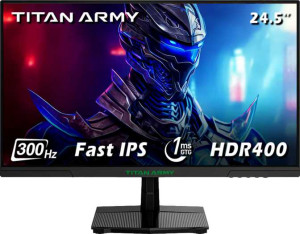
Titan Army P2510HS 25"
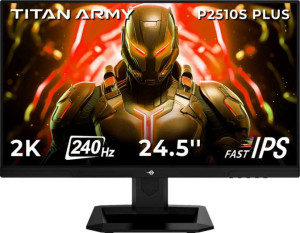
Titan Army P2510S Plus 25"

Titan Army P2510HS 25" Titan Army P2510S Plus 25"

Common Features

  • Both products have a 1 ms response time.
  • Both products have a 178º maximum horizontal viewing angle.
  • Both products have a 178º maximum vertical viewing angle.
  • Both products have an LED-backlit, LCD, IPS display type.
  • Both products have no anti-glare coating.
  • Both products have a glossy panel.
  • Both products have a 24.5″ screen size.
  • Both products support total tilt.
  • Both products support VESA mount.
  • Both products have a height of 330 mm.
  • Both products have a width of 557 mm.
  • Both products have a thickness of 58 mm.
  • Both products have a volume of 10660.98 cm³.
  • Both products support color calibration.
  • Both products display 16.7 million colors.
  • Both products have a contrast ratio of 1000:1.
  • Both products have a standby power consumption of 0.5W.
  • Both products have PiP support.
  • Both products do not have stereo speakers.

Main Differences

  • Resolution is 1920 x 1080 px on Titan Army P2510HS 25″ and 2560 x 1440 px on Titan Army P2510S Plus 25″.
  • Pixel density is 89 ppi on Titan Army P2510HS 25″ and 119 ppi on Titan Army P2510S Plus 25″.
  • Adaptive synchronization is AMD FreeSync on Titan Army P2510HS 25″ and VESA Adaptive Sync on Titan Army P2510S Plus 25″.
  • Refresh rate is 300Hz on Titan Army P2510HS 25″ and 240Hz on Titan Army P2510S Plus 25″.
  • Titan Army P2510S Plus 25″ has a swivel stand, while Titan Army P2510HS 25″ does not.
  • Weight is 3200 g on Titan Army P2510HS 25″ and 3800 g on Titan Army P2510S Plus 25″.
  • Titan Army P2510S Plus 25″ supports portrait mode, while Titan Army P2510HS 25″ does not.
  • Brightness is 350 nits on Titan Army P2510HS 25″ and 400 nits on Titan Army P2510S Plus 25″.
  • Adobe RGB coverage is 104% on Titan Army P2510HS 25″ and 102% on Titan Army P2510S Plus 25″.
  • sRGB coverage is 121% on Titan Army P2510HS 25″ and 123% on Titan Army P2510S Plus 25″.
  • Titan Army P2510HS 25″ has 1 DisplayPort output, while Titan Army P2510S Plus 25″ has 2 DisplayPort outputs.
  • Titan Army P2510HS 25″ supports Wi-Fi, while Titan Army P2510S Plus 25″ does not.
  • Operating power consumption is 32W on Titan Army P2510HS 25″ and 35W on Titan Army P2510S Plus 25″.
Specs Comparison
Titan Army P2510HS 25"

Titan Army P2510HS 25"

Titan Army P2510S Plus 25"

Titan Army P2510S Plus 25"

Display:
Display type LED-backlit, LCD, IPS LED-backlit, LCD, IPS
response time 1 ms 1 ms
screen size 24.5" 24.5"
resolution 1920 x 1080 px 2560 x 1440 px
pixel density 89 ppi 119 ppi
Adaptive synchronization AMD FreeSync VESA Adaptive Sync
has anti-glare coating
refresh rate 300Hz 240Hz
maximum horizontal viewing angle 178º 178º
maximum vertical viewing angle 178º 178º
has a matte panel
has a glossy panel
has a touch screen

The Titan Army P2510HS 25″ and Titan Army P2510S Plus 25″ both feature LED-backlit, LCD, and IPS display types, ensuring vibrant color and wide viewing angles. The P2510HS offers a 1920 x 1080 px resolution, while the P2510S Plus has a higher 2560 x 1440 px resolution, which provides sharper details with a pixel density of 119 ppi compared to the P2510HS’s 89 ppi. Both monitors share a 1 ms response time for fast and responsive gameplay.

In terms of refresh rate, the P2510HS has a 300Hz refresh rate, higher than the P2510S Plus’s 240Hz. However, the P2510S Plus supports VESA Adaptive Sync for smoother visuals, while the P2510HS uses AMD FreeSync. Both displays offer the same 178º horizontal and vertical viewing angles. Neither model has an anti-glare coating or a matte panel, and both sport glossy screens, which can enhance contrast but might reflect light.

Neither monitor has a touch screen, and both feature non-matte glossy panels, making them suitable for environments with controlled lighting. Overall, the main differences between the two models lie in the resolution, pixel density, refresh rate, and the type of adaptive sync technology they support.

General info:
Type Gaming Gaming
release date March 2025 March 2025
supports total tilt
Has a swivel stand
Supports VESA mount
height 330 mm 330 mm
width 557 mm 557 mm
thickness 58 mm 58 mm
weight 3200 g 3800 g
supports portrait mode
volume 10660.98 cm³ 10660.98 cm³

Both the Titan Army P2510HS 25″ and Titan Army P2510S Plus 25″ are designed as gaming monitors and share several similarities in their general specifications. Both models support total tilt, making it easy to adjust the screen angle for a more comfortable viewing experience. They also both support VESA mounting, allowing users to attach the monitors to compatible stands or wall mounts. The height, width, thickness, and volume are identical for both models, with each measuring 330 mm in height, 557 mm in width, 58 mm in thickness, and having a volume of 10660.98 cm³.

The primary differences between the two models lie in their stand capabilities and weight. The P2510S Plus includes a swivel stand, allowing for more flexibility in adjusting the screen’s orientation, while the P2510HS lacks this feature. Additionally, the P2510S Plus is slightly heavier at 3800 g compared to the P2510HS’s 3200 g. The P2510S Plus also supports portrait mode, which is not available on the P2510HS. Both monitors have a similar weight range, but these differences in stand adjustments and portrait mode could affect the user’s preferred setup.

In summary, the Titan Army P2510HS and P2510S Plus are similar in terms of size and overall build, but the P2510S Plus offers more versatility with its swivel stand and portrait mode support, while the P2510HS is lighter and simpler in terms of adjustability.

Colors:
brightness (typical) 350 nits 400 nits
supports color calibration
display colors 16.7 million 16.7 million
contrast ratio 1000:1 1000:1
Adobe RGB coverage 104% 102%
sRGB coverage 121% 123%

The Titan Army P2510HS 25″ and Titan Army P2510S Plus 25″ share similar color-related features, but there are a few notable differences. Both models offer 16.7 million display colors and support color calibration, ensuring accurate and vibrant color reproduction. The contrast ratio is identical for both monitors at 1000:1, providing a balanced distinction between dark and light areas on the screen.

When it comes to brightness, the P2510S Plus has a slight edge with a typical brightness of 400 nits compared to the P2510HS’s 350 nits, which might make the P2510S Plus a bit brighter in well-lit environments.

In terms of color gamut, both monitors provide impressive coverage, with the P2510HS covering 104% of the Adobe RGB spectrum and 121% of the sRGB spectrum, while the P2510S Plus covers 102% of Adobe RGB and 123% of sRGB. These differences are relatively small but could have an impact on the range of colors each monitor can display.

Connectivity:
HDMI ports 2 2
supports Thunderbolt
DisplayPort outputs 1 2
DisplayPort version DisplayPort 1.4 DisplayPort 1.4
has a socket for a 3.5 mm audio jack
has a DVI connector
USB ports 0 0
Has USB Type-C
HDMI version HDMI 2.0 HDMI 2.0
supports Ethernet
supports Wi-Fi
has AirPlay
mini DisplayPort outputs 0 0
has a VGA connector

The Titan Army P2510HS 25″ and Titan Army P2510S Plus 25″ both offer similar connectivity options, with each model featuring 2 HDMI ports and 1 DisplayPort output supporting DisplayPort 1.4. Neither monitor supports Thunderbolt, has USB Type-C, or includes a DVI connector. Both monitors have a socket for a 3.5 mm audio jack, allowing for external audio connections.

In terms of DisplayPort outputs, the P2510S Plus has 2, while the P2510HS has 1, giving the P2510S Plus more flexibility for connecting additional displays. The P2510HS supports Wi-Fi, whereas the P2510S Plus does not, so the P2510HS may offer easier wireless connectivity. Neither model supports Ethernet, AirPlay, or has mini DisplayPort or VGA connectors.

Overall, the Titan Army P2510S Plus provides more DisplayPort outputs, but the Titan Army P2510HS has Wi-Fi support, making it more versatile for wireless connections.

Power:
operating power consumption 32W 35W
standby power consumption 0.5W 0.5W

The Titan Army P2510HS 25″ and Titan Army P2510S Plus 25″ have very similar power consumption figures. Both monitors have the same standby power consumption of 0.5W, ensuring minimal energy usage when not in active use. However, the operating power consumption differs slightly between the two models. The P2510HS consumes 32W during operation, while the P2510S Plus uses 35W. This difference is relatively small but could indicate a slightly higher power draw for the P2510S Plus when in use.

In summary, the Titan Army P2510HS is marginally more power-efficient with a lower operating power consumption, while both monitors share the same standby power usage.

Features:
has PiP
has stereo speakers
has built-in smart TV
has a remote control
supports Dolby Digital
supports Dolby Digital Plus
has DTS Surround
has an ambient light sensor
has a front camera

Both the Titan Army P2510HS 25″ and Titan Army P2510S Plus 25″ share identical features. They both support Picture-in-Picture (PiP), allowing for multitasking with multiple input sources on the screen. Neither monitor includes stereo speakers, built-in smart TV functionality, a remote control, or support for Dolby Digital or Dolby Digital Plus audio formats. Additionally, neither model features DTS Surround sound, an ambient light sensor, or a front camera.

In summary, the feature sets of the Titan Army P2510HS and P2510S Plus are essentially the same, with both monitors lacking advanced audio and smart features but offering PiP functionality.

Comparison Summary

This is a specification comparison between Titan Army P2510HS 25″ and Titan Army P2510S Plus 25″. Both products share features like a 1 ms response time, a 178º maximum viewing angle, and support for color calibration with 16.7 million colors. The main differences include the resolution (1920 x 1080 px on P2510HS vs 2560 x 1440 px on P2510S Plus), the refresh rate (300Hz on P2510HS vs 240Hz on P2510S Plus), and the weight (3200 g for P2510HS vs 3800 g for P2510S Plus). Additionally, the P2510HS supports Wi-Fi while the P2510S Plus does not, and the operating power consumption is slightly higher on P2510S Plus (35W vs 32W on P2510HS).