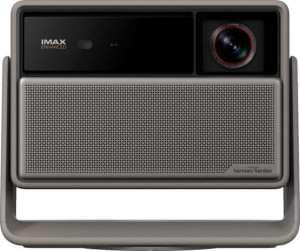
XGIMI Horizon 20 Pro
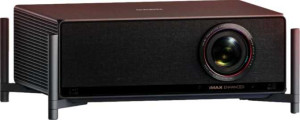
XGIMI Titan

XGIMI Horizon 20 Pro XGIMI Titan

Overview

Welcome to our in-depth spec comparison between the XGIMI Horizon 20 Pro and the XGIMI Titan — two laser-powered 4K projectors from XGIMI that share a surprisingly strong common foundation yet diverge in meaningful ways. Both deliver 4K resolution, 240Hz refresh rate, and a rich connectivity suite, but key differences in physical footprint, maximum projection size, and audio capabilities make each projector a better fit for different scenarios. Read on to see how these two stack up across every major specification.

Common Features

  • Both projectors use a laser light source.
  • Both projectors output at 4K resolution.
  • Both projectors have a 1 ms response time.
  • HDR10+ support is available on both projectors.
  • Both projectors have a 240Hz refresh rate.
  • Dolby Vision support is available on both projectors.
  • HDR10 support is available on both projectors.
  • AirPlay is available on both projectors.
  • Bluetooth is available on both projectors.
  • Wi-Fi support is available on both projectors.
  • Both projectors have 2 USB ports.
  • Chromecast built-in is available on both projectors.
  • Neither projector has a VGA connector.
  • Both projectors are DLNA-certified.
  • Miracast support is available on both projectors.
  • Both projectors have stereo speakers.
  • Both projectors have vertical lens shift.
  • Both projectors have horizontal lens shift.
  • Both projectors include a remote control.
  • Both projectors have a built-in smart TV.
  • Both projectors have a built-in speaker with 2 x 12W audio output power.
  • Both projectors have a 3.5 mm audio jack socket.

Main Differences

  • Width is 218 mm on XGIMI Horizon 20 Pro and 441 mm on XGIMI Titan.
  • Height is 208 mm on XGIMI Horizon 20 Pro and 158 mm on XGIMI Titan.
  • Thickness is 136 mm on XGIMI Horizon 20 Pro and 345 mm on XGIMI Titan.
  • Weight is 4900 g on XGIMI Horizon 20 Pro and 11500 g on XGIMI Titan.
  • Volume is 6166.784 cm³ on XGIMI Horizon 20 Pro and 24038.91 cm³ on XGIMI Titan.
  • Maximum projection size is 300″ on XGIMI Horizon 20 Pro and 250″ on XGIMI Titan.
  • Minimum throw distance is 2.1 m on XGIMI Horizon 20 Pro and 2.67 m on XGIMI Titan.
  • HDMI ports: XGIMI Horizon 20 Pro has 2 while XGIMI Titan has 1.
  • A DVI connector is present on XGIMI Horizon 20 Pro but not available on XGIMI Titan.
  • Dolby Atmos support is present on XGIMI Titan but not available on XGIMI Horizon 20 Pro.
Specs Comparison
XGIMI Horizon 20 Pro

XGIMI Horizon 20 Pro

XGIMI Titan

XGIMI Titan

General info:
has laser light source
release date September 2025 September 2025
width 218 mm 441 mm
height 208 mm 158 mm
thickness 136 mm 345 mm
weight 4900 g 11500 g
volume 6166.784 cm³ 24038.91 cm³

Both the XGIMI Horizon 20 Pro and the XGIMI Titan share a laser light source, which is the most significant commonality in this group. Laser projection delivers superior longevity, color consistency, and instant-on capability compared to traditional lamp-based systems, so neither product has an edge here — both benefit equally from this technology.

Where these two projectors diverge dramatically is in their physical footprint and mass. The Horizon 20 Pro is a notably compact unit at 218 × 208 × 136 mm and 4,900 g, while the Titan is a substantially larger machine measuring 441 × 158 × 345 mm and weighing 11,500 g — more than twice as heavy and nearly four times the volume (~6,167 cm³ vs. ~24,039 cm³). In practical terms, the Horizon 20 Pro can be repositioned, placed on a shelf, or moved between rooms with ease, whereas the Titan's size and weight firmly place it in the category of a fixed, dedicated home theater installation.

For users who prioritize flexibility and portability, the Horizon 20 Pro holds a clear advantage. The Titan's bulk is not a flaw per se — it signals a product engineered for a permanent setup where raw capability trumps convenience — but anyone without a dedicated projection room should factor in that the Titan demands a committed, stationary installation.

Projection quality:
output resolution 4K 4K
response time 1 ms 1 ms
maximum projection size 300" 250"
supports HDR10+
minimum throw distance 2.1 m 2.67 m
refresh rate 240Hz 240Hz
supports Dolby Vision
supports HDR10

On the core image quality credentials, these two projectors are remarkably well-matched. Both output native 4K resolution, hit a 240Hz refresh rate, and share an identical 1 ms response time — a combination that makes either projector genuinely capable for both cinematic content and fast-paced gaming. The full HDR stack is identical as well, with support for HDR10, HDR10+, and Dolby Vision on both units, meaning neither has an edge in color volume or dynamic tone mapping compatibility.

The only differentiators in this group are throw distance and maximum image size — and they tell an interesting story. The Horizon 20 Pro can project up to 300″ starting from a minimum distance of 2.1 m, while the Titan maxes out at 250″ and requires at least 2.67 m of clearance before it can even begin projecting. In practice, the Horizon 20 Pro is more flexible in tighter rooms and can fill a larger screen when space allows, both meaningful advantages in real home environments.

The Horizon 20 Pro takes a clear edge in this group — not because of image processing credentials, which are identical, but because its shorter minimum throw distance and larger maximum image size give it greater versatility across different room configurations. The Titan demands more space to operate and ultimately delivers a smaller canvas, which is a notable constraint for a projector of its size and positioning.

Connectivity:
HDMI ports 2 1
has AirPlay
Has Bluetooth
supports Wi-Fi
USB ports 2 2
has Chromecast built-in
has a VGA connector
is DLNA-certified
has a DVI connector
supports Miracast
RJ45 ports 0 0
Has S/PDIF Out port

Wireless connectivity is essentially a tie between the two projectors — both support Wi-Fi, Bluetooth, AirPlay, Chromecast built-in, Miracast, and DLNA certification. Whether you prefer casting from an iPhone, an Android device, or a laptop, either unit covers the full range of mainstream wireless streaming protocols without compromise.

On the wired side, the gap is small but meaningful. The Horizon 20 Pro includes 2 HDMI ports versus the Titan's single 1 HDMI port, which matters in a real home theater setup where a games console, a streaming stick, and a Blu-ray player might all compete for the same input. Swapping cables or adding an external switch becomes unnecessary with the Horizon 20 Pro. Additionally, the Horizon 20 Pro carries a DVI connector that the Titan lacks — a niche but useful addition for users connecting older PC hardware or certain professional displays.

The Horizon 20 Pro holds a clear advantage in wired connectivity. The extra HDMI port alone is a practical daily-use benefit for anyone running multiple source devices, and the presence of DVI adds a degree of legacy compatibility the Titan cannot match. For users who rely primarily on wireless streaming the difference is negligible, but for a wired-first home theater setup the Horizon 20 Pro is the stronger choice.

Features:
has stereo speakers
has lens shift (vertical)
has lens shift (horizontal)
has a remote control
has built-in smart TV
has a built-in speaker
audio output power 2 x 12W 2 x 12W
has a socket for a 3.5 mm audio jack
has Dolby Atmos

Across almost every feature in this group, the two projectors are identical. Both offer built-in smart TV functionality, stereo speakers rated at 2 × 12W, both horizontal and vertical lens shift, a 3.5 mm audio jack, and a remote control. The lens shift support on both units is worth highlighting — it allows physical image repositioning without moving the projector itself, a convenience that significantly simplifies installation in rooms where perfect placement is not always possible.

The single differentiator here is Dolby Atmos support, which is present on the Titan and absent on the Horizon 20 Pro. Dolby Atmos enables object-based spatial audio, creating a more immersive, three-dimensional soundstage compared to standard stereo. While the real-world impact depends on the content being played and the audio setup used, it is a meaningful addition for users who prioritize cinematic audio experiences — particularly given that both projectors share the same 2 × 12W output power, making Atmos decoding the only way the Titan differentiates itself on sound.

The Titan takes the edge in this group on the strength of its Dolby Atmos certification. It is a single but significant distinction — one that aligns well with the Titan's positioning as a dedicated home theater device. For users who are indifferent to spatial audio formats or plan to route sound through an external system anyway, the two projectors are functionally equivalent in features.

Comparison Summary & Verdict

After a thorough comparison, it is clear that the XGIMI Horizon 20 Pro and XGIMI Titan share the same strong visual core — 4K output, 240Hz refresh rate, Dolby Vision, and HDR10+ — making either a capable choice for demanding home cinema use. Where they diverge is telling: the Horizon 20 Pro wins on portability and maximum projection size, offering a lighter 4.9 kg body and an impressive 300″ ceiling, alongside a shorter minimum throw distance and an extra HDMI port. The Titan, by contrast, is a larger, heavier installation-grade unit that brings Dolby Atmos audio to the table, making it the stronger pick for dedicated home theatre rooms where immersive sound is a priority. Choose according to your space and setup requirements.

XGIMI Horizon 20 Pro
Buy XGIMI Horizon 20 Pro if...

Buy the XGIMI Horizon 20 Pro if you want a lighter, more compact projector capable of a larger 300″ image with a shorter throw distance and an extra HDMI port.

XGIMI Titan
Buy XGIMI Titan if...

Buy the XGIMI Titan if you are setting up a dedicated home theatre room and want built-in Dolby Atmos audio for a more immersive sound experience.