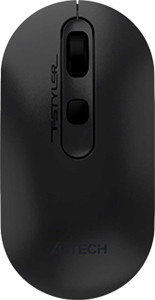
A4Tech FB20 / FB20S specifications and in-depth review

A4Tech FB20 / FB20S

Manufacturer: A4Tech

The A4Tech FB20 / FB20S is a lightweight ambidextrous mouse aimed at users who want flexible wireless connectivity for both productivity and casual gaming use. Weighing just 60 g, it keeps things practical and low-profile, and its dual wireless connectivity via 2.4GHz and Bluetooth 5 makes it straightforward to switch between devices. The mouse is also gesture-capable, adding a layer of usability beyond standard point-and-click input.

On the technical side, the FB20 / FB20S uses an optical sensor with a DPI range spanning from 1200 to 2000 DPI, adjustable via a dedicated DPI switching button. It carries four buttons, all of which are programmable, though there are no side buttons and no profile switching button. The mouse runs on a removable battery — rather than a rechargeable one — rated for a substantial 8760 hours of battery life. With dimensions of 113 × 57 × 26 mm and no onboard memory profiles, it keeps its feature set focused and straightforward.

Pros
  • Ambidextrous design makes it usable by both left- and right-handed users without any physical adjustment
  • Dual wireless connectivity via 2.4GHz and Bluetooth 5 allows pairing with multiple devices and switching between them
  • At 60 g, the mouse is light enough for extended sessions without causing fatigue
  • All 4 buttons are programmable, offering user-level customization within a minimal layout
  • The removable battery is rated for 8760 hours of use, reducing the need for frequent replacements
  • Gesture support adds an extra layer of input control beyond standard mouse functions
Cons
  • The DPI range of 1200 to 2000 is narrow, limiting sensitivity options for users who need finer or more dramatic adjustments
  • A polling rate of 125 Hz is low for a mouse also positioned for gaming use
  • No side buttons are included, which restricts shortcut access for users who rely on them for productivity or in-game actions
  • There are no onboard memory profiles, so custom button configurations cannot be stored on the mouse itself
  • No profile switching button means changing setups requires software or manual steps rather than a quick on-device toggle
Who is this for?

The A4Tech FB20 / FB20S is well suited to everyday office and productivity users who want the flexibility of dual wireless connectivity across multiple devices without the hassle of cables. Its ambidextrous design and 60 g weight make it a practical choice for users who work long hours at a desk or switch between setups regularly. The removable battery with an exceptionally long rated life also appeals to users who prefer not to manage charging routines.

Who is this NOT for?

Users who demand precise or highly customizable tracking will find the narrow DPI range of 1200 to 2000 too limiting for tasks that require either very low sensitivity or fine high-sensitivity control. Competitive or performance-oriented gamers are poorly served by the 125 Hz polling rate, which delivers noticeably less cursor responsiveness than what fast-paced gaming typically demands. The absence of side buttons and onboard memory profiles also makes it a poor fit for power users who depend on extensive shortcut access or need to carry saved configurations between devices.

Performance:

polling rate 125 Hz
maximum DPI 2000 DPI
minimum DPI 1200 DPI
has adjustable DPI

The mouse operates at a polling rate of 125 Hz and uses an optical sensor with an adjustable DPI range running from a minimum of 1200 DPI up to a maximum of 2000 DPI, giving users a degree of sensitivity control to suit different tasks and surfaces.

General info:

Type Productivity, Gaming
connection type 2.4GHz wireless, Bluetooth
sensor Optical Sensor
onboard memory profiles 0
Bluetooth version 5
has gesture support
Battery life 8760 hours
has a rechargeable battery
has a removable battery

The A4Tech FB20 / FB20S is positioned as both a productivity and gaming mouse, connecting wirelessly via 2.4GHz and Bluetooth 5, which allows it to pair with multiple devices without a wired connection. It uses an optical sensor and supports gesture input for added usability. The battery is removable rather than rechargeable, and is rated for an impressive 8760 hours of battery life. The mouse carries no onboard memory profiles, keeping its configuration approach simple.

Buttons:

number of buttons 4
number of side buttons 0
number of programmable buttons 4
has a DPI switching button
has a profile switching button

The mouse features 4 buttons in total, all of which are programmable, offering a degree of customization within a compact layout. A dedicated DPI switching button is included for on-the-fly sensitivity adjustments, while a profile switching button is not present. There are no side buttons.

Design:

Orientation Ambidextrous
weight 60 g
has RGB lighting
has a tilting scroll wheel
has a thumb scroll wheel
has extra weights
volume 167.466 cm³
thickness 26 mm
height 113 mm
width 57 mm

The mouse is built with an ambidextrous form factor, measuring 113 × 57 × 26 mm and weighing just 60 g, making it accessible for both left- and right-handed users in a light, unobtrusive package. It does not include RGB lighting, a tilting scroll wheel, a thumb scroll wheel, or extra swappable weights, reflecting a straightforward and no-frills physical design.

Final Verdict

The A4Tech FB20 / FB20S is a practical, no-frills wireless mouse that delivers where it matters most for everyday use — its dual 2.4GHz and Bluetooth 5 connectivity paired with an ambidextrous build and an exceptionally long battery life make it a reliable desktop companion for users who prioritize convenience and cross-device flexibility. That said, its performance envelope and feature set are clearly calibrated for light to moderate use, and users with more demanding tracking, responsiveness, or customization needs will find it falls short. As a straightforward productivity-oriented mouse, the FB20 / FB20S is a sensible choice for those who value simplicity and wireless versatility over raw performance.

Popular Comparisons

A4Tech FB20 / FB20S
A4Tech FB20 / FB20S
VS
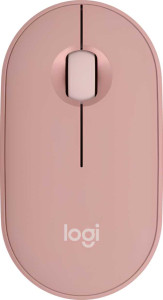
Logitech Pebble Mouse 2 M350s