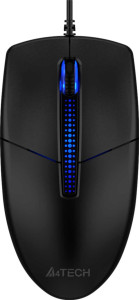
A4Tech N-530 / N-530S specifications and in-depth review

A4Tech N-530 / N-530S

Manufacturer: A4Tech

The A4Tech N-530 / N-530S is a straightforward USB wired mouse designed for everyday productivity use. Built with an ambidextrous orientation, it accommodates both left- and right-handed users without any ergonomic bias, making it a versatile option for shared workspaces or general desktop tasks. Its modest physical footprint — 119 mm in height, 63 mm in width, and 35 mm in thickness — keeps it compact without sacrificing a functional layout.

On the technical side, the N-530 / N-530S operates at a fixed 1200 DPI using an optical sensor, with no adjustable DPI settings or dedicated switching button. The polling rate sits at 125 Hz, and the mouse connects via a 1.5 m USB cable. It offers three buttons in total, including a scroll wheel that supports tilting for horizontal scrolling, though there are no side buttons or programmable inputs. The design omits RGB lighting, onboard memory profiles, and extra weights, keeping the feature set lean and focused on basic pointer control.

Pros
  • Ambidextrous design makes it suitable for both left- and right-handed users
  • Tilting scroll wheel enables horizontal scrolling without additional inputs
  • Gesture support adds navigational capability beyond standard button use
  • Lightweight at 96 g, keeping wrist strain low during extended use
  • 1.5 m cable provides a reasonable reach for most desktop setups
Cons
  • Fixed 1200 DPI with no adjustable sensitivity limits adaptability across different tasks or surfaces
  • 125 Hz polling rate is on the lower end for pointer responsiveness
  • No programmable buttons restrict workflow customization
  • Zero side buttons reduces quick-access input options
  • No onboard memory profiles mean no settings can be saved on the device itself
  • Only 3 buttons total, which may feel limiting for users who rely on extended button layouts
Who is this for?

This mouse is well-matched for users who need a no-frills tool for everyday office and productivity tasks, where basic pointer control and a clean button layout are sufficient. Its ambidextrous design makes it a practical choice for shared workstations or users who alternate hands, and the tilting scroll wheel adds useful horizontal navigation for spreadsheet work or wide document views. Those who prefer a lightweight, simple device without the distraction of RGB lighting or complex configuration will find its straightforward setup easy to work with.

Who is this NOT for?

Users who require adjustable sensitivity will find this mouse limiting, as the fixed 1200 DPI cannot be tuned to suit different surfaces or tasks. It is also a poor fit for those who depend on extended button layouts for productivity shortcuts or macros, given the absence of side buttons and programmable inputs. Additionally, users who expect precise, low-latency tracking for fast-paced or detail-sensitive work may be underserved by the 125 Hz polling rate, which offers less frequent position reporting than higher-end input devices.

Performance:

polling rate 125 Hz
maximum DPI 1200 DPI
minimum DPI 1200 DPI
has adjustable DPI

The A4Tech N-530 / N-530S operates at a fixed 1200 DPI with no adjustable DPI functionality, meaning the sensitivity cannot be changed on the fly or through software profiles. The sensor ceiling and floor both sit at the same value, confirming a single, static tracking resolution. The mouse also runs at a polling rate of 125 Hz, indicating how frequently it reports its position to the host system each second.

General info:

Type Productivity
connection type USB
sensor Optical Sensor
onboard memory profiles 0
has gesture support

The A4Tech N-530 / N-530S is a productivity mouse that connects to a host system via USB and relies on an optical sensor for cursor tracking. It carries no onboard memory profiles, so no settings are stored on the device itself. Notably, the mouse does support gesture input, adding a layer of navigational flexibility beyond standard button clicks.

Buttons:

number of buttons 3
number of side buttons 0
number of programmable buttons 0
has a DPI switching button
has a profile switching button

The A4Tech N-530 / N-530S features a total of 3 buttons, with no side buttons included in the layout. There are no programmable buttons, and the mouse lacks both a DPI switching button and a profile switching button, keeping the input options minimal and straightforward without any on-device customization controls.

Design:

Orientation Ambidextrous
weight 96 g
has RGB lighting
has a tilting scroll wheel
has a thumb scroll wheel
has extra weights
cable length 1.5 m
volume 262.395 cm³
thickness 35 mm
height 119 mm
width 63 mm

The A4Tech N-530 / N-530S is built with an ambidextrous orientation, making it equally usable in either hand, and weighs 96 g without any additional weights included. Its dimensions come in at 119 mm in height, 63 mm in width, and 35 mm in thickness, with an overall volume of 262.395 cm³. The scroll wheel supports tilting for horizontal scrolling, though there is no thumb scroll wheel present. The mouse attaches via a 1.5 m cable and forgoes both RGB lighting and a thumb scroll wheel, keeping the aesthetic plain and functional.

Final Verdict

The A4Tech N-530 / N-530S is a lean, no-nonsense productivity mouse that delivers exactly what its specs promise — a simple, reliable input device suited to standard desktop use. Its ambidextrous build and gesture support stand out as practical strengths, particularly in shared or mixed-hand environments, while the tilting scroll wheel adds a touch of functional versatility. That said, the fixed 1200 DPI, minimal button count, and 125 Hz polling rate make clear that this mouse is not designed for users with specialized or demanding input requirements. For those whose work revolves around basic navigation and document handling, the N-530 / N-530S is a focused, functional tool — but users seeking configurability or expanded control should look within a different class of device.