A4Tech N-600X / N-600XS specifications and in-depth review

A4Tech N-600X / N-600XS

Manufacturer: A4Tech

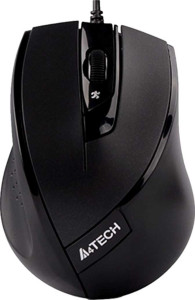
The A4Tech N-600X / N-600XS is a wired productivity mouse designed for right-handed users, built around a straightforward feature set suited to everyday computing tasks. It connects via USB and carries a relatively compact footprint, with a weight of 104 g and dimensions that keep it manageable for extended desktop use. Gesture support is included, adding a layer of navigation flexibility beyond standard button inputs.

On the technical side, the mouse uses an optical sensor with a DPI range spanning 600 to 1600, switchable via a dedicated DPI button. The polling rate runs at 125 Hz, and the design includes a tilting scroll wheel for horizontal scrolling. With four total buttons, no programmable inputs, and no onboard memory profiles, the N-600X / N-600XS keeps its configuration simple. The attached cable measures 1.5 m in length, and RGB lighting is absent from the design.

Pros
  • Adjustable DPI with a dedicated switching button lets users shift sensitivity on the fly without entering software
  • Tilting scroll wheel adds horizontal scrolling capability, useful for wide spreadsheets or documents
  • Gesture support extends navigation options beyond standard button inputs
  • Right-handed ergonomic orientation suits the majority of users
  • Cable length of 1.5 m provides a practical reach for most desk setups
Cons
  • 125 Hz polling rate is relatively low, which may result in less smooth cursor tracking during fast movements
  • No programmable buttons limits the ability to customize shortcuts or automate tasks
  • No onboard memory profiles means settings cannot be saved directly to the device
  • Maximum DPI of 1600 is on the lower end, which may feel limiting for users who need finer precision control
  • No side buttons reduces quick-access input options for navigation or application shortcuts
Who is this for?

This mouse is a practical fit for users engaged in everyday office and productivity tasks, where a reliable wired connection and a straightforward button layout are all that is needed. The tilting scroll wheel makes it particularly well-suited for working with wide documents or spreadsheets, and the inclusion of gesture support adds useful navigation flexibility for general desktop workflows. Users who prefer a right-handed ergonomic design with a no-frills setup and a manageable 104 g weight will find it comfortable for extended use at a standard desk.

Who is this NOT for?

Users who require precise, high-speed cursor control — such as those engaged in competitive gaming or detailed graphic work — will find the 125 Hz polling rate and 1600 DPI ceiling limiting for their needs. The complete absence of programmable buttons and onboard memory profiles makes it a poor match for power users who rely on customizable inputs or need settings to persist across different systems. Left-handed users are also excluded by design, as the mouse is shaped exclusively for right-handed grip.

Performance:

polling rate 125 Hz
maximum DPI 1600 DPI
minimum DPI 600 DPI
has adjustable DPI

The A4Tech N-600X / N-600XS operates at a polling rate of 125 Hz and supports adjustable DPI sensitivity, with settings ranging from a minimum of 600 DPI up to a maximum of 1600 DPI. This range gives users a degree of control over cursor speed to suit different tasks, and the ability to switch between levels on the fly adds practical flexibility to the mouse's everyday use.

General info:

Type Productivity
connection type USB
sensor Optical Sensor
onboard memory profiles 0
has gesture support

The A4Tech N-600X / N-600XS is a productivity mouse that connects via USB and relies on an optical sensor for tracking. It includes gesture support, which extends its navigation capabilities beyond conventional button use. The mouse carries no onboard memory profiles, meaning settings are not stored directly on the device.

Buttons:

number of buttons 4
number of side buttons 0
number of programmable buttons 0
has a DPI switching button
has a profile switching button

The A4Tech N-600X / N-600XS features 4 buttons in total, with none assigned as side buttons and none configured as programmable inputs. A dedicated DPI switching button is present, allowing sensitivity adjustments on the fly, though the mouse does not include a profile switching button.

Design:

Orientation Right-handed
weight 104 g
has RGB lighting
has a tilting scroll wheel
has a thumb scroll wheel
has extra weights
cable length 1.5 m
volume 261.1 cm³
thickness 37.3 mm
height 100 mm
width 70 mm

The A4Tech N-600X / N-600XS is shaped for right-handed use and weighs 104 g, with a body measuring 100 mm in height, 70 mm in width, and 37.3 mm in thickness, giving it a volume of 261.1 cm³. The scroll wheel supports tilting for horizontal navigation, though there is no thumb scroll wheel included. The attached cable runs 1.5 m in length, and the mouse ships without extra weights. RGB lighting is absent from the design, keeping the aesthetic straightforward and understated.
Final Verdict

The A4Tech N-600X / N-600XS is a no-frills wired productivity mouse that delivers on the essentials without overreaching. Its right-handed design, gesture support, and tilting scroll wheel make it a genuinely practical tool for users focused on document-heavy or general office workflows. That said, its modest polling rate and capped DPI range signal that this mouse is not built for demanding or specialized use cases — and the lack of programmable buttons or onboard memory keeps it firmly in basic-use territory. For the right user, it fulfills its intended role cleanly and without unnecessary complexity.