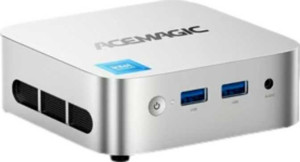
Acemagic Vista V1 specifications and in-depth review

Acemagic Vista V1

Manufacturer: AceMagic

The Acemagic Vista V1 is a compact mini PC designed for users who need a small-footprint desktop solution without sacrificing core functionality. Measuring just 100 × 100 × 32 mm and weighing 245 grams, it fits easily into tight spaces while still offering a respectable feature set. One of its more practical attributes is its 512GB NVMe SSD, which delivers solid-state storage in a form factor that keeps the overall volume to around 320 cm³.

On the memory side, the Vista V1 is equipped with 16GB of DDR4 RAM running at 3200 MHz, giving it a reasonable amount of working memory for everyday computing tasks. Wireless connectivity is handled by Wi-Fi 6 (802.11ax) alongside backwards compatibility with Wi-Fi 5 and Wi-Fi 4, and Bluetooth 5.2 is also built in. The port selection includes two USB 2.0 ports and two USB 3.2 Gen 2 Type-A ports, a single HDMI 1.1 output, a DisplayPort 1.4 output, and an AUX input. The unit carries a one-year warranty.

Pros
  • Wi-Fi 6 support ensures faster and more reliable wireless connections on compatible networks
  • Bluetooth 5.2 enables stable connections with a wide range of modern wireless peripherals
  • The NVMe SSD provides faster data access speeds compared to SATA-based storage
  • Dual display output via both HDMI and DisplayPort 1.4 allows connecting two monitors simultaneously
  • The compact dimensions and low weight of 245 grams make it easy to place or mount in space-constrained environments
  • 16GB of DDR4 RAM at 3200 MHz offers a solid amount of memory for multitasking and everyday workloads
Cons
  • No USB-C ports of any kind limits compatibility with newer devices and accessories
  • Absence of an RJ45 port means wired Ethernet connectivity is not available
  • HDMI 1.1 is an older standard with limited bandwidth, restricting resolution and refresh rate options over that output
  • No 3.5mm headset jack means standard headsets cannot be plugged in directly
  • The 1-year warranty period is relatively short for a desktop computing device
  • Only two USB 2.0 ports alongside the faster USB-A ports, which may bottleneck older peripherals requiring higher bandwidth
Who is this for?

The Acemagic Vista V1 is well-suited for users who need a compact desktop solution for everyday computing tasks such as web browsing, document editing, and light multitasking. Its 16GB of DDR4 RAM and NVMe SSD storage make it a practical fit for home office setups or small workspaces where desk space is limited. The inclusion of dual display output via HDMI and DisplayPort 1.4 also makes it a reasonable choice for users who want to run two monitors simultaneously without occupying much physical space.

Who is this NOT for?

This device is not a good fit for users who rely on wired Ethernet connectivity, as it lacks an RJ45 port entirely, which could be a significant drawback in environments where Wi-Fi is unreliable or restricted. The absence of any USB-C ports makes it poorly suited for users with a modern peripheral ecosystem that depends on that interface. Additionally, users who require high-bandwidth display output — such as those working with high-refresh-rate or high-resolution monitors — may find the HDMI 1.1 port limiting, as it is an older standard with restricted output capabilities.

General info:

SSD storage capacity 512GB
Is an NVMe SSD
thickness 100 mm
height 32 mm
width 100 mm
weight 245 g
volume 320 cm³

The Acemagic Vista V1 has a compact physical footprint, measuring 100 mm in width, 100 mm in thickness, and just 32 mm in height, which results in a total volume of 320 cm³. It weighs 245 grams, keeping it lightweight and easy to reposition or mount. For storage, it includes a 512GB NVMe SSD, offering faster read and write performance compared to traditional SATA-based solid-state drives.

CPU:

Graphics card:

Memory:

RAM 16GB
RAM speed 3200 MHz
DDR memory version 4

The Acemagic Vista V1 is equipped with 16GB of DDR4 RAM, running at a speed of 3200 MHz, providing a solid amount of system memory for handling everyday computing workloads and multitasking across multiple applications.

Connectivity:

Wi-Fi version Wi-Fi 6 (802.11ax), Wi-Fi 5 (802.11ac), Wi-Fi 4 (802.11n)
supports Wi-Fi
Has Bluetooth
Bluetooth version 5.2
USB 2.0 ports 2
USB 3.2 Gen 2 ports (USB-A) 2
USB 3.2 Gen 1 ports (USB-A) 0
USB 3.2 Gen 2 ports (USB-C) 0
USB 4 40Gbps ports 0
USB 4 20Gbps ports 0
USB 3.2 Gen 2x2 ports 0
USB 3.2 Gen 1 ports (USB-C) 0
Thunderbolt 4 ports 0
Thunderbolt 3 ports 0
DisplayPort version DisplayPort 1.4
DisplayPort outputs 1.4
HDMI version HDMI 1.1
HDMI ports 1
RJ45 ports 0
has an AUX input
has a socket for a 3.5 mm audio jack
has a VGA connector
Has S/PDIF Out port

The Acemagic Vista V1 supports Wi-Fi 6 (802.11ax) along with backwards-compatible Wi-Fi 5 and Wi-Fi 4 standards, and includes Bluetooth 5.2 for wireless peripheral connectivity. On the wired side, it provides two USB 2.0 ports and two USB 3.2 Gen 2 Type-A ports, while there are no USB-C, Thunderbolt, or RJ45 ports present. Display output is handled through one HDMI 1.1 port and one DisplayPort 1.4 output. For audio, an AUX input is available, though the unit does not include a 3.5mm headset jack, a VGA connector, or an S/PDIF output.

Benchmarks:

Miscellaneous:

warranty period 1 years

The Acemagic Vista V1 comes with a 1-year warranty period.

Final Verdict

The Acemagic Vista V1 is a compact mini PC that delivers a focused set of capabilities for users seeking a space-efficient desktop with a practical feature set. Its NVMe SSD storage paired with 16GB of DDR4 RAM gives it enough capability for everyday productivity, and the support for dual display output and Wi-Fi 6 adds genuine usability in modern home or office environments. That said, the absence of USB-C ports, the lack of wired Ethernet, and the older HDMI standard do place real constraints on its versatility. Overall, the Acemagic Vista V1 is best approached as a lightweight general-purpose machine for users with straightforward computing needs and limited desk space — those requiring more connectivity flexibility or advanced display capabilities should weigh its port limitations carefully before committing.