Acer KB0 KB220Q H2bi 22" specifications and in-depth review

Acer KB0 KB220Q H2bi 22"

Manufacturer: Acer

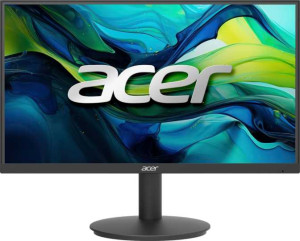
The Acer KB220Q H2bi is a 22-inch class standard monitor designed for everyday desktop use. Built around a matte, anti-glare panel, it offers a comfortable viewing experience in a variety of lighting conditions. The display supports AMD FreeSync and VESA Adaptive Sync, making it a capable option for users who want smoother visuals without screen tearing. The stand provides a notable degree of flexibility, with tilt, swivel, and portrait mode support, along with VESA mount compatibility for those who prefer a third-party arm.

On the technical side, the panel delivers a 1920x1080 resolution across a 21.5-inch screen, resulting in a pixel density of 102 ppi, paired with a 100Hz refresh rate and a 1ms response time. Brightness is rated at 300 nits, and the display supports color calibration. Connectivity is handled through a single HDMI 1.4 port and a VGA connector, while the monitor does not include USB ports, an audio jack, or wireless features of any kind.

Pros
  • The stand supports tilt, swivel, and portrait mode rotation, offering meaningful ergonomic flexibility for different workspace setups
  • VESA mount compatibility allows the monitor to be used with third-party mounting arms
  • AMD FreeSync and VESA Adaptive Sync support helps reduce screen tearing during motion
  • The matte panel with anti-glare coating reduces reflections in well-lit environments
  • A 100Hz refresh rate and 1ms response time provide smoother motion handling than standard 60Hz displays
  • Color calibration support allows users to fine-tune display output to their preferences
Cons
  • Only a single HDMI 1.4 port and a VGA connector are available, with no DisplayPort or USB-C video input options
  • There are no USB ports on the monitor, limiting peripheral connectivity
  • The absence of a 3.5mm audio jack means audio devices cannot be connected directly to the monitor
  • No built-in speakers are included, requiring an external audio solution
  • Lacks wireless features such as Wi-Fi, AirPlay, or Ethernet connectivity
Who is this for?

This monitor is a solid fit for everyday office work, general web browsing, and light home use where a reliable, no-frills display is sufficient. The 100Hz refresh rate combined with AMD FreeSync makes it reasonably capable for casual gaming, where smoother motion and reduced tearing are a practical benefit. Users who need flexible stand adjustments — including tilt, swivel, and portrait mode — will appreciate the ergonomic options, and those who prefer mounting the display on a third-party arm will find VESA compatibility a useful addition.

Who is this NOT for?

Users with demanding multi-device or daisy-chain setups will find the connectivity limiting, as the monitor offers only one HDMI 1.4 port and a VGA input with no DisplayPort, USB-C, or USB hub functionality. The display is also poorly suited for audio-dependent workflows, since it lacks both built-in speakers and a 3.5mm audio jack, requiring a completely separate audio solution. Additionally, professionals working in color-critical fields such as photo editing or graphic design may find the available color data insufficient to meet their accuracy requirements.

Display:

response time 1 ms
screen size 21.5"
resolution 1920 x 1080 px
pixel density 102 ppi
Adaptive synchronization AMD FreeSync, VESA Adaptive Sync
has anti-glare coating
refresh rate 100Hz
has a matte panel
has a glossy panel
has a touch screen

The display measures 21.5 inches with a 1920x1080 resolution and a pixel density of 102 ppi. It runs at a 100Hz refresh rate with a 1ms response time, and supports adaptive sync through both AMD FreeSync and VESA Adaptive Sync to help reduce screen tearing. The panel has a matte finish with an anti-glare coating, does not have a glossy surface, and touch input is not supported.

General info:

Type Standard
supports total tilt
Has a swivel stand
Supports VESA mount
supports portrait mode

This is a standard type monitor with a stand that supports both tilt and swivel adjustments, giving users flexibility in positioning. It also supports portrait mode, allowing the screen to be rotated vertically when needed. For those who prefer a different mounting solution, the monitor is compatible with VESA mount brackets.

Colors:

brightness (typical) 300 nits
supports color calibration

The monitor has a typical brightness of 300 nits, providing a reasonably well-lit image for standard indoor use. It also supports color calibration, allowing users to adjust the display output to better suit their specific needs.

Connectivity:

HDMI ports 1
supports Thunderbolt
DisplayPort outputs 0
has a socket for a 3.5 mm audio jack
has a DVI connector
USB ports 0
Has USB Type-C
HDMI version HDMI 1.4
supports Ethernet
supports Wi-Fi
has AirPlay
mini DisplayPort outputs 0
has a VGA connector

The monitor's connectivity options are straightforward, offering a single HDMI 1.4 port and a VGA connector as the available video inputs. There are no DisplayPort, mini DisplayPort, DVI, or Thunderbolt outputs, and USB Type-C is not supported. The monitor does not include any USB ports or a 3.5mm audio jack, and it lacks wireless connectivity features such as Wi-Fi, Ethernet, or AirPlay.

Power:

Features:

has PiP
has stereo speakers
has built-in smart TV
has a remote control
supports Dolby Digital
supports Dolby Digital Plus
has DTS Surround
has an ambient light sensor
has a front camera
megapixels (front camera) 0MP

This monitor does not include stereo speakers, and there is no support for Dolby Digital, Dolby Digital Plus, or DTS Surround audio formats. Picture-in-Picture is not available, and the monitor lacks a remote control, an ambient light sensor, and a front camera. It also does not feature built-in smart TV functionality.
Final Verdict

The Acer KB220Q H2bi is a straightforward 21.5-inch monitor that delivers on the essentials without overreaching. Its 100Hz refresh rate with AMD FreeSync support gives it a practical edge for casual use and light gaming, while the flexible stand with tilt, swivel, and portrait mode capability adds day-to-day ergonomic value that is genuinely useful in a standard desktop setup. The connectivity options are minimal — one HDMI 1.4 port and VGA, with no audio output or USB expansion — which means it works best as a dedicated single-source display rather than a multi-device hub. For users who need a functional, well-adjusted monitor for everyday tasks without requiring advanced audio, video, or peripheral integration, the KB220Q H2bi is a competent and practical choice.