Amazon Basics C24M2020DNA 24" specifications and in-depth review

Amazon Basics C24M2020DNA 24"

Manufacturer: Amazon Basics

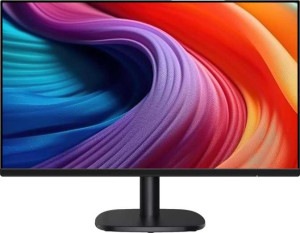
The Amazon Basics C24M2020DNA 24″ is a standard desktop monitor aimed at everyday computing tasks. Built around a 23.8-inch IPS panel with LED backlighting, it offers consistent color reproduction and wide viewing angles suited to general use. One of its practical conveniences is the inclusion of built-in stereo speakers, removing the need for a separate audio setup in straightforward desktop configurations.

On the technical side, the display runs at a 100Hz refresh rate with a full HD resolution of 1920 x 1080 pixels and a pixel density of 92 ppi. It supports color calibration and is VESA mount compatible, giving users some flexibility in how they position it. The stand offers tilt adjustment, and the monitor supports Thunderbolt, DVI, Ethernet, AirPlay, and mini DisplayPort are all absent from its connectivity options. It does not have a touch screen, front camera, ambient light sensor, remote control, PiP functionality, or any Dolby or DTS audio technologies.

Pros
  • The IPS panel provides consistent color reproduction and wide viewing angles suitable for general desktop use
  • A 100Hz refresh rate offers smoother motion handling than standard 60Hz monitors during everyday tasks
  • Built-in stereo speakers eliminate the need for separate audio hardware in basic setups
  • VESA mount support allows the display to be paired with a third-party arm or wall bracket for flexible positioning
  • Tilt adjustment enables users to set a more ergonomically comfortable screen angle
  • Color calibration support gives users the ability to fine-tune color output for more accurate on-screen representation
Cons
  • No Thunderbolt, DVI, or mini DisplayPort outputs, which limits connection options for certain devices
  • Ethernet is not supported, so the monitor cannot contribute to network connectivity in a setup
  • There is no PiP functionality, making it unsuitable for users who need to view multiple sources simultaneously
  • The absence of a front camera means video calls require a separate external webcam
  • No ambient light sensor, so brightness cannot adjust automatically to changing room conditions
  • Dolby Digital, Dolby Digital Plus, and DTS Surround are all unsupported, limiting the audio experience from the built-in speakers
Who is this for?

This monitor is a practical fit for users who need a straightforward desktop display for everyday tasks such as browsing, document work, or general productivity. The 23.8-inch IPS panel with a 100Hz refresh rate makes it a reasonable choice for casual use where smooth visuals matter but high-end performance is not a requirement. Users who want flexibility in positioning will appreciate the VESA mount support and tilt adjustment, and those who prefer a clutter-free desk setup will find the built-in stereo speakers a convenient addition.

Who is this NOT for?

Users with demanding connectivity needs will find this monitor limiting, as it lacks Thunderbolt, DVI, Ethernet, and mini DisplayPort outputs, making it a poor match for multi-device or professional workstation setups. Creative professionals who rely on accurate color grading or advanced display configurations will be held back by the absence of PiP and the monitor's generally modest feature set. It is also not suited to users who need integrated webcam functionality or advanced audio output, since there is no front camera and audio formats like Dolby Digital and DTS Surround are unsupported.

Display:

Display type LED-backlit, LCD, IPS
screen size 23.8"
resolution 1920 x 1080 px
pixel density 92 ppi
refresh rate 100Hz
has a touch screen

The monitor uses an IPS LCD panel with LED backlighting across a 23.8-inch screen, delivering a resolution of 1920 x 1080 pixels at a pixel density of 92 ppi. It operates at a 100Hz refresh rate, which provides a somewhat smoother visual experience compared to standard 60Hz panels during everyday use. The display does not support touch input.

General info:

Type Standard
supports total tilt
Supports VESA mount

This is a standard type monitor that supports tilt adjustment, allowing users to angle the screen for a more comfortable viewing position. It is also VESA mount compatible, making it straightforward to attach to a third-party arm or wall bracket if the default stand does not suit the setup.

Colors:

supports color calibration

The monitor supports color calibration, allowing users to adjust color output to better match their accuracy requirements for tasks where consistent color representation matters.

Connectivity:

supports Thunderbolt
has a DVI connector
supports Ethernet
has AirPlay
mini DisplayPort outputs 0

The monitor's connectivity options are limited in scope, with no Thunderbolt, DVI, or Ethernet support present. It also lacks AirPlay and does not include any mini DisplayPort outputs, so users will need to rely on other available connection types when setting up the display.

Power:

Features:

has PiP
has stereo speakers
has built-in smart TV
has a remote control
supports Dolby Digital
supports Dolby Digital Plus
has DTS Surround
has an ambient light sensor
has a front camera

The monitor includes built-in stereo speakers, providing a basic audio solution without the need for external hardware. Beyond that, the feature set is minimal — there is no PiP functionality, remote control, ambient light sensor, or front camera. It does not support Dolby Digital, Dolby Digital Plus, or DTS Surround audio formats, and it does not function as a smart TV.
Final Verdict

The Amazon Basics C24M2020DNA 24″ is a no-frills standard monitor that covers the basics well enough for everyday desktop use. Its IPS panel with a 100Hz refresh rate, combined with VESA mount compatibility and built-in stereo speakers, makes it a functional choice for users who simply need a reliable screen without complex setup requirements. That said, its connectivity limitations and sparse feature set mean it will not satisfy users with more demanding workflows or multi-device environments. For straightforward daily computing where a dependable display and minimal peripheral clutter are the main priorities, it serves its purpose without overreaching.