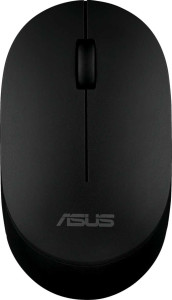
The MW105 offers an adjustable DPI range running from 800 to 1600, giving users the ability to tune cursor sensitivity to their preference. The lower 800 DPI setting suits tasks requiring careful, controlled movements, while the 1600 DPI ceiling accommodates quicker navigation across the screen. This adjustability makes the sensor reasonably versatile for general productivity use within those boundaries.
Positioned as a productivity mouse, the MW105 connects via Bluetooth and relies on an optical sensor for tracking. It carries no onboard memory profiles and does not support gesture input, keeping its feature set straightforward. The battery is removable rather than rechargeable, and Asus rates it for a substantial 8640 hours of battery life, meaning replacements should be infrequent. The mouse ships with a 2-year warranty.
The MW105 features 3 buttons in total, covering the essentials for everyday use. There are no side buttons and no programmable buttons, so the layout offers no customization in that regard. The mouse also lacks both a DPI switching button and a profile switching button, meaning adjustments to sensitivity or profiles cannot be made directly on the device.
The MW105 is built with an ambidextrous orientation, making it equally usable for left- and right-handed users. It weighs just 48 g and measures 105 mm in height, 60.7 mm in width, and 32 mm in thickness, with a total volume of 203.952 cm³ — a compact and light physical profile overall. The design includes no RGB lighting, no tilting or thumb scroll wheel, and no extra weights, keeping the aesthetic and physical configuration clean and unadorned.