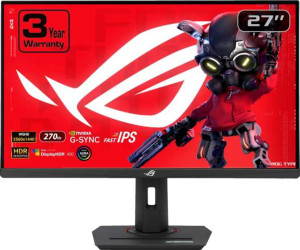
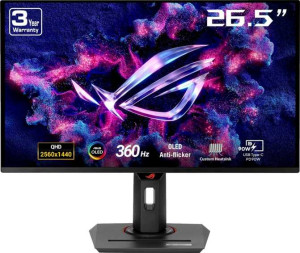
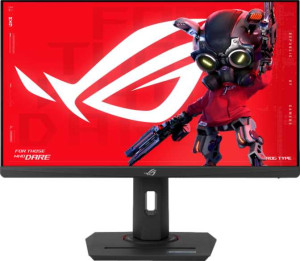
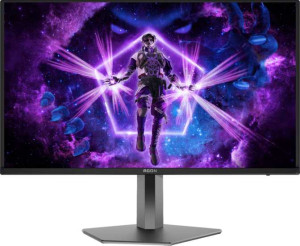
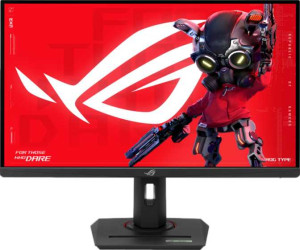
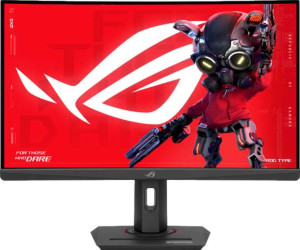
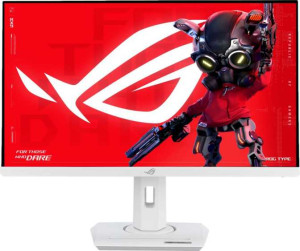
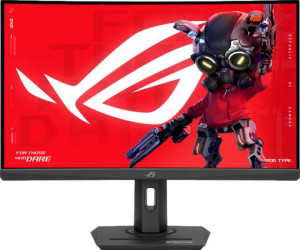
Asus ROG Strix XG27ACS 27" specifications and in-depth review

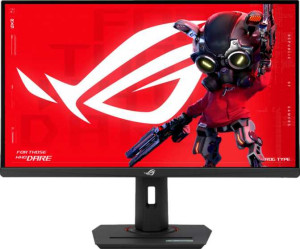
Asus ROG Strix XG27ACS 27"

Manufacturer: Asus

The Asus ROG Strix XG27ACS 27″ is a gaming monitor built around a 27-inch IPS panel with a native resolution of 2560 x 1440 pixels at 108 ppi. Its 180Hz refresh rate is paired with a 1 ms response time, and adaptive sync is covered by both AMD FreeSync and Nvidia G-Sync compatibility, giving it broad GPU pairing flexibility. The panel includes an anti-glare coating, and wide 178-degree viewing angles in both directions ensure consistent image quality from most seated positions.

On the color side, the display covers 97% of Adobe RGB and 133% of sRGB, rendering 16.7 million colors at 8-bit depth with a 1000:1 contrast ratio and a typical brightness of 350 nits, and color calibration is supported. The stand offers tilt and swivel adjustments alongside VESA mount compatibility, though portrait mode is not available. Connectivity includes one HDMI 2.0 port, one DisplayPort 1.4 output, one USB port, a USB-C connector, and a 3.5 mm headset jack, while Ethernet, Wi-Fi, DVI, VGA, and Thunderbolt are absent. There are no built-in speakers, camera, or smart features, and operating power consumption sits at 23.1W with a 0.5W standby draw.

Pros
  • Dual adaptive sync support covering both AMD FreeSync and Nvidia G-Sync gives this monitor broad GPU compatibility for tear-free gaming
  • A 180Hz refresh rate combined with a 1 ms response time keeps motion handling sharp and responsive during fast-paced gameplay
  • Color gamut coverage of 97% Adobe RGB and 133% sRGB, paired with built-in color calibration support, makes this display suitable for color-conscious workflows beyond gaming
  • The anti-glare coating helps manage reflections in environments with ambient light, reducing eye strain during extended sessions
  • Tilt, swivel, and VESA mount compatibility provide meaningful ergonomic flexibility for different desk setups
  • Operating power consumption of just 23.1W is modest for a 27-inch gaming panel running at this specification level
Cons
  • Portrait mode is not supported, limiting rotation options for users who occasionally work in a vertical display orientation
  • No built-in speakers are included, requiring external audio hardware for any sound output
  • The absence of Thunderbolt connectivity restricts high-bandwidth peripheral or daisy-chain display configurations
  • With only one HDMI and one DisplayPort input, users with multiple source devices have limited switching flexibility without additional hardware
  • At 6,610 g, the monitor is relatively heavy, which may complicate mounting on lighter or less robust monitor arms
Who is this for?

The Asus ROG Strix XG27ACS is a strong fit for PC gamers who use either AMD or Nvidia graphics hardware, as its dual FreeSync and G-Sync compatibility removes the need to match GPU brand to monitor. The 180Hz refresh rate with 1 ms response time suits players of fast-paced genres where smooth, low-latency motion matters, while the 2560 x 1440 resolution at 27 inches offers a meaningful step up in image detail over 1080p without pushing frame rates out of reach. The wide color gamut coverage and built-in color calibration also make it a practical choice for users who split their time between gaming and color-sensitive creative work.

Who is this NOT for?

Users who need to connect multiple source devices simultaneously will find the single HDMI and single DisplayPort input limiting, making this a poor fit for multi-source setups without an external switch. The monitor's lack of portrait mode support rules it out for anyone who regularly rotates their display for reading, coding, or document work. Additionally, users who rely on the monitor as an audio output hub will be disappointed by the complete absence of built-in speakers and audio processing support, requiring a separate audio solution for any sound output.

Display:

Display type IPS
response time 1 ms
screen size 27"
resolution 2560 x 1440 px
pixel density 108 ppi
Adaptive synchronization AMD FreeSync, Nvidia G-Sync
has anti-glare coating
refresh rate 180Hz
maximum horizontal viewing angle 178º
maximum vertical viewing angle 178º
has a matte panel
has a glossy panel
has a touch screen

The 27-inch IPS panel runs at a resolution of 2560 x 1440 pixels with a pixel density of 108 ppi, a 180Hz refresh rate, and a 1 ms response time. Adaptive synchronization covers both AMD FreeSync and Nvidia G-Sync, and an anti-glare coating is included. Horizontal and vertical viewing angles both reach 178 degrees, while touch input is not supported and the panel is neither classified as matte nor glossy.

General info:

Type Gaming
EU energy label F
supports total tilt
Has a swivel stand
Supports VESA mount
height 367 mm
width 641 mm
thickness 60 mm
weight 6610 g
supports portrait mode
volume 14114.82 cm³

Classified as a gaming monitor, the Asus ROG Strix XG27ACS carries an EU energy label of F and measures 641 mm wide, 367 mm tall, and 60 mm deep, with a weight of 6,610 g. The stand supports both tilt and swivel adjustments, and the monitor is VESA mount compatible for wall or arm installation. Portrait mode is not supported.

Colors:

brightness (typical) 350 nits
supports color calibration
display colors 16.7 million
bit depth 8-bit
contrast ratio 1000:1
Adobe RGB coverage 97%
sRGB coverage 133%

The display renders 16.7 million colors at 8-bit depth with a typical brightness of 350 nits and a contrast ratio of 1000:1. Color gamut coverage reaches 97% of Adobe RGB and 133% of sRGB, and the monitor supports color calibration, allowing users to fine-tune color accuracy through a built-in calibration workflow.

Connectivity:

HDMI ports 1
supports Thunderbolt
DisplayPort outputs 1
DisplayPort version DisplayPort 1.4
has a socket for a 3.5 mm audio jack
has a DVI connector
USB ports 1
Has USB Type-C
HDMI version HDMI 2.0
supports Ethernet
supports Wi-Fi
has AirPlay
mini DisplayPort outputs 0
has a VGA connector

Video input options consist of one HDMI 2.0 port and one DisplayPort 1.4 output, alongside a USB-C connector, one additional USB port, and a 3.5 mm headset jack. Thunderbolt, DVI, VGA, mini DisplayPort, Ethernet, Wi-Fi, and AirPlay are all absent from this monitor's connectivity suite.

Power:

operating power consumption 23.1W
standby power consumption 0.5W

The monitor draws 23.1W during normal operation and drops to a minimal 0.5W in standby mode, reflecting a modest power footprint for a 27-inch gaming display.

Features:

has PiP
has stereo speakers
has built-in smart TV
has a remote control
supports Dolby Digital
supports Dolby Digital Plus
has DTS Surround
has an ambient light sensor
has a front camera

The Asus ROG Strix XG27ACS does not include built-in speakers, a front camera, or an ambient light sensor. Picture-in-Picture, smart TV functionality, remote control, and all audio processing formats — including Dolby Digital, Dolby Digital Plus, and DTS Surround — are also absent from this display's feature set.
Final Verdict

The Asus ROG Strix XG27ACS 27″ is a well-rounded gaming monitor that earns its place through a combination of dual AMD FreeSync and Nvidia G-Sync support at 180Hz, wide color gamut coverage, and built-in calibration capability — a set of attributes that serves both competitive gamers and users with color-conscious workflows. The anti-glare coating, ergonomic stand adjustments, and modest power consumption add practical day-to-day value, while the limited input selection and absence of portrait mode reflect the focused nature of the design. For users who want a single display that handles fast gaming and delivers accurate color output without GPU brand restrictions, the ROG Strix XG27ACS presents a technically coherent and capable option.

Popular Comparisons

Asus ROG Strix XG27ACS 27"
VS
AOC Q27G4ZD 27“
AOC Q27G4ZD 27“
Asus ROG Strix XG27ACS 27"
VS
Asus ROG Strix XG27ACMG 27"
Asus ROG Strix XG27ACS 27"
VS
Asus ROG Strix OLED XG27ACDNG 27"
Asus ROG Strix XG27ACS 27"
VS
Asus ROG Strix XG259CS 25"
Asus ROG Strix XG27ACS 27"
VS
AOC Agon Pro AG326UD 32"
Asus ROG Strix XG27ACS 27"
VS
Asus ROG Strix XG27ACG 27"
Asus ROG Strix XG27ACS 27"
VS
Asus ROG Strix OLED XG27AQDMG 27"
Asus ROG Strix XG27ACS 27"
VS
AOC Q27G4X 27"
AOC Q27G4X 27"
Asus ROG Strix XG27ACS 27"
VS
Asus TUF Gaming VG27AQ3A 27"
Asus ROG Strix XG27ACS 27"
VS
Xiaomi Mini LED Gaming Monitor G Pro 27i
Asus ROG Strix XG27ACS 27"
VS
Titan Army P2710S 27"
Asus ROG Strix XG27ACS 27"
VS
Gigabyte M27UA 27"
Gigabyte M27UA 27"
Asus ROG Strix XG27ACS 27"
VS
MSI MAG 275QF 27"
MSI MAG 275QF 27"
Asus ROG Strix XG27ACS 27"
VS
LG UltraGear 27GS60QC-B 27"
Asus ROG Strix XG27ACS 27"
VS
LG UltraGear 27GS85Q-B 27"
Asus ROG Strix XG27ACS 27"
VS
Lenovo Legion R27q-30 27"
Asus ROG Strix XG27ACS 27"
VS
Samsung Odyssey G5 27" (G50D)
Asus ROG Strix XG27ACS 27"
VS
MSI G272QPF E2 27"
MSI G272QPF E2 27"
Asus ROG Strix XG27ACS 27"
VS
Asus ROG Strix XG27WCS 27"
Asus ROG Strix XG27ACS 27"
VS
MSI MAG 274QRFW 27"
MSI MAG 274QRFW 27"
Asus ROG Strix XG27ACS 27"
VS
MSI MAG 274QRF QD E2 27"
Asus ROG Strix XG27ACS 27"
VS
Asus TUF Gaming VG27AQL3A 27"
Asus ROG Strix XG27ACS 27"
VS
MSI G274QPF E2 27"
MSI G274QPF E2 27"
Asus ROG Strix XG27ACS 27"
VS
Asus VA24EHF 24"
Asus VA24EHF 24"
Asus ROG Strix XG27ACS 27"
VS
Asus ROG Strix XG27UCS 27"
Asus ROG Strix XG27ACS 27"
VS
Asus ROG Strix XG27WCMS 27"
Asus ROG Strix XG27ACS 27"
VS
Samsung ViewFinity S8 (S80UD) 27"