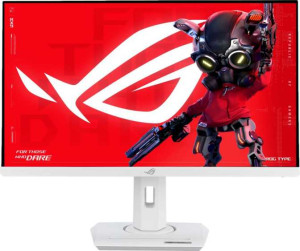
Asus ROG Strix XG27UCG 27" specifications and in-depth review

Asus ROG Strix XG27UCG 27"

Manufacturer: Asus

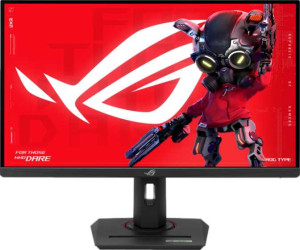
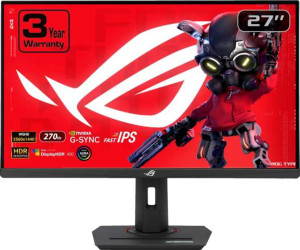
The Asus ROG Strix XG27UCG is a 27-inch gaming monitor built around an IPS, LED-backlit LCD panel that delivers a native resolution of 3840 x 2160 pixels at a pixel density of 163 ppi. Designed with competitive and enthusiast gamers in mind, it carries a 160Hz refresh rate paired with a 1ms response time, making fast-paced gameplay noticeably smoother on screen. The matte anti-glare coating helps reduce unwanted reflections in varied lighting environments.

On the color side, the display reaches 130% coverage of both sRGB and Adobe RGB color spaces, renders up to 1.073 billion colors through its 10-bit panel, and maintains a contrast ratio of 1000:1 at a typical brightness of 350 nits. Adaptive sync is handled through Nvidia G-Sync, Nvidia G-Sync Compatible, and AMD FreeSync support. Connectivity includes an HDMI 2.1 port, a DisplayPort 1.4 output, a USB Type-C port, a single additional USB port, and a 3.5mm audio jack. The stand supports tilt, swivel, height adjustment, and portrait rotation, while VESA mount compatibility provides further flexibility in placement.

Pros
  • Supports both Nvidia G-Sync and AMD FreeSync, giving flexibility across different GPU setups
  • The stand accommodates tilt, swivel, height adjustment, and portrait rotation, offering strong ergonomic adaptability
  • A 178-degree viewing angle in both directions ensures consistent image quality from a wide range of positions
  • Color calibration support combined with 10-bit depth and 1073 million colors makes it suitable for color-sensitive work alongside gaming
  • VESA mount compatibility allows the monitor to be used with third-party arms or wall mounts
  • The matte anti-glare panel helps manage reflections in environments with varied or strong ambient light
Cons
  • No built-in speakers means a separate audio solution is always required
  • The EU energy label of F indicates relatively low energy efficiency for a display of this size
  • Absence of Picture-in-Picture support limits multitasking directly on screen
  • Only a single HDMI and a single DisplayPort input restricts simultaneous connections to multiple source devices
  • No Ethernet, Wi-Fi, or AirPlay support confirms a strictly wired and non-networked setup with no flexibility for wireless use cases
Who is this for?

This monitor is a strong fit for PC gamers who want a 4K gaming experience at 160Hz without being locked into a single GPU ecosystem, thanks to its simultaneous support for Nvidia G-Sync and AMD FreeSync. The flexible stand with tilt, swivel, and portrait rotation also makes it a practical choice for users who split their time between gaming and color-sensitive creative work, given the 10-bit panel, color calibration support, and wide color space coverage. Those who prefer a dedicated desktop setup with a fixed workstation will also appreciate the VESA mount compatibility and the clean, wired-only connectivity approach.

Who is this NOT for?

Users looking for a more self-contained or multimedia-ready display will find this monitor limiting, as it ships with no built-in speakers, no remote control, and no smart TV functionality, requiring external solutions for audio and any non-PC media use. It is also poorly suited for environments where multiple source devices need to be connected simultaneously, since the single HDMI and single DisplayPort input leave little room for flexibility. Additionally, those working in energy-conscious or regulated environments may find the EU energy label of F a meaningful drawback for a display intended for extended daily use.

Display:

Display type IPS, LED-backlit, LCD
response time 1 ms
screen size 27"
resolution 3840 x 2160 px
pixel density 163 ppi
Adaptive synchronization Nvidia G-Sync, AMD FreeSync, Nvidia G-Sync Compatible
has anti-glare coating
refresh rate 160Hz
maximum horizontal viewing angle 178º
maximum vertical viewing angle 178º
has a matte panel
has a glossy panel
has a touch screen

The display section of the Asus ROG Strix XG27UCG centers on a 27-inch IPS, LED-backlit LCD panel with a 3840 x 2160 pixel resolution and a pixel density of 163 ppi. It runs at a 160Hz refresh rate with a 1ms response time, and supports adaptive sync through Nvidia G-Sync, Nvidia G-Sync Compatible, and AMD FreeSync. Wide viewing angles of 178 degrees both horizontally and vertically ensure consistent image quality from off-center positions. The panel has a matte finish with an anti-glare coating, and is not glossy nor does it support touch input.

General info:

Type Gaming
EU energy label F
supports total tilt
Has a swivel stand
Supports VESA mount
height 367 mm
width 614 mm
thickness 90 mm
weight 6600 g
supports portrait mode
volume 20280.42 cm³

The Asus ROG Strix XG27UCG is classified as a gaming monitor and carries an EU energy label of F. It measures 614 mm wide, 367 mm tall, and 90 mm thick, with a total weight of 6600 g. The stand offers considerable flexibility, supporting tilt, swivel, and portrait mode rotation, and the monitor is also compatible with VESA mount configurations for alternative mounting setups.

Colors:

brightness (typical) 350 nits
supports color calibration
display colors 1073 million
bit depth 10-bit
contrast ratio 1000:1
Adobe RGB coverage 130%
sRGB coverage 130%

The color output of the Asus ROG Strix XG27UCG is handled through a 10-bit panel capable of displaying 1073 million colors, with a typical brightness of 350 nits and a contrast ratio of 1000:1. Both Adobe RGB and sRGB color spaces are covered at 130%, and the monitor supports color calibration for users who need to fine-tune accuracy. These figures reflect a display intended to handle a wide range of color-demanding workloads alongside its gaming focus.

Connectivity:

HDMI ports 1
supports Thunderbolt
DisplayPort outputs 1
DisplayPort version DisplayPort 1.4
has a socket for a 3.5 mm audio jack
has a DVI connector
USB ports 1
Has USB Type-C
HDMI version HDMI 2.1
supports Ethernet
supports Wi-Fi
has AirPlay
mini DisplayPort outputs 0
has a VGA connector

The Asus ROG Strix XG27UCG offers a focused set of video inputs, including one HDMI 2.1 port and one DisplayPort 1.4 output, with no mini DisplayPort, DVI, or VGA connectors present. A USB Type-C port and one additional USB port are available for peripheral connectivity, alongside a 3.5mm audio jack for headset use. The monitor does not support Thunderbolt, Ethernet, Wi-Fi, or AirPlay, positioning it as a wired-only display without any networking capabilities.

Power:

operating power consumption 30W
standby power consumption 0.5W

The Asus ROG Strix XG27UCG draws 30W during normal operation and drops to just 0.5W in standby mode, reflecting a modest power footprint for a 27-inch 4K gaming panel.

Features:

has PiP
has stereo speakers
has built-in smart TV
has a remote control
supports Dolby Digital
supports Dolby Digital Plus
has DTS Surround
has an ambient light sensor
has a front camera

The Asus ROG Strix XG27UCG does not include several features commonly found on multimedia-oriented displays. There are no built-in stereo speakers, no support for Dolby Digital, Dolby Digital Plus, or DTS Surround, and no front camera or ambient light sensor. The monitor also lacks Picture-in-Picture, a remote control, and any built-in smart TV functionality, keeping its feature set focused purely on display output.
Final Verdict

The Asus ROG Strix XG27UCG presents a well-rounded 27-inch gaming monitor built around a 4K IPS panel with a 160Hz refresh rate and broad adaptive sync support, making it a capable option for users who want high-resolution gaming without committing to a single GPU brand. Its 10-bit color depth, color calibration support, and extensive color space coverage add genuine utility beyond gaming, giving it relevance in light creative workflows as well. The stand's ergonomic range and VESA compatibility further strengthen its case for a permanent desktop setup. Where it falls short is in multimedia versatility — the absence of speakers, limited input options, and a wired-only design narrow its appeal to users with a dedicated, single-source PC workstation in mind. For that audience, however, the XG27UCG delivers a focused and technically capable package.

Popular Comparisons

Asus ROG Strix XG27UCG 27"
VS
Asus ROG Strix XG27ACMG 27"
Asus ROG Strix XG27UCG 27"
VS
Asus ROG Strix OLED XG27AQDMG 27"
Asus ROG Strix XG27UCG 27"
VS
AOC C27G4ZH 27"
AOC C27G4ZH 27"
Asus ROG Strix XG27UCG 27"
VS
Asus ProArt Display PA278CGV 27"
Asus ROG Strix XG27UCG 27"
VS
Asus ROG Strix XG27UCS 27"
Asus ROG Strix XG27UCG 27"
VS
Gigabyte MO27U2 27"
Gigabyte MO27U2 27"
Asus ROG Strix XG27UCG 27"
VS
Sony Inzone M9 II 27"
Asus ROG Strix XG27UCG 27"
VS
Dell Alienware AW2725DF 27"
Asus ROG Strix XG27UCG 27"
VS
Asus ROG Swift PG32UQXR 32"
Asus ROG Strix XG27UCG 27"
VS
MSI MAG 274URFW 27"
MSI MAG 274URFW 27"
Asus ROG Strix XG27UCG 27"
VS
Dell Alienware AW3225QF 32"
Asus ROG Strix XG27UCG 27"
VS
Gigabyte M27UA 27"
Gigabyte M27UA 27"
Asus ROG Strix XG27UCG 27"
VS
MSI MPG 274URF QD 27"