Asus ROG Strix XG27UCS 27" specifications and in-depth review

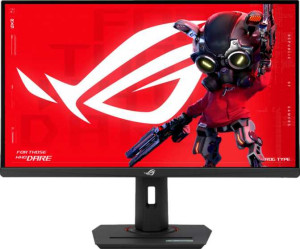
Asus ROG Strix XG27UCS 27"

Manufacturer: Asus

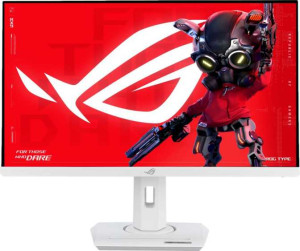
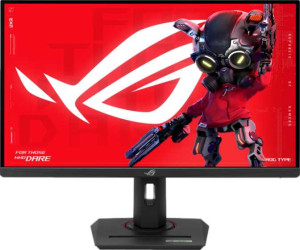
The Asus ROG Strix XG27UCS is a 27-inch gaming monitor built around an IPS panel with a native 4K resolution of 3840 x 2160 pixels, delivering a pixel density of 163 ppi. Designed with competitive and enthusiast gamers in mind, it features a 160Hz refresh rate combined with a 1ms response time, making it suited for fast-paced gameplay without sacrificing image clarity.

On the color side, the display covers 89% of Adobe RGB and 130% of sRGB at a 10-bit depth with 1.073 billion colors, alongside a typical brightness of 400 nits and a 1000:1 contrast ratio. The monitor supports both Nvidia G-Sync and AMD FreeSync adaptive sync technologies, and connectivity options include one HDMI 2.1 port, one DisplayPort 1.4 output, a USB Type-C port, and a 3.5mm audio jack. Ergonomically, it offers tilt, swivel, height adjustment up to 12 cm, and portrait mode rotation, with VESA mount support rounding out its physical flexibility.

Pros
  • The IPS panel delivers wide 178-degree viewing angles both horizontally and vertically, ensuring consistent image quality across a broad range of sitting positions
  • A 160Hz refresh rate combined with a 1ms response time makes the display well-suited for fast-paced gaming sessions
  • Adaptive sync support covers both Nvidia G-Sync and AMD FreeSync, offering flexibility regardless of the graphics card in use
  • The stand supports tilt, swivel, height adjustment up to 12 cm, and portrait mode rotation, giving users considerable ergonomic flexibility
  • VESA mount support allows the monitor to be paired with third-party arms or wall brackets
  • Color calibration support and 10-bit depth with 1073 million colors make the display usable for color-sensitive work alongside gaming
Cons
  • The EU energy label of F indicates relatively low energy efficiency for a monitor in this category
  • There are no built-in speakers, so a separate audio solution is required
  • With only one HDMI and one DisplayPort input, source switching options are limited for users with multiple devices
  • No Ethernet, Wi-Fi, or AirPlay support means all connectivity is strictly wired and limited to video and peripheral use
  • The absence of Picture-in-Picture means users cannot display multiple sources simultaneously on the screen
Who is this for?

This monitor is a strong fit for PC gamers who prioritize both visual clarity and smooth motion, thanks to its 4K resolution at 160Hz combined with a 1ms response time and support for both Nvidia G-Sync and AMD FreeSync. The wide 178-degree viewing angles and 10-bit color panel with color calibration support also make it a reasonable choice for users who split their time between gaming and color-sensitive creative work such as photo editing. Those who value ergonomic flexibility will also appreciate the stand's full range of adjustments, including tilt, swivel, height change, and portrait rotation, along with VESA mount compatibility for custom desk setups.

Who is this NOT for?

Users who need a monitor for multi-source setups may find the single HDMI and single DisplayPort input limiting, as there is no room to connect several devices simultaneously without an external switch. The absence of built-in speakers makes it a poor fit for those seeking an all-in-one audio-visual solution without additional hardware. Additionally, users with strict energy efficiency requirements should take note of the EU energy label of F, as this rating indicates the monitor is not among the more power-efficient options available in its category.

Display:

Display type LED-backlit, IPS, LCD
response time 1 ms
screen size 27"
resolution 3840 x 2160 px
pixel density 163 ppi
Adaptive synchronization Nvidia G-Sync, AMD FreeSync, Nvidia G-Sync Compatible
has anti-glare coating
refresh rate 160Hz
maximum horizontal viewing angle 178º
maximum vertical viewing angle 178º
has a matte panel
has a glossy panel
has a touch screen

The display section of this monitor centers on a 27-inch LED-backlit IPS LCD panel running at a 3840 x 2160 pixel resolution, which works out to a pixel density of 163 ppi. It supports a 160Hz refresh rate with a 1ms response time, and adaptive sync is covered through Nvidia G-Sync, Nvidia G-Sync Compatible, and AMD FreeSync. Viewing angles reach 178 degrees both horizontally and vertically, and the panel comes with an anti-glare coating and a matte finish rather than a glossy surface. The screen does not include touch input.

General info:

Type Gaming
EU energy label F
supports total tilt
Has a swivel stand
Supports VESA mount
height 367 mm
width 614.8 mm
thickness 60.1 mm
weight 6570 g
supports portrait mode
volume 13560.45916 cm³

This is a gaming-type monitor with physical dimensions of 614.8 mm wide, 367 mm tall, and 60.1 mm thick, weighing 6570 g. The stand offers tilt, swivel, and portrait mode rotation, and the monitor also supports VESA mounting for those who prefer an aftermarket arm or wall bracket. It carries an EU energy label of F. The unit's total volume is noted at 13560.46 cm³.

Colors:

brightness (typical) 400 nits
supports color calibration
display colors 1073 million
bit depth 10-bit
contrast ratio 1000:1
Adobe RGB coverage 89%
sRGB coverage 130%

The display operates at a 10-bit color depth, rendering up to 1073 million colors, and covers 89% of the Adobe RGB color space alongside 130% of sRGB. Typical brightness is rated at 400 nits, and the contrast ratio sits at 1000:1. Color calibration is supported, giving users the option to fine-tune the panel's output to their specific needs.

Connectivity:

HDMI ports 1
supports Thunderbolt
DisplayPort outputs 1
DisplayPort version DisplayPort 1.4
has a socket for a 3.5 mm audio jack
has a DVI connector
USB ports 1
Has USB Type-C
HDMI version HDMI 2.1
supports Ethernet
supports Wi-Fi
has AirPlay
mini DisplayPort outputs 0
has a VGA connector

Connectivity options include one HDMI 2.1 port, one DisplayPort 1.4 output, a USB Type-C port, and one additional USB port, along with a 3.5mm headset jack for audio. There is no mini DisplayPort, DVI, or VGA connector present. The monitor does not support Thunderbolt, Ethernet, Wi-Fi, or AirPlay, keeping its connectivity focused on wired video and peripheral connections.

Power:

operating power consumption 26W
standby power consumption 0.5W

During normal operation, the monitor draws 26W, while in standby mode power consumption drops to just 0.5W.

Features:

has PiP
has stereo speakers
has built-in smart TV
has a remote control
supports Dolby Digital
supports Dolby Digital Plus
has DTS Surround
has an ambient light sensor
has a front camera

This monitor does not include stereo speakers, built-in smart TV functionality, a remote control, a front camera, or an ambient light sensor. Audio features such as Dolby Digital, Dolby Digital Plus, and DTS Surround are not supported. Picture-in-Picture is also absent, making this a display-focused unit without supplementary multimedia or smart features.

Miscellaneous:

height adjustment range 12 cm

The monitor's stand provides a height adjustment range of 12 cm, allowing users to reposition the screen vertically to suit their setup.
Final Verdict

The Asus ROG Strix XG27UCS positions itself as a capable 27-inch gaming monitor that balances high-resolution output with fast panel performance, combining a 4K IPS display with a 160Hz refresh rate and broad adaptive sync support for both Nvidia and AMD graphics hardware. Its ergonomic stand, color calibration support, and 10-bit color depth add genuine versatility beyond pure gaming use. That said, its limited input selection, lack of built-in speakers, and below-average energy rating mean it works best in focused single-PC setups where those trade-offs are acceptable. For users who want a large-format, high-resolution gaming display with solid ergonomic flexibility and cross-platform sync compatibility, the XG27UCS delivers a well-rounded specification set that covers the essentials without unnecessary extras.

Popular Comparisons

Asus ROG Strix XG27UCS 27"
VS
Asus ROG Strix XG27UCG 27"
Asus ROG Strix XG27UCS 27"
VS
Asus ROG Strix OLED XG27AQDMG 27"
Asus ROG Strix XG27UCS 27"
VS
Asus ROG Strix XG27ACS 27"
Asus ROG Strix XG27UCS 27"
VS
Titan Army P2710S 27"
Asus ROG Strix XG27UCS 27"
VS
Gigabyte M27UA 27"
Gigabyte M27UA 27"
Asus ROG Strix XG27UCS 27"
VS
MSI MAG 274URFW 27"
MSI MAG 274URFW 27"
Asus ROG Strix XG27UCS 27"
VS
MSI MPG 274URF QD 27"
Asus ROG Strix XG27UCS 27"
VS
MSI G272QPF E2 27"
MSI G272QPF E2 27"
Asus ROG Strix XG27UCS 27"
VS
Dell Alienware AW2725DF 27"
Asus ROG Strix XG27UCS 27"
VS
Samsung Odyssey G7 27" (G70D)