Asus ROG Strix XG27WCS 27" specifications and in-depth review

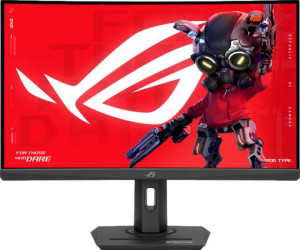
Asus ROG Strix XG27WCS 27"

Manufacturer: Asus

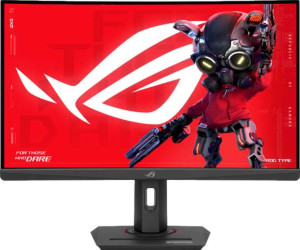
The Asus ROG Strix XG27WCS is a 27-inch curved gaming monitor built around a VA panel that combines a sharp QHD resolution with a fast 180Hz refresh rate, making it a straightforward choice for users who want smooth, detailed visuals in a curved form factor. The display carries an anti-glare coating and wide viewing angles of 178 degrees both horizontally and vertically, while the stand offers tilt, swivel, and VESA mount compatibility for flexible placement on a variety of setups.

Measured at 2560 x 1440 pixels with a pixel density of 108 ppi, the screen renders content at a level of clarity well above standard 1080p. Color coverage reaches 125% of the sRGB gamut, and the panel supports up to 16.7 million colors alongside a contrast ratio of 3000:1 and a typical brightness of 400 nits. Connectivity includes one HDMI 2.0 port, one DisplayPort output, a USB Type-C port, one additional USB port, and a 3.5mm audio jack, while the monitor draws just 22.5W during normal operation.

Pros
  • The 180Hz refresh rate combined with a 1ms response time makes for noticeably smoother motion during fast-paced content
  • Wide 178-degree viewing angles in both directions mean the image remains consistent across a broad range of seated positions
  • At 125% sRGB coverage with support for color calibration, the display offers a wide and adjustable color output for a gaming monitor
  • The stand supports both tilt and swivel adjustments, and VESA mount compatibility adds further flexibility for different desk setups
  • Connectivity covers HDMI 2.0, DisplayPort, USB Type-C, an additional USB port, and a 3.5mm audio jack, providing a reasonable range of options for a single-display setup
  • Standby power consumption of just 0.5W keeps idle energy draw very low
Cons
  • Portrait mode is not supported, limiting orientation flexibility for users who rotate their display
  • There are no built-in speakers, so separate audio hardware is required for sound output
  • Picture-in-Picture is unavailable, which restricts multitasking directly on the screen
  • The monitor does not support Thunderbolt, which may be a limitation for users relying on high-bandwidth single-cable workflows
  • At 7100g, the overall weight is on the heavier side for a 27-inch panel, which could matter when repositioning or mounting
Who is this for?

This monitor is a solid fit for desktop gamers who prioritize smooth, responsive gameplay, as the 180Hz refresh rate and 1ms response time handle fast-paced titles without obvious motion blur or input lag. The wide color gamut at 125% sRGB combined with color calibration support also makes it a reasonable choice for users who dabble in color-sensitive creative work alongside gaming. Those who value ergonomic flexibility will appreciate the tilt and swivel stand along with VESA mount compatibility, which accommodates a range of desk configurations. The QHD resolution at 27 inches also suits users who want noticeably sharper detail than a standard 1080p display without stepping up to a larger screen.

Who is this NOT for?

Users who need a fully versatile workstation setup will find the lack of portrait mode support a meaningful limitation, particularly those who work with long documents or vertical content layouts. The absence of built-in speakers and no support for Dolby Digital or DTS Surround means anyone seeking an all-in-one audio-visual solution will need to invest in external audio hardware. Those requiring Thunderbolt connectivity for high-bandwidth peripherals or daisy-chaining devices will also find the connection options insufficient for that workflow.

Display:

Display type VA
response time 1 ms
screen size 27"
resolution 2560 x 1440 px
pixel density 108 ppi
Adaptive synchronization VESA Adaptive Sync
has anti-glare coating
refresh rate 180Hz
maximum horizontal viewing angle 178º
maximum vertical viewing angle 178º
has a matte panel
has a glossy panel
has a touch screen

The Asus ROG Strix XG27WCS uses a 27-inch VA panel with a 2560 x 1440 pixel resolution and a pixel density of 108 ppi, delivering a clear and detailed image across the curved screen. It supports a 180Hz refresh rate paired with a 1ms response time, and includes VESA Adaptive Sync for smoother motion handling. Both horizontal and vertical viewing angles reach 178 degrees, and the display features an anti-glare coating to reduce reflections. The panel is neither matte nor glossy in classification and does not include touch screen functionality.

General info:

Type Gaming, Curved
supports total tilt
Has a swivel stand
Supports VESA mount
height 370 mm
width 611 mm
thickness 92 mm
weight 7100 g
supports portrait mode
volume 20798.44 cm³

The Asus ROG Strix XG27WCS is a curved gaming monitor with physical dimensions of 611 mm wide, 370 mm tall, and 92 mm thick, weighing 7100 g. The stand supports both tilt and swivel adjustments, and the monitor is compatible with VESA mounting solutions for wall or arm installation. Portrait mode is not supported. With a total volume of 20798.44 cm³, the overall footprint is fairly substantial, which is consistent with its curved gaming design.

Colors:

brightness (typical) 400 nits
supports color calibration
display colors 16.7 million
contrast ratio 3000:1
sRGB coverage 125%

The display produces up to 16.7 million colors with a 125% sRGB color coverage, offering a wide color gamut relative to the standard sRGB space. Typical brightness is rated at 400 nits, and the contrast ratio stands at 3000:1, which is characteristic of VA panel technology and contributes to deeper perceived blacks. The monitor also supports color calibration, allowing users to adjust the output for greater color accuracy.

Connectivity:

HDMI ports 1
supports Thunderbolt
DisplayPort outputs 1
has a socket for a 3.5 mm audio jack
has a DVI connector
USB ports 1
Has USB Type-C
HDMI version HDMI 2.0
supports Ethernet
supports Wi-Fi
has AirPlay
mini DisplayPort outputs 0
has a VGA connector

The monitor's connectivity options include one HDMI 2.0 port, one DisplayPort output, a USB Type-C port, and one additional USB port, covering the most common display and peripheral connection needs. A 3.5mm audio jack is also present for headset or speaker use. There are no DVI, VGA, mini DisplayPort, or Thunderbolt connections available, and the monitor does not support Ethernet, Wi-Fi, or AirPlay.

Power:

operating power consumption 22.5W
standby power consumption 0.5W

The Asus ROG Strix XG27WCS draws 22.5W during normal operation and drops to just 0.5W in standby mode, reflecting a modest power footprint for a 27-inch gaming display.

Features:

has PiP
has stereo speakers
has built-in smart TV
has a remote control
supports Dolby Digital
supports Dolby Digital Plus
has DTS Surround
has an ambient light sensor
has a front camera

The Asus ROG Strix XG27WCS is focused purely on display output, with no built-in stereo speakers, no Dolby Digital or Dolby Digital Plus support, and no DTS Surround audio capability. It also lacks Picture-in-Picture functionality, a remote control, an ambient light sensor, and a front camera. Smart TV functionality is not included, positioning this as a dedicated monitor rather than a multipurpose display device.
Final Verdict

The Asus ROG Strix XG27WCS is a curved 27-inch gaming monitor that delivers a well-rounded specification set for its category, anchored by a 180Hz refresh rate with 1ms response time and a QHD resolution that brings genuine visual clarity to fast-paced gameplay. Its wide color gamut, color calibration support, and strong contrast ratio give it some reach into color-conscious workflows, while the flexible stand and VESA compatibility add practical value for varied desk setups. The trade-offs are real — no speakers, no portrait mode, limited audio format support, and the absence of Thunderbolt will matter to certain users — but for a desktop gamer focused on smooth, responsive visuals in a curved form factor, this monitor covers the fundamentals with few meaningful gaps.

Popular Comparisons

Asus ROG Strix XG27WCS 27"
VS
Asus ROG Strix XG27ACS 27"
Asus ROG Strix XG27WCS 27"
VS
Asus ROG Strix XG27WCMS 27"
Asus ROG Strix XG27WCS 27"
VS
Asus TUF Gaming VG27VQM1B 27"
Asus ROG Strix XG27WCS 27"
VS
Asus TUF Gaming VG27AQL3A 27"
Asus ROG Strix XG27WCS 27"
VS
MSI MAG 275QF 27"
MSI MAG 275QF 27"
Asus ROG Strix XG27WCS 27"
VS
Dell G2724D 27"
Dell G2724D 27"