Asus ROG Strix XG32WCS 32" specifications and in-depth review

Asus ROG Strix XG32WCS 32"

Manufacturer: Asus

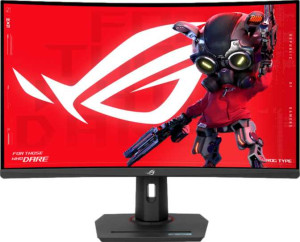
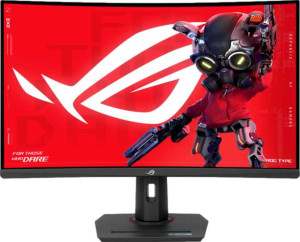
The Asus ROG Strix XG32WCS is a 31.5-inch curved gaming monitor built around a VA panel that combines a high refresh rate with a wide QHD resolution. Designed for gaming use, it features a 180Hz refresh rate paired with 1ms response time, making it suited for fast-paced gameplay. The monitor ships with an anti-glare coating and wide 178-degree viewing angles both horizontally and vertically, while its curved form factor adds a degree of immersion for longer sessions.

On the technical side, the display outputs a resolution of 2560 x 1440 pixels at 93 ppi across the 31.5-inch panel, with a contrast ratio of 3500:1 and a brightness rating of 350 nits. Color reproduction reaches 1073 million colors at 10-bit depth. Connectivity options include one HDMI 2.0 port, one DisplayPort output, a USB Type-C port, a VGA connector, and a 3.5mm audio jack. The monitor supports both VESA Adaptive Sync and AMD FreeSync, and is VESA mount compatible. It draws 50W under normal operation and drops to 0.3W in standby, with physical dimensions of 708 x 425 x 108mm and a total weight of 9.4kg.

Pros
  • The 180Hz refresh rate combined with a 1ms response time makes for smooth motion handling in fast-paced gaming sessions
  • A contrast ratio of 3500:1 is notably high for a VA panel, producing deep blacks and strong differentiation between dark and bright areas
  • Wide 178-degree viewing angles in both directions reduce color and contrast shift when viewing from off-center positions
  • VESA Adaptive Sync and AMD FreeSync support help eliminate screen tearing without requiring a specific GPU ecosystem
  • The inclusion of USB Type-C alongside HDMI 2.0 and DisplayPort provides a reasonable variety of connection options for different setups
  • Picture-in-Picture support allows two input sources to be displayed simultaneously, adding flexibility for multitasking
Cons
  • The stand lacks a swivel function and does not support portrait mode rotation, limiting ergonomic flexibility
  • No stereo speakers are built in, requiring an external audio solution for any sound output
  • Color calibration is not supported, so users have no built-in option to fine-tune color accuracy from the monitor itself
  • At 9,400g, the monitor is quite heavy, which can complicate desk setup and repositioning
  • There is no Thunderbolt support, which restricts high-bandwidth single-cable connection options
  • Wireless connectivity is entirely absent, with no Wi-Fi, Ethernet, or AirPlay available
Who is this for?

This monitor is well-suited for PC gamers who prioritize smooth, responsive gameplay, as the combination of a 180Hz refresh rate, 1ms response time, and AMD FreeSync support directly addresses the demands of fast-paced titles. The 2560x1440 resolution on a 31.5-inch curved panel also makes it a solid fit for users who want a more immersive desktop experience with a meaningful step up in detail over 1080p. Those who regularly work with multiple input sources will also appreciate the Picture-in-Picture functionality, along with the varied port selection that includes HDMI 2.0, DisplayPort, and USB Type-C.

Who is this NOT for?

Users who require precise, accurate color reproduction out of the box will find this monitor limiting, as it lacks any color calibration support, making it a poor fit for photo editing, graphic design, or color-critical professional work. The absence of a swivel stand and portrait mode also rules it out for those who need flexible ergonomic adjustments or a vertical screen orientation for tasks like coding or document review. Additionally, users who rely on a fully wireless or minimal-cable desk setup will be disappointed, as there is no Wi-Fi, Ethernet, or AirPlay support of any kind.

Display:

Display type VA
response time 1 ms
screen size 31.5"
resolution 2560 x 1440 px
pixel density 93 ppi
Adaptive synchronization VESA Adaptive Sync, AMD FreeSync
has anti-glare coating
refresh rate 180Hz
maximum horizontal viewing angle 178º
maximum vertical viewing angle 178º
has a matte panel
has a glossy panel
has a touch screen

The display uses a VA panel measuring 31.5 inches with a 2560 x 1440 pixel resolution at 93 ppi, delivering a reasonably sharp image across its curved surface. It runs at a 180Hz refresh rate with a 1ms response time, and supports both VESA Adaptive Sync and AMD FreeSync for smoother visuals during fast motion. Viewing angles reach 178 degrees on both the horizontal and vertical axes, and an anti-glare coating helps manage reflections in varied lighting conditions. The panel is neither matte nor glossy in classification, and does not support touch input.

General info:

Type Gaming, Curved
supports total tilt
Has a swivel stand
Supports VESA mount
height 425 mm
width 708 mm
thickness 108 mm
weight 9400 g
supports portrait mode
volume 32497.2 cm³

This is a curved gaming monitor with physical dimensions of 708 x 425 x 108mm and a total weight of 9,400g, giving it a fairly substantial footprint on a desk. The stand supports tilt adjustment and the monitor is compatible with VESA mounting, though it lacks a swivel stand and does not support portrait mode rotation. Its volume measures 32,497.2 cm³, and while it offers some ergonomic flexibility through tilt, the adjustment options are otherwise limited.

Colors:

brightness (typical) 350 nits
supports color calibration
display colors 1073 million
bit depth 10-bit
contrast ratio 3500:1

The display is capable of rendering 1,073 million colors at a 10-bit depth, supported by a contrast ratio of 3,500:1 that allows for a noticeable difference between dark and bright areas of an image. Typical brightness is rated at 350 nits, which is a moderate level suited for indoor use. Color calibration is not supported out of the box, meaning the panel ships without factory calibration options available to the user.

Connectivity:

HDMI ports 1
supports Thunderbolt
DisplayPort outputs 1
has a socket for a 3.5 mm audio jack
has a DVI connector
USB ports 1
Has USB Type-C
HDMI version HDMI 2.0
supports Ethernet
supports Wi-Fi
has AirPlay
mini DisplayPort outputs 0
has a VGA connector

The monitor offers a modest but practical set of ports, including one HDMI 2.0 port, one DisplayPort output, and a USB Type-C connection, along with a single USB port and a 3.5mm headphone jack. A VGA connector is also present for legacy device compatibility. There is no Thunderbolt support, no DVI connector, and no mini DisplayPort output. Wireless connectivity is absent entirely, as the monitor does not support Wi-Fi, Ethernet, or AirPlay.

Power:

operating power consumption 50W
standby power consumption 0.3W

The monitor draws 50W during normal operation and drops to just 0.3W in standby mode, reflecting a low idle power draw when the display is not actively in use.

Features:

has PiP
has stereo speakers
has built-in smart TV
has a remote control
supports Dolby Digital
supports Dolby Digital Plus
has DTS Surround
has an ambient light sensor
has a front camera

The monitor includes Picture-in-Picture (PiP) support and has built-in smart TV functionality, which are among its more notable software-side features. It does not come with stereo speakers, a front camera, or an ambient light sensor, and there is no remote control included. On the audio side, Dolby Digital, Dolby Digital Plus, and DTS Surround are all absent.

Final Verdict

The Asus ROG Strix XG32WCS presents a coherent package for gaming-focused users who want a large curved screen with genuinely responsive display characteristics. Its 180Hz refresh rate paired with AMD FreeSync support anchors the experience firmly in the gaming segment, and the high contrast ratio of the VA panel adds visual depth that suits immersive gameplay well. That said, the limited ergonomic adjustability, absence of built-in speakers, and lack of color calibration tools mean it is a product with a clear and narrow audience in mind. For users whose needs align with that profile — primarily desktop gamers seeking fluid visuals and a wide QHD image — the ROG Strix XG32WCS delivers on its core purpose without overreaching.

Popular Comparisons

Asus ROG Strix XG32WCS 32"
VS
Asus ROG Strix XG32WCMS 32"
Asus ROG Strix XG32WCS 32"
VS
Dell Alienware AW3425DWM 34"
Asus ROG Strix XG32WCS 32"
VS
MSI MAG 325CQRXF E2 32"
Asus ROG Strix XG32WCS 32"
VS
Asus TUF Gaming VG34VQ3B 34"
Asus ROG Strix XG32WCS 32"
VS
MSI MAG 32CQ6F 32"
MSI MAG 32CQ6F 32"
Asus ROG Strix XG32WCS 32"
VS
MSI MAG 274QRFW 27"
MSI MAG 274QRFW 27"
Asus ROG Strix XG32WCS 32"
VS
Dell Alienware AW3225QF 32"
Asus ROG Strix XG32WCS 32"
VS
LG UltraGear 32GS75Q-B 32"