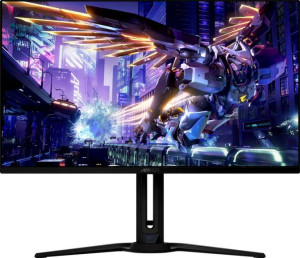
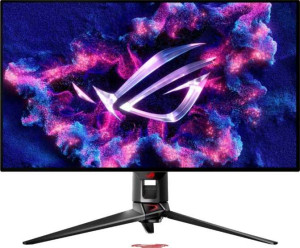
Asus ROG Swift OLED PG32UCDM 32" specifications and in-depth review

Asus ROG Swift OLED PG32UCDM 32"

Manufacturer: Asus

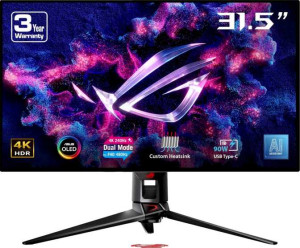
The Asus ROG Swift OLED PG32UCDM is a 32-inch gaming monitor built around a QD-OLED panel, targeting users who need both high resolution and fast motion handling in a single display. It carries a 3840 x 2160 pixel resolution across a 31.5-inch screen, yielding a pixel density of 139 ppi, and supports adaptive sync through Nvidia G-Sync, AMD FreeSync, and Nvidia G-Sync Compatible certification. The stand offers tilt, swivel, height adjustment up to 11 cm, and portrait mode rotation, with VESA mount support also available for those who prefer an aftermarket arm.

On the technical side, the panel delivers a 240Hz refresh rate paired with a 0.03ms response time and a contrast ratio of 1,500,000:1, figures typical of OLED technology. Brightness is rated at 250 nits typical, and the display reproduces approximately 1,073 million colors. Connectivity includes two HDMI 2.1 ports, one DisplayPort 2.1 output, four USB 3.1 ports, a USB Type-C port, and a 3.5mm audio jack. Operating power consumption sits at 42W, with a standby draw of 0.5W, and the unit carries an EU energy label of G. The monitor weighs 8,800 g and measures 718 x 430 x 74 mm.

Pros
  • The QD-OLED panel delivers a contrast ratio of 1,500,000:1, making dark scenes and shadow detail far more distinct than conventional LCD panels
  • A 240Hz refresh rate combined with a 0.03ms response time makes the display well-suited for fast-paced gaming where motion clarity matters
  • The stand supports tilt, swivel, height adjustment up to 11 cm, and portrait mode rotation, offering a solid range of ergonomic positioning
  • Connectivity is broad, including two HDMI 2.1 ports, one DisplayPort 2.1 output, four USB 3.1 ports, and a USB Type-C port on a single device
  • Adaptive sync support covers both Nvidia G-Sync and AMD FreeSync, making it compatible with a wide range of graphics hardware
  • Wide 178-degree viewing angles both horizontally and vertically help maintain consistent image quality across different seating positions
Cons
  • Typical brightness of 250 nits is relatively modest for a display of this size and panel type
  • The monitor carries an EU energy label of G, indicating it sits at the lower end of energy efficiency ratings
  • No stereo speakers or built-in audio output beyond the 3.5mm jack means external audio equipment is required for sound
  • Color calibration is not supported, limiting fine-tuned accuracy adjustments for color-sensitive workflows
  • There is no Ethernet or Wi-Fi connectivity, so the monitor cannot function as a network hub or smart display
Who is this for?

This monitor is well-suited for PC gamers who prioritize fast, fluid gameplay, as the combination of a 240Hz refresh rate and 0.03ms response time minimizes motion blur and input lag in competitive titles. The dual HDMI 2.1 and DisplayPort 2.1 outputs make it a practical fit for users running high-end GPUs from either Nvidia or AMD, with adaptive sync support covering both ecosystems. The flexible stand with tilt, swivel, height adjustment, and portrait rotation also makes it a reasonable choice for users who need ergonomic flexibility across different desk setups, including those who occasionally switch between landscape and portrait orientations for productivity tasks.

Who is this NOT for?

Users with color-critical professional workflows such as photo editing or print production will find the lack of color calibration support a significant limitation, as precise color accuracy cannot be verified or adjusted on this monitor. The typical brightness of 250 nits makes it less appropriate for brightly lit rooms or environments with strong ambient light, where the screen may struggle to maintain adequate visibility. Additionally, users looking for a self-contained multimedia workstation will be disappointed by the absence of built-in speakers, Ethernet, and Wi-Fi, as these omissions require separate peripherals to cover functions that other monitors in this category sometimes handle natively.

Display:

Display type OLED/AMOLED, QD-OLED
response time 0.03 ms
screen size 31.5"
resolution 3840 x 2160 px
pixel density 139 ppi
Adaptive synchronization Nvidia G-Sync, AMD FreeSync, Nvidia G-Sync Compatible
has anti-glare coating
refresh rate 240Hz
maximum horizontal viewing angle 178º
maximum vertical viewing angle 178º
has a matte panel
has a glossy panel
has a touch screen

The display uses a QD-OLED panel measuring 31.5 inches with a 3840 x 2160 pixel resolution and a pixel density of 139 ppi. It runs at a 240Hz refresh rate with a 0.03ms response time, and supports adaptive sync through Nvidia G-Sync, AMD FreeSync, and Nvidia G-Sync Compatible. Both the horizontal and vertical viewing angles reach 178 degrees, and an anti-glare coating is present. The screen is neither matte nor glossy in the traditional panel sense, and it does not support touch input.

General info:

Type Gaming
EU energy label G
supports total tilt
Has a swivel stand
Supports VESA mount
height 430 mm
width 718 mm
thickness 74 mm
weight 8800 g
supports portrait mode
volume 22846.76 cm³

This is a gaming monitor with an EU energy label of G, measuring 718 x 430 x 74 mm and weighing 8,800 g. The stand supports tilt, swivel, and portrait mode rotation, giving users a reasonable range of positioning options, and VESA mount compatibility is included for those who prefer a third-party mounting solution.

Colors:

brightness (typical) 250 nits
supports color calibration
display colors 1073 million
contrast ratio 1500000:1

The display has a typical brightness of 250 nits and reproduces approximately 1,073 million colors, with a contrast ratio of 1,500,000:1. Color calibration is not supported on this monitor.

Connectivity:

HDMI ports 2
supports Thunderbolt
DisplayPort outputs 1
DisplayPort version DisplayPort 2.1
has a socket for a 3.5 mm audio jack
has a DVI connector
USB ports 4
USB version 3.1
Has USB Type-C
HDMI version HDMI 2.1
supports Ethernet
supports Wi-Fi
has AirPlay
mini DisplayPort outputs 0
has a VGA connector

The monitor offers two HDMI 2.1 ports and one DisplayPort 2.1 output, covering the main video input options for modern systems. There are four USB 3.1 ports alongside a USB Type-C port, and a 3.5mm audio jack is also present. No mini DisplayPort, DVI, or VGA connectors are included, and the monitor does not support Thunderbolt, Ethernet, Wi-Fi, or AirPlay.

Power:

operating power consumption 42W
standby power consumption 0.5W

The monitor draws 42W during normal operation and drops to 0.5W in standby mode.

Features:

has PiP
has stereo speakers
has built-in smart TV
has a remote control
supports Dolby Digital
supports Dolby Digital Plus
has DTS Surround
has an ambient light sensor
has a front camera

The monitor supports Picture-in-Picture (PiP), allowing two input sources to be displayed simultaneously. It does not include stereo speakers, a remote control, an ambient light sensor, or a front camera, and there is no built-in smart TV functionality. Audio-related features such as Dolby Digital, Dolby Digital Plus, and DTS Surround are also absent.

Miscellaneous:

height adjustment range 11 cm

The stand provides a height adjustment range of 11 cm, allowing the screen position to be shifted vertically to suit different setups.
Final Verdict

The Asus ROG Swift OLED PG32UCDM is a 32-inch gaming monitor built around a clear set of priorities: fast motion handling, high resolution, and broad GPU compatibility. Its 240Hz QD-OLED panel with a 0.03ms response time and 1,500,000:1 contrast ratio makes it a compelling option for gamers who want both speed and deep image quality in a large-format display. The ergonomic stand, wide adaptive sync support, and versatile connectivity through HDMI 2.1 and DisplayPort 2.1 add practical value for a range of desk setups. That said, the modest 250-nit typical brightness and the absence of color calibration mean it is not the right fit for every user. For those whose primary focus is gaming performance on a 4K OLED screen, the PG32UCDM covers the core requirements with few compromises in its intended use case.

Popular Comparisons

Asus ROG Swift OLED PG32UCDM 32"
VS
Asus ROG Strix XG32UCG 32"
Asus ROG Swift OLED PG32UCDM 32"
VS
Asus ProArt Display OLED PA32UCDM 32"
Asus ROG Swift OLED PG32UCDM 32"
VS
Asus ROG Swift OLED PG27UCDM 27"
Asus ROG Swift OLED PG32UCDM 32"
VS
Samsung Odyssey OLED G8 (G81SF) 27"
Asus ROG Swift OLED PG32UCDM 32"
VS
LG UltraGear OLED 32GS95UV-B 32"
Asus ROG Swift OLED PG32UCDM 32"
VS
MSI MPG 322URX QD-OLED 32"
Asus ROG Swift OLED PG32UCDM 32"
VS
MSI MAG 321UP QD-OLED 32"
Asus ROG Swift OLED PG32UCDM 32"
VS
Samsung Odyssey OLED G8 (G80SD) 32"
Asus ROG Swift OLED PG32UCDM 32"
VS
Asus ROG Swift OLED PG32UCDP 32"
Asus ROG Swift OLED PG32UCDM 32"
VS
Gigabyte Aorus FO32U2P 32"
Asus ROG Swift OLED PG32UCDM 32"
VS
Dell Alienware AW2725DF 27"
Asus ROG Swift OLED PG32UCDM 32"
VS
MSI MAG 321UPX QD-OLED 32"
Asus ROG Swift OLED PG32UCDM 32"
VS
Dell G2724D 27"
Dell G2724D 27"
Asus ROG Swift OLED PG32UCDM 32"
VS
Dell Alienware AW3225QF 32"
Asus ROG Swift OLED PG32UCDM 32"
VS
LG UltraGear OLED 32GS95UE-B 32"
Asus ROG Swift OLED PG32UCDM 32"
VS
LG UltraGear 34GS95QE-B 34"
Asus ROG Swift OLED PG32UCDM 32"
VS
MSI MPG 321URX QD-OLED 32"
Asus ROG Swift OLED PG32UCDM 32"
VS
Samsung Odyssey OLED G9 49" (G93SC)