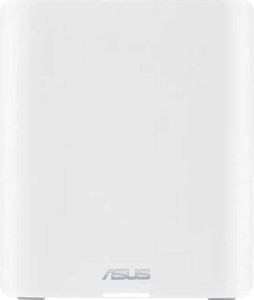
The Asus ZenWiFi BT10 has a compact physical footprint, measuring 159 mm in height, 72 mm in width, and 186 mm in thickness, with a total volume of 2129.328 cm³. It features 8 internal antennas with no external or removable antenna elements, keeping the exterior clean and uncluttered. Connectivity ports are straightforward, with one LAN port, one WAN port, and one USB port, while outdoor use is not supported. The unit is backed by a 3-year warranty.
The ZenWiFi BT10 operates across three bands and supports a wide range of Wi-Fi standards, spanning Wi-Fi 4 (802.11n) through to Wi-Fi 7 (802.11be), including Wi-Fi 5, Wi-Fi 6, and Wi-Fi 6E. Combined wireless throughput reaches 11529 Mb/s, backed by a quad-core CPU running at 2 GHz per core and 2GB of RAM. Internal storage stands at 256MB, and an external memory slot is available for additional capacity. DNS relay is supported, rounding out a capable performance-oriented feature set.
The ZenWiFi BT10 comes with a broad set of security capabilities, starting with a built-in network firewall and SPI intrusion protection to guard against unauthorized access. Wireless connections are protected through WEP, WPA, WPA2, and WPA3 protocols, while MAC address filtering, URL filtering, port filtering, and a Network Services Filter provide additional layers of traffic control. On the network management side, the router supports both automatic and static IP addressing, Network Address Translation, parental controls, and a PPTP server. VPN passthrough is covered across multiple protocols, including L2TP, IPsec, and PPTP, giving users flexibility in how they route secured remote connections.
The ZenWiFi BT10 supports mesh Wi-Fi, allowing it to function as part of a larger whole-home network, and beamforming is included to help direct wireless signals more efficiently toward connected devices. Network configuration is flexible, with both static and dynamic routing options, VLAN tagging, Inter-VLAN routing, and Quality of Service controls for managing traffic prioritization. IPv6 and Network Time Protocol are enabled, and a WPS button is present for straightforward device pairing. A dedicated smartphone app is available for managing the router, rounding out a feature set that covers a wide range of home and small-office networking needs.