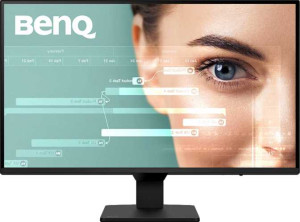
BenQ GW2790Q 27" specifications and in-depth review

BenQ GW2790Q 27"

Manufacturer: BenQ

The BenQ GW2790Q is a 27-inch standard desktop monitor built around an IPS panel with LED backlighting, targeting users who need accurate color reproduction and a comfortable viewing experience across long sessions. Its matte, anti-glare surface reduces reflections without sacrificing image clarity, and the stand supports both tilt adjustment and portrait mode rotation, giving users some flexibility in how they position the screen.

Running at a native resolution of 2560x1440 pixels with a pixel density of 109 ppi, the display delivers a sharp image across its 614mm-wide panel. A 100Hz refresh rate and 5ms response time are on offer alongside a contrast ratio of 1500:1 and a brightness rating of 350 nits. Color coverage reaches 99% of both sRGB and Adobe RGB color spaces, and the panel produces approximately 16.7 million colors. On the connectivity side, the monitor includes two HDMI 2.0 ports, one DisplayPort 1.2 output, and a 3.5mm audio jack, while a pair of built-in 2W speakers handle basic audio output. Power draw sits at 20W during operation and drops to 0.5W in standby, and VESA mounting is supported for those preferring a third-party arm.

Pros
  • Wide color coverage at 99% of both sRGB and Adobe RGB makes it well-suited for color-sensitive work
  • Near-180-degree horizontal and vertical viewing angles allow comfortable viewing from a wide range of positions
  • The matte, anti-glare panel surface helps reduce reflections in bright environments
  • VESA mount support gives users the option to use a third-party arm or wall mount
  • Portrait mode rotation adds flexibility for vertical content or document-heavy workflows
  • Built-in stereo speakers eliminate the need for a basic external audio setup
Cons
  • No adaptive synchronization support, which may result in screen tearing during fast-moving content
  • The stand does not include a swivel function, limiting horizontal adjustment options
  • No USB ports of any kind, including USB Type-C, restricting peripheral connectivity
  • Hardware color calibration is not supported, which may be a drawback for precision color work
  • No Picture-in-Picture support, limiting multitasking across multiple input sources
Who is this for?

This monitor is a solid fit for users engaged in color-accurate work such as graphic design or photo editing, given its 99% coverage of both sRGB and Adobe RGB color spaces and 16.7 million color output. The wide 178-degree viewing angles and matte anti-glare panel also make it comfortable for extended desk use in well-lit environments. Those who value ergonomic flexibility will appreciate the portrait mode rotation and VESA mount support, which allow the display to adapt to different workspace setups without relying on the stock stand.

Who is this NOT for?

Users looking for a display optimized for fast-paced gaming will find this monitor lacking, as it offers no adaptive synchronization support, which can lead to screen tearing during high-action content. The absence of any USB ports — including USB Type-C — makes it a poor match for those who depend on a monitor to act as a connectivity hub for peripherals or devices. Additionally, users who require hardware color calibration for precision color-managed workflows will need to look elsewhere, as that capability is not available on this display.

Display:

Display type IPS, LCD, LED-backlit
response time 5 ms
screen size 27"
resolution 2560 x 1440 px
pixel density 109 ppi
Adaptive synchronization None
has anti-glare coating
refresh rate 100Hz
maximum horizontal viewing angle 178º
maximum vertical viewing angle 178º
has a matte panel
has a glossy panel
has a touch screen

The BenQ GW2790Q uses an IPS LCD panel with LED backlighting, measuring 27 inches and delivering a resolution of 2560x1440 pixels at a pixel density of 109 ppi. It runs at a refresh rate of 100Hz with a 5ms response time, and both horizontal and vertical viewing angles extend to 178 degrees, making off-axis viewing comfortable from most positions. The display features a matte surface with an anti-glare coating and does not have a glossy finish or touch input. Adaptive synchronization is not supported, and the panel is not a touchscreen.

General info:

Type Standard
supports total tilt
Has a swivel stand
Supports VESA mount
height 371 mm
width 614 mm
thickness 61.6 mm
weight 4700 g
supports portrait mode
volume 14032.1104 cm³

This is a standard-type monitor with a physical footprint of 614mm wide, 371mm tall, and 61.6mm thick, weighing 4700g. The stand supports tilt adjustment and portrait mode rotation, offering some ergonomic flexibility, though it does not include a swivel function. VESA mount compatibility is available for users who prefer to use a wall mount or third-party arm instead of the included stand.

Colors:

brightness (typical) 350 nits
supports color calibration
display colors 16.7 million
contrast ratio 1500:1
Adobe RGB coverage 99%
sRGB coverage 99%

The display produces 16.7 million colors with a typical brightness of 350 nits and a contrast ratio of 1500:1. Color space coverage reaches 99% of both Adobe RGB and sRGB, indicating broad and consistent color reproduction across two widely used standards. Hardware color calibration is not supported.

Connectivity:

HDMI ports 2
supports Thunderbolt
DisplayPort outputs 1
DisplayPort version DisplayPort 1.2
has a socket for a 3.5 mm audio jack
has a DVI connector
USB ports 0
Has USB Type-C
HDMI version HDMI 2.0
supports Ethernet
supports Wi-Fi
has AirPlay
mini DisplayPort outputs 0
has a VGA connector

The monitor's video inputs consist of two HDMI 2.0 ports and one DisplayPort 1.2 output, with no mini DisplayPort, DVI, or VGA connectors present. A 3.5mm headset jack is included for audio passthrough, while USB connectivity is absent entirely — there are no standard USB ports and no USB Type-C. Wireless options such as Wi-Fi, Ethernet, AirPlay, and Thunderbolt are not supported.

Power:

operating power consumption 20W
standby power consumption 0.5W

The monitor draws 20W during normal operation and drops to 0.5W in standby mode, reflecting a modest power footprint for a 27-inch display.

Features:

has PiP
has stereo speakers
has built-in smart TV
audio output power 2 x 2W
has a remote control
supports Dolby Digital
supports Dolby Digital Plus
has DTS Surround
has an ambient light sensor
has a front camera

The monitor includes built-in stereo speakers rated at 2 x 2W, providing basic audio output without the need for external speakers. It does not support Dolby Digital, Dolby Digital Plus, or DTS Surround, and there is no remote control, ambient light sensor, or front camera. Picture-in-Picture and built-in smart TV functionality are also absent.
Final Verdict

The BenQ GW2790Q presents a well-rounded 27-inch IPS display aimed at users who prioritize color accuracy and everyday productivity over gaming-oriented features. Its 99% coverage of both sRGB and Adobe RGB color spaces, combined with a sharp 2560x1440 resolution and wide viewing angles, makes it a reliable choice for design and content-related work. Ergonomic touches like portrait mode rotation and VESA mount compatibility add practical value, though the lack of adaptive sync, no USB connectivity, and the absence of hardware color calibration do set some boundaries around its use cases. For users whose workflow centers on color-consistent output in a stable, well-lit environment, this monitor delivers on its core strengths without unnecessary extras.

Popular Comparisons

BenQ GW2790Q 27"
BenQ GW2790Q 27"
VS
Xiaomi 4K Monitor A27Ui 27"
BenQ GW2790Q 27"
BenQ GW2790Q 27"
VS
KTC H27T22 27"
KTC H27T22 27"
BenQ GW2790Q 27"
BenQ GW2790Q 27"
VS
Lenovo Legion R27q-30 27"