BenQ Mobiuz EX321UX 32" specifications and in-depth review

BenQ Mobiuz EX321UX 32"

Manufacturer: BenQ

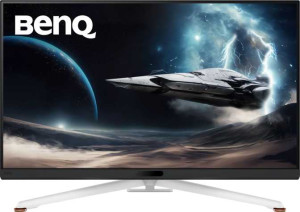
The BenQ Mobiuz EX321UX is a 32-inch gaming monitor built around a Mini-LED IPS panel that combines a 3840 x 2160 resolution with a 144Hz refresh rate, targeting users who want detailed visuals without sacrificing motion clarity. It supports AMD FreeSync Premium Pro for adaptive synchronization and delivers a 1 ms response time, keeping it oriented firmly toward gaming use. The stand offers both tilt and swivel adjustments, and VESA mounting is supported for those who prefer an arm setup. A remote control is included, which is a relatively uncommon addition in this category.

Color coverage reaches 99% of the Adobe RGB color space, and the display is capable of rendering approximately 1.07 billion colors, with factory color calibration supported. Typical brightness is rated at 700 nits, and viewing angles extend to 178 degrees both horizontally and vertically. On the connectivity side, the monitor provides three HDMI 2.1 ports, one DisplayPort output, a USB Type-C port, and six USB ports in total, along with a 3.5 mm headphone jack. Wi-Fi, Ethernet, and Thunderbolt are not supported, and the monitor does not include built-in speakers. Operating power consumption is listed at 80W, dropping to 0.5W in standby.

Pros
  • The Mini-LED IPS panel delivers 700 nits of typical brightness alongside 99% Adobe RGB coverage and support for 1.07 billion colors, making it a strong choice for color-sensitive work
  • A 144Hz refresh rate combined with a 1 ms response time and AMD FreeSync Premium Pro keeps motion handling well-suited for fast-paced gaming
  • Three HDMI 2.1 ports allow multiple high-bandwidth sources to be connected simultaneously without swapping cables
  • Factory color calibration is included, reducing the need for manual profiling to achieve accurate color output
  • The stand supports both tilt and swivel, and VESA mounting is available, giving users meaningful flexibility in how they position the display
  • A remote control is included, making it straightforward to adjust settings from a distance without navigating physical buttons
Cons
  • No built-in speakers are included, so users must rely on external audio equipment or headphones connected via the 3.5 mm jack
  • Portrait mode is not supported, locking the display to landscape orientation regardless of the use case
  • Thunderbolt connectivity is absent, which limits single-cable docking options for compatible laptops
  • There is no Wi-Fi or Ethernet, meaning the monitor cannot be used in any networked or smart display capacity
  • Picture-in-Picture is not available, preventing simultaneous viewing of multiple sources on screen
Who is this for?

The monitor is well-suited to gamers who want a large-screen experience with both visual fidelity and responsive performance, as the combination of a 144Hz refresh rate, 1 ms response time, and AMD FreeSync Premium Pro addresses the core demands of fast-paced gaming without sacrificing resolution. The 4K panel with 99% Adobe RGB coverage and factory color calibration also makes it a practical fit for creative professionals who handle color-critical work such as photo editing or digital illustration. Users with multiple sources to connect — consoles, PCs, or other devices — will appreciate the three HDMI 2.1 ports, which reduce the need for switching equipment.

Who is this NOT for?

Users who rely on a single cable for both video and data — such as laptop users who expect Thunderbolt connectivity for a streamlined desk setup — will find this monitor limiting, as Thunderbolt is not supported. Those who prefer an all-in-one workstation experience will also be affected by the absence of built-in speakers and Picture-in-Picture mode, both of which are missing here. Additionally, anyone working in a space where the display orientation needs to shift between landscape and portrait — such as developers or editors who work with long-form documents — will be constrained, as portrait mode is not available on this model.

Display:

Display type Mini-LED, IPS
response time 1 ms
screen size 31.5"
resolution 3840 x 2160 px
pixel density 138 ppi
Adaptive synchronization AMD FreeSync Premium Pro
has anti-glare coating
refresh rate 144Hz
maximum horizontal viewing angle 178º
maximum vertical viewing angle 178º
has a matte panel
has a glossy panel
has a touch screen

The monitor uses a Mini-LED IPS panel measuring 31.5 inches with a 3840 x 2160 pixel resolution and a pixel density of 138 ppi. It runs at a 144Hz refresh rate with a 1 ms response time, and adaptive synchronization is handled by AMD FreeSync Premium Pro. Viewing angles reach 178 degrees in both the horizontal and vertical directions, and an anti-glare coating is applied to the screen surface. The panel is neither matte nor glossy in classification, and touch input is not supported.

General info:

Type Gaming
supports total tilt
Has a swivel stand
Supports VESA mount
height 433.3 mm
width 714.4 mm
thickness 98.1 mm
weight 9700 g
supports portrait mode
volume 30366.807912 cm³

Classified as a gaming monitor, the unit measures 714.4 mm wide, 433.3 mm tall, and 98.1 mm deep, with a weight of 9,700 g. The stand supports both tilt and swivel adjustments, giving users some flexibility in positioning, and VESA mounting is available for those who prefer a third-party arm or wall mount. Portrait mode is not supported, so the display is fixed to landscape orientation. VESA compatibility alongside the adjustable stand makes it reasonably adaptable to different desk setups.

Colors:

brightness (typical) 700 nits
supports color calibration
display colors 1070 million
Adobe RGB coverage 99%

The display covers 99% of the Adobe RGB color space and is capable of rendering approximately 1,070 million colors, supported by factory color calibration for users who need accurate out-of-box output. Typical brightness is rated at 700 nits, providing a reasonably high luminance level for HDR content and well-lit environments.

Connectivity:

HDMI ports 3
supports Thunderbolt
DisplayPort outputs 1
has a socket for a 3.5 mm audio jack
has a DVI connector
USB ports 6
Has USB Type-C
HDMI version HDMI 2.1
supports Ethernet
supports Wi-Fi
has AirPlay
mini DisplayPort outputs 0
has a VGA connector

The monitor offers a well-stocked set of video inputs, with three HDMI 2.1 ports and one DisplayPort output covering the main display connections, while mini DisplayPort, DVI, and VGA are all absent. A USB Type-C port is included alongside six USB ports in total, and a 3.5 mm headphone jack provides audio output. Thunderbolt is not supported, and the monitor has no wireless connectivity — Wi-Fi, Ethernet, and AirPlay are all unavailable, keeping it strictly a wired-connection device.

Power:

operating power consumption 80W
standby power consumption 0.5W

The monitor draws 80W during normal operation and drops to just 0.5W in standby, keeping idle power consumption minimal when the display is not in active use.

Features:

has PiP
has stereo speakers
has built-in smart TV
has a remote control
supports Dolby Digital
supports Dolby Digital Plus
has DTS Surround
has an ambient light sensor
has a front camera

The monitor includes a remote control, which provides a convenient way to manage settings without using on-screen buttons directly. It does not feature built-in stereo speakers, Picture-in-Picture mode, a front camera, or an ambient light sensor. Audio format support is also absent, with Dolby Digital, Dolby Digital Plus, and DTS Surround all unsupported. Smart TV functionality is not present, keeping the device focused purely on its role as a display output.
Final Verdict

The BenQ Mobiuz EX321UX positions itself as a capable 32-inch gaming monitor that also holds genuine appeal for color-focused creative work, owing to its 4K Mini-LED IPS panel with 99% Adobe RGB coverage and factory color calibration alongside a 144Hz refresh rate and AMD FreeSync Premium Pro. The generous port selection — particularly three HDMI 2.1 inputs — adds practical flexibility for multi-device setups, and the inclusion of a remote control is a thoughtful convenience for a display of this size. It does come with trade-offs: no built-in audio, no portrait mode, and no Thunderbolt mean it falls short of being a fully self-contained workstation solution. For users whose priorities center on visual accuracy and gaming responsiveness in a large-format display, the EX321UX is a well-specified option that delivers meaningfully on both fronts.

Popular Comparisons

BenQ Mobiuz EX321UX 32"
VS
Asus ProArt Display 6K PA32QCV 32"
BenQ Mobiuz EX321UX 32"
VS
AOC U32U3CV 32"
AOC U32U3CV 32"
BenQ Mobiuz EX321UX 32"
VS
Dell Alienware AW3225QF 32"
BenQ Mobiuz EX321UX 32"
VS
MSI MPG 321URX QD-OLED 32"