Blackview Tab 30 Wi-Fi specifications and in-depth review

Blackview Tab 30 Wi-Fi

Manufacturer: Blackview

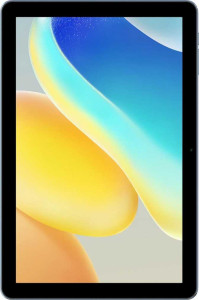
The Blackview Tab 30 Wi-Fi is an entry-level tablet built around a 10.1″ IPS LCD screen with a resolution of 1280 x 800 pixels and a pixel density of 149 ppi. Running Android 12 out of the box, it offers a familiar and functional software experience, complete with support for split-screen multitasking, dark mode, dynamic theming, and picture-in-picture. The device is powered by the Allwinner A133 chipset, paired with 2GB of RAM and 64GB of onboard storage that can be expanded via a microSD card slot.

On the connectivity side, the Tab 30 Wi-Fi supports Wi-Fi 4, Wi-Fi 5, and Wi-Fi 6 standards alongside Bluetooth 5.0, and it includes a USB Type-C port running at USB 2.0 speeds. Its 5100 mAh battery supports fast charging, though wireless charging is not available. The tablet features a 5 MP rear camera capable of recording 1080p video at 30 fps, a 2 MP front-facing camera, stereo speakers, and a 3.5 mm headphone jack. Sensors include an accelerometer, and the device supports offline voice recognition as well as on-device machine learning.

Pros
  • Supports Wi-Fi 6 alongside Wi-Fi 4 and Wi-Fi 5, providing flexible wireless connectivity options
  • Stereo speakers and a 3.5 mm headphone jack offer wired and built-in audio output without adapters
  • Internal storage is expandable via an external memory slot, allowing more flexibility for files and media
  • The 5100 mAh battery supports fast charging, reducing downtime between uses
  • Includes a range of manual camera controls such as ISO, exposure, white balance, and focus for the rear camera
  • Supports split-screen multitasking, picture-in-picture, dark mode, and multiple user accounts for shared use
Cons
  • With only 2GB of RAM, multitasking and running demanding applications may be noticeably limited
  • The display resolution of 1280 x 800 pixels results in a relatively low pixel density of 149 ppi on a 10.1-inch panel
  • No GPS, gyroscope, or compass are present, limiting navigation and motion-sensing functionality
  • The chipset does not support 64-bit processing, which restricts compatibility with modern 64-bit applications
  • No NFC, fingerprint scanner, or any biometric authentication method is available
  • Wireless charging is not supported, and the USB port is limited to USB 2.0 speeds
Who is this for?

This tablet is a reasonable fit for light everyday use such as web browsing, media consumption, and casual reading, where the 10.1-inch IPS LCD display and stereo speakers provide an adequate experience without demanding heavy processing power. Users who want a shared family or household device will appreciate the multi-user support, child lock, and parental-friendly software features. The expandable storage and Wi-Fi 6 support also make it a practical option for those who primarily stream content or store files locally in a home or school environment.

Who is this NOT for?

Users who need smooth performance for demanding applications, gaming, or heavy multitasking will find the 2GB of RAM and the entry-level Allwinner A133 chipset — which lacks 64-bit support — genuinely limiting. The absence of GPS, a gyroscope, and a compass makes this tablet entirely unsuitable for navigation, augmented reality, or any motion-sensitive application. Similarly, anyone looking to use this device for high-quality photography or video work will be disappointed by the basic 5 MP rear camera, the lack of optical image stabilization, and the absence of HDR10 or Dolby Vision recording support.

Design:

weight 520 g
thickness 9.85 mm
width 246 mm
height 162.7 mm
volume 394.23837 cm³
Stylus included
Has a detachable keyboard
Has a backlit keyboard
water resistance None
Has tilt sensitivity

The Blackview Tab 30 Wi-Fi has a footprint of 246 x 162.7 mm and a thickness of 9.85 mm, with a total weight of 520 g and a volume of approximately 394.24 cm³. The tablet does not include a stylus, a detachable keyboard, or a backlit keyboard, and it offers no water resistance. Tilt sensitivity is also absent, making this a straightforward slate design without any accessory bundles or environmental protection.

Display:

screen size 10.1"
resolution 1280 x 800 px
pixel density 149 ppi
Display type IPS, LCD
has branded damage-resistant glass
has anti-reflection coating
supports HDR10
has a touch screen
Has sapphire glass display
supports HDR10+
supports Dolby Vision
Has an e-paper display

The Blackview Tab 30 Wi-Fi uses a 10.1″ IPS LCD touchscreen with a resolution of 1280 x 800 pixels and a pixel density of 149 ppi. The panel does not feature branded damage-resistant glass, an anti-reflection coating, or a sapphire glass surface. On the HDR front, HDR10, HDR10+, and Dolby Vision are all unsupported, and the display is a conventional LCD rather than an e-paper panel.

Performance:

internal storage 64GB
RAM 2GB
Chipset (SoC) name Allwinner A133
CPU speed 4 x 1.6 GHz
has an external memory slot
semiconductor size 28 nm
Supports 64-bit
Has integrated LTE
Uses big.LITTLE technology
DirectX version DirectX 10
Has integrated graphics
GPU clock speed 660 MHz
Has NX bit
RAM speed 1600 MHz
Has TrustZone
maximum memory amount 4GB
Android version Android 12
bits executed at a time 128
OpenGL ES version 3.2
PassMark result 668
PassMark result (single) 409
VFP version 4
eMMC version 5.1
OpenCL version 1.2

The Blackview Tab 30 Wi-Fi is powered by the Allwinner A133 chipset, a quad-core processor running at 4 x 1.6 GHz and built on a 28 nm process node, paired with 2GB of DDR4 RAM clocked at 1600 MHz and a maximum supported memory ceiling of 4GB. The SoC does not support 64-bit processing and does not use big.LITTLE technology, but it does include integrated graphics with a GPU clock speed of 660 MHz, support for DirectX 10 and OpenGL ES 3.2, and OpenCL 1.2 for compute tasks. Storage comes in at 64GB via eMMC 5.1, expandable through an external memory slot, and the chip includes both NX bit and TrustZone security features as well as integrated LTE on the SoC. The device ships with Android 12 and scores 668 in the PassMark multi-core benchmark and 409 in the single-core test, with NEON executing 128 bits at a time and VFP version 4 for floating-point operations.

Cameras:

megapixels (main camera) 5 MP
megapixels (front camera) 2MP
video recording (main camera) 1080 x 30 fps
has a flash
has a front camera
has a built-in HDR mode
can create panoramas in-camera
supports slow-motion video recording
has touch autofocus
optical zoom 0x
has a BSI sensor
has manual white balance
has a CMOS sensor
supports HDR10 recording
has continuous autofocus when recording movies
supports Dolby Vision recording
Has a front-facing LED flash
number of flash LEDs 1
has manual ISO
has a video light
Shoots 360° panorama
has a serial shot mode
has built-in optical image stabilization
has 3D photo/video recording capabilities
Has a dual-tone LED flash
has manual focus
Has a RGB LED flash
has manual exposure
has manual shutter speed

The Blackview Tab 30 Wi-Fi is equipped with a 5 MP rear camera using a CMOS sensor — without back-illumination — capable of recording video at 1080p and 30 fps, along with slow-motion video support. The rear camera includes a single LED flash, a video light, touch autofocus, continuous autofocus during recording, manual focus, manual white balance, manual ISO, and manual exposure, though manual shutter speed, optical zoom, optical image stabilization, burst mode, panorama, and 3D or 360-degree capture are all absent. HDR mode is supported for photos, but HDR10 and Dolby Vision recording are not available, and the flash is a standard single-tone LED rather than a dual-tone or RGB unit. On the front, there is a 2 MP camera without a dedicated flash, suitable for video calls and self-portraits.

Audio:

has aptX
has aptX HD
has LDAC
has aptX Low Latency
has aptX Adaptive
has aptX Lossless
has stereo speakers
has a socket for a 3.5 mm audio jack
Has a radio

The Blackview Tab 30 Wi-Fi features stereo speakers and a 3.5 mm headphone jack, covering the basics for both built-in and wired audio output. It does not include a radio, and none of the advanced Bluetooth audio codecs are supported — aptX, aptX HD, aptX Low Latency, aptX Adaptive, aptX Lossless, and LDAC are all absent.

Battery:

battery power 5100 mAh
Supports fast charging
has wireless charging
has a battery level indicator
has a rechargeable battery
has a removable battery

The Blackview Tab 30 Wi-Fi is equipped with a 5100 mAh rechargeable battery that supports fast charging and includes a battery level indicator for convenient monitoring. The battery is non-removable, and wireless charging is not supported.

Connectivity & Features:

Wi-Fi version Wi-Fi 4 (802.11n), Wi-Fi 5 (802.11ac), Wi-Fi 6 (802.11ax)
has Mail Privacy Protection
has on-device machine learning
has clipboard warnings
has location privacy options
has camera/microphone privacy options
can block app tracking
blocks cross-site tracking
supports split screen
has Live Text
has notification permissions
has full-page screenshots
has Quick Start
has theme customization
has Wi-Fi password sharing
has PiP
Can play games while they download
has an extra dim mode
can offload apps
has focus modes
has media picker
has dynamic theming
has dark mode
has battery health check
Has USB Type-C
has a cellular module
has 5G support
is a multi-user system
gets direct OS updates
has GPS
has a child lock
has an HDMI output
has NFC
Has a fingerprint scanner
USB version 2
Supports widgets
Bluetooth version 5
download speed 150 MBits/s
has a gyroscope
Is free and open source
Has offline voice recognition
has a compass
upload speed 50 MBits/s
supports Wi-Fi
Has sharing intents
Has customizable notifications
Uses 3D facial recognition
supports Galileo
Has a barometer
has an accelerometer
has voice commands
Has an iris scanner
Has a built-in projector
supports Ethernet
Has an infrared sensor
Tracks the current position of a mobile device

The Blackview Tab 30 Wi-Fi supports Wi-Fi 4, Wi-Fi 5, and Wi-Fi 6 with download speeds up to 150 Mbits/s and upload speeds up to 50 Mbits/s, and connects wirelessly to peripherals via Bluetooth 5.0. It uses a USB Type-C port running at USB 2.0, but lacks HDMI output, NFC, Ethernet, and has no cellular module, meaning there is no 4G or 5G connectivity. GPS, a gyroscope, a compass, a barometer, an infrared sensor, and a built-in projector are all absent, though an accelerometer is present and device position tracking is supported. On the software side, the tablet offers a solid set of features including split-screen multitasking, picture-in-picture, dark mode, dynamic theming, theme customization, full-page screenshots, Live Text, widgets, sharing intents, customizable notifications, an extra dim mode, offline voice recognition, voice commands, on-device machine learning, and the ability to play games while they download. Privacy controls include location privacy options, camera and microphone access management, clipboard warnings, and app tracking blocking, though cross-site tracking blocking and Mail Privacy Protection are not available. The system supports multiple user accounts, a child lock, and device position tracking, but does not offer direct OS vendor updates, Quick Start, focus modes, a media picker, app offloading, battery health check, Wi-Fi password sharing, fingerprint scanning, iris scanning, or 3D facial recognition.

Miscellaneous:

DDR memory version 4

The Blackview Tab 30 Wi-Fi uses DDR4 system memory.
Final Verdict

The Blackview Tab 30 Wi-Fi is a straightforward entry-level tablet that delivers on the basics — a decent-sized IPS touchscreen, stereo speakers, a 3.5 mm jack, and Wi-Fi 6 connectivity paired with a 5100 mAh fast-charging battery — making it a functional choice for light daily tasks in a home or shared setting. However, the modest 2GB of RAM, the absence of GPS and biometric security, and a chipset without 64-bit support mean it is best positioned for undemanding use cases rather than productivity or performance-oriented workflows. For users whose needs revolve around casual browsing, media playback, and family-friendly features, the Tab 30 Wi-Fi covers the essentials, but those expecting more from their tablet experience will quickly encounter its hardware ceiling.

Popular Comparisons

Blackview Tab 30 Wi-Fi
VS
Samsung Galaxy Tab A9
Blackview Tab 30 Wi-Fi
VS
Teclast T60 Plus
Teclast T60 Plus