Corsair M55 specifications and in-depth review

Corsair M55

Manufacturer: Corsair

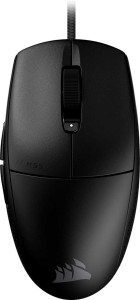
The Corsair M55 is a wired gaming mouse designed with an ambidextrous layout, making it suitable for both left- and right-handed users. Weighing just 55 g and connecting via USB, it targets gamers and productivity users alike, with a practical 1.8 m cable and a compact form factor measuring 118.6 mm in length and 62.2 mm in width.

On the technical side, the M55 features an optical sensor with a maximum resolution of 16000 DPI and a minimum of 200 DPI, fully adjustable to suit different tasks. It delivers a polling rate of 1000 Hz, handles speeds up to 300 IPS, and supports up to 35G of acceleration. The mouse includes six buttons, all programmable, with two dedicated side buttons, a DPI switching button, and a profile switching button backed by one onboard memory profile. Corsair covers the M55 with a 2-year warranty.

Pros
  • Ambidextrous orientation makes it usable for both left- and right-handed users
  • All 6 buttons are programmable, offering full input customization
  • Wide DPI range from 200 to 16000 allows fine-grained sensitivity adjustment
  • Dedicated DPI and profile switching buttons enable on-the-fly changes without software
  • Lightweight at 55 g, reducing hand fatigue during extended sessions
  • Generous 1.8 m cable provides comfortable reach without restricting movement
Cons
  • No RGB lighting for users who prefer illuminated peripherals
  • Only one onboard memory profile limits the number of stored configurations
  • No tilting or thumb scroll wheel, restricting alternative scrolling options
  • No extra weights included, so weight cannot be adjusted to personal preference
  • Gesture support is absent, limiting advanced navigation capabilities
Who is this for?

The Corsair M55 is well suited to users who need a mouse that works comfortably in either hand, as its ambidextrous design removes the typical right-hand bias found in many gaming peripherals. Its wide DPI range and fully programmable button layout make it a practical choice for those who switch between gaming sessions and productivity tasks, particularly users who value the ability to adjust sensitivity and remap controls on the fly. The lightweight 55 g build also benefits anyone who prefers a mouse that causes minimal strain during extended use.

Who is this NOT for?

Users who rely on a rich lighting setup will find the M55 lacking, as it ships with no RGB illumination. Those who need to store multiple distinct configuration profiles will also be limited, since the mouse supports only a single onboard memory profile. Additionally, users who require more nuanced scrolling input — such as horizontal scrolling or thumb-wheel navigation — will be underserved, as the M55 includes no tilting or thumb scroll wheel, making it a poor fit for workflows or applications that depend on those input methods.

Performance:

polling rate 1000 Hz
maximum speed 300 IPS
maximum acceleration 35G
maximum DPI 16000 DPI
minimum DPI 200 DPI
has adjustable DPI

The Corsair M55 delivers a polling rate of 1000 Hz, ensuring frequent position updates for responsive cursor movement. Its optical sensor covers a wide sensitivity range, from 200 DPI up to a maximum of 16000 DPI, with full adjustability across that span to suit different tasks and preferences. The mouse also handles speeds of up to 300 IPS and tolerates a maximum acceleration of 35G, reflecting capable tracking characteristics under fast movement.

General info:

Type Gaming, Productivity
connection type USB
sensor Optical Sensor
onboard memory profiles 1
has gesture support
has a removable battery
warranty period 2 years

The Corsair M55 is positioned for both gaming and productivity use, connecting to a host system via USB and relying on an optical sensor for tracking. It stores a single onboard memory profile, allowing one custom configuration to be saved directly on the device. Gesture support is not included. The mouse has a removable battery and is backed by a 2-year warranty.

Buttons:

number of buttons 6
number of side buttons 2
number of programmable buttons 6
has a DPI switching button
has a profile switching button

The Corsair M55 features 6 buttons in total, all of which are programmable, giving users full control over their input configuration. Two of these are side buttons, positioned for thumb access. The mouse also includes dedicated DPI switching and profile switching buttons, allowing on-the-fly adjustments to sensitivity and stored settings without navigating software.

Design:

Orientation Ambidextrous
weight 55 g
has RGB lighting
has a tilting scroll wheel
has a thumb scroll wheel
has extra weights
cable length 1.8 m
volume 184.423 cm³
thickness 25 mm
height 118.6 mm
width 62.2 mm

The Corsair M55 uses an ambidextrous design, making it physically suited for use in either hand. It weighs 55 g and measures 118.6 mm in height, 62.2 mm in width, and 25 mm in thickness, with a total volume of 184.423 cm³. The attached cable runs 1.8 m in length. The mouse does not include RGB lighting, a tilting scroll wheel, a thumb scroll wheel, or extra weights, and no additional weight customization options are provided.
Final Verdict

The Corsair M55 is a focused, no-frills gaming and productivity mouse built around two clear strengths: its ambidextrous form factor and a fully programmable, flexible input layout. At 55 g with a broad DPI range and dedicated switching buttons, it serves users who want functional control without unnecessary complexity. Where it falls short — limited onboard profiles, absent RGB, and basic scrolling options — reflects deliberate design choices rather than oversights, making the M55 a practical pick for users whose priorities align with its straightforward, accessible feature set.

Popular Comparisons

Corsair M55
Corsair M55
VS
Redragon M996 K1NG 8K