Dell XPS 13 (2024) 13.4" specifications and in-depth review

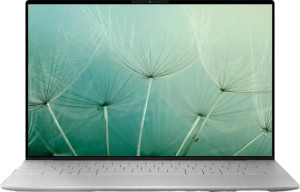
Dell XPS 13 (2024) 13.4"

Manufacturer: Dell

The Dell XPS 13 (2024) is a compact 13.4″ laptop oriented toward users who want a capable, slim machine in a small footprint. Measuring 295 mm wide and 15 mm thin while weighing 1,220 g, it keeps a manageable physical profile. The display runs at 120Hz with a 1920×1200 resolution, a pixel density of 168 ppi, 500-nit typical brightness, and an anti-reflection coating, making it well-suited to varied lighting conditions. The machine includes a front-facing 2MP camera, stereo speakers, a 3.5 mm headset jack, and a fingerprint scanner for biometric login.

The processor uses a hybrid core layout of 6 performance cores at 1.4 GHz and 8 efficiency cores at 0.9 GHz, spanning 22 threads with a turbo frequency of 4.8 GHz and a 28W TDP, built on a 7 nm process with 24MB of L3 cache. It is paired with 16GB of DDR5 memory at 7,467 MHz, with the platform supporting up to 64GB. Storage is a 512GB NVMe SSD over PCIe 5.0. Graphics are handled by the integrated Arc Xe-LPG 128EU GPU, which reaches a turbo of 2,250 MHz and supports DirectX 12 Ultimate and OpenCL 3. Connectivity is built around two Thunderbolt 4 ports with USB 4 40Gbps capability, Wi-Fi support, and AirPlay, though no HDMI, USB-A, RJ45, or external memory card slot is present. The 55 Wh battery carries a rated life of 19 hours.

Pros
  • The 120Hz display refresh rate delivers noticeably smoother motion during everyday scrolling and content interaction compared to standard 60Hz panels
  • A rated battery life of 19 hours means the machine can realistically last a full day of use without needing to be plugged in
  • The 4.8GHz turbo frequency across 22 threads, backed by a PCIe 5.0 NVMe SSD, supports demanding multitasking and fast file access
  • Two Thunderbolt 4 ports with USB 4 40Gbps capability provide high-bandwidth connectivity for external storage and docking solutions
  • At 500 nits typical brightness with an anti-reflection coating, the display remains usable in well-lit environments
  • The fingerprint scanner provides a reliable biometric login option without relying solely on a password
Cons
  • The keyboard has no backlighting, making it harder to use in dim or dark environments
  • There are no USB-A ports of any kind, requiring adapters for standard USB peripherals and older accessories
  • No HDMI output is present, so connecting to a projector or external display requires an adapter or dock
  • Only a single microphone is built in, which may limit audio capture quality during calls or recordings
  • 3D facial recognition is not supported, leaving the fingerprint scanner as the only biometric authentication option
  • No external memory card slot is available, making direct transfers from cameras or other card-based devices inconvenient
Who is this for?

The Dell XPS 13 (2024) is well-suited to professionals and students who spend long hours away from a desk and need a machine that can keep up without frequent charging — the 19-hour rated battery life makes it a strong fit for full-day mobile use. Its compact 13.4″ form factor, combined with a 120Hz display at 500 nits with an anti-reflection coating, makes it practical for working in varied environments including brighter indoor and outdoor settings. Users who connect to Thunderbolt 4 docks or high-bandwidth external storage will find the two USB 4 40Gbps ports well-equipped for that workflow, and the 22-thread CPU with a 4.8GHz turbo handles demanding productivity and multitasking workloads without thermal constraints becoming an immediate concern at its 28W TDP.

Who is this NOT for?

Users who depend on a broad range of wired peripherals will find the XPS 13 limiting, as the complete absence of USB-A ports and HDMI output means adapters are required for most standard accessories and external displays. Those who work in low-light environments will be hampered by the lack of keyboard backlighting, which is a meaningful omission for evening or travel use. The integrated Arc Xe-LPG GPU, while capable for general tasks, is not suited to users with graphically intensive workloads such as video rendering, 3D modelling, or gaming, as it offers no dedicated graphics memory or ray tracing support. Additionally, users who rely on facial recognition for login will need to depend solely on the fingerprint scanner, since 3D facial recognition is not available.

Design:

weight 1220 g
Uses a fanless design
Has a backlit keyboard
volume 880.575 cm³
width 295 mm
height 199 mm
thickness 15 mm
is weather-sealed (splashproof)
has a rugged build

The Dell XPS 13 (2024) measures 295 mm wide, 199 mm deep, and 15 mm thick, with a total volume of 880.575 cm³. It weighs 1,220 g, keeping it reasonably manageable for a 13.4″ machine. The keyboard does not include backlighting, and the chassis is neither weather-sealed nor built to a rugged standard. It also does not use a fanless design, meaning active cooling is present.

Display:

screen size 13.4"
resolution 1920 x 1200 px
pixel density 168 ppi
has a touch screen
brightness (typical) 500 nits
refresh rate 120Hz
has anti-reflection coating
supported displays 4

The 13.4″ display resolves at 1920×1200 px with a pixel density of 168 ppi, and its 120Hz refresh rate provides noticeably smoother motion than standard 60Hz panels for everyday scrolling and content consumption. Typical brightness is rated at 500 nits, and an anti-reflection coating helps maintain legibility in brighter environments. The screen does not support touch input. Beyond the built-in panel, the system can drive up to four displays simultaneously, giving users meaningful flexibility when connecting to external monitors.

Performance:

RAM 16GB
RAM speed 7467 MHz
Uses flash storage
internal storage 512GB
CPU speed 6 x 1.4 & 8 x 0.9 GHz
CPU threads 22 threads
Is an NVMe SSD
DirectX version DirectX 12 Ultimate
GPU clock speed 300 MHz
uses multithreading
maximum memory amount 64GB
DDR memory version 5
turbo clock speed 4.8GHz
GPU turbo 2250 MHz
PCI Express (PCIe) version 5
semiconductor size 7 nm
Supports 64-bit

The processor features a hybrid layout of 6 performance cores clocked at 1.4 GHz and 8 efficiency cores at 0.9 GHz, totalling 22 threads with multithreading enabled and a turbo frequency of 4.8 GHz, all manufactured on a 7 nm process node with 64-bit support. It is paired with 16GB of DDR5 memory running at 7,467 MHz — the platform’s rated maximum — and can be configured with up to 64GB. The 512GB NVMe SSD connects over PCIe 5.0, providing fast flash-based storage access. On the graphics side, the GPU has a base clock of 300 MHz and a turbo of 2,250 MHz, with support for DirectX 12 Ultimate, covering the full range of current graphics API requirements.

Benchmarks:

PassMark result 24879
PassMark result (single) 3468

In PassMark testing, the system achieves a multi-threaded score of 24,879, reflecting the combined throughput of all available cores and threads under load. The single-core result stands at 3,468, indicating the processor’s per-core speed for sequential, single-threaded workloads.

Connectivity:

USB 3.2 Gen 2 ports (USB-C) 0
USB 3.2 Gen 2 ports (USB-A) 0
USB 4 20Gbps ports 0
USB 4 40Gbps ports 2
Thunderbolt 4 ports 2
USB 3.2 Gen 1 ports (USB-C) 0
USB 3.2 Gen 1 ports (USB-A) 0
Thunderbolt 3 ports 0
has an HDMI output
Has USB Type-C
supports Wi-Fi
has an external memory slot
RJ45 ports 0
HDMI ports 0
DisplayPort outputs 0
has AirPlay
mini DisplayPort outputs 0
has a VGA connector

The XPS 13 (2024) relies entirely on two Thunderbolt 4 ports, which also function as USB 4 40Gbps connections, as its sole wired interface — there are no USB-A ports of any generation, no HDMI output, no DisplayPort or mini DisplayPort, no RJ45 Ethernet port, and no external memory card slot. Wireless connectivity is supported alongside AirPlay, though the specific Wi-Fi standard is not detailed in the provided data. The complete absence of legacy wired ports means users who regularly connect standard USB-A peripherals or external displays via HDMI will need to rely on adapters or docks.

Battery:

Battery life 19 hours
battery size 55 Wh
Has sleep-and-charge USB ports
Has a MagSafe power adapter

The Dell XPS 13 (2024) is equipped with a 55 Wh battery and carries a rated battery life of 19 hours, suggesting it is designed to last through extended use without needing a charge. The machine does not support sleep-and-charge through its USB ports, and it does not use a MagSafe power adapter.

Features:

has stereo speakers
has a socket for a 3.5 mm audio jack
megapixels (front camera) 2MP
supports ray tracing
supports DLSS
has Dolby Atmos
Stylus included
Has a fingerprint scanner
number of microphones 1
Uses 3D facial recognition
has voice commands
has a front camera
Has S/PDIF Out port
has a gyroscope
has GPS
has an accelerometer
has a compass
Has an optical disc drive

Audio output is handled by stereo speakers, though Dolby Atmos is not supported, and a 3.5 mm headset jack is available for wired headphones or headsets. The 2MP front camera is paired with a single built-in microphone, making it functional for video calls in straightforward setups. A fingerprint scanner is present for biometric login, but 3D facial recognition is not included. The machine does not come with a stylus, has no voice command support, and lacks an optical disc drive. Motion and location sensors — including a gyroscope, accelerometer, compass, and GPS — are all absent, as is an S/PDIF output port. Ray tracing and DLSS are not supported.

Miscellaneous:

clock multiplier 38
PassMark result (overclocked) 24880
shading units 1024
render output units (ROPs) 32
texture mapping units (TMUs) 64
GPU name Arc Xe-LPG 128EU
CPU socket BGA 2049
Type Laptop
Has an unlocked multiplier
instruction sets MMX, F16C, FMA3, AES, AVX, AVX2, SSE 4.1, SSE 4.2
L3 cache 24 MB
Has NX bit
CPU temperature 110 °C
OpenCL version 3
OpenGL version 4.6
GPU execution units 8
Has integrated graphics
Supports ECC memory
memory channels 2
RAM speed (max) 7467 MHz
Thermal Design Power (TDP) 28W
Uses big.LITTLE technology

The laptop-class CPU uses a BGA 2049 socket, operates with a clock multiplier of 38, and carries a 28W TDP, with a maximum rated temperature of 110°C. It employs big.LITTLE technology to manage its mix of performance and efficiency cores, supports NX bit for memory protection, and covers a broad instruction set including MMX, F16C, FMA3, AES, AVX, AVX2, SSE 4.1, and SSE 4.2. The multiplier is locked, and ECC memory is not supported. Memory runs across two channels with a maximum rated speed of 7,467 MHz, and the processor carries 24MB of L3 cache. Graphics are handled by the integrated Arc Xe-LPG 128EU, which includes 1,024 shading units, 64 texture mapping units, 32 render output units, and 8 execution units, with compatibility for OpenCL 3 and OpenGL 4.6. The overclocked PassMark result is recorded at 24,880, virtually identical to the standard result, consistent with the locked multiplier.
Final Verdict

The Dell XPS 13 (2024) is a compact 13.4″ laptop that makes a clear case for itself among users who prioritize sustained mobility and processing capability over peripheral versatility. Its 19-hour rated battery life combined with a 120Hz display and a 22-thread CPU capable of reaching 4.8GHz turbo gives it a well-rounded profile for productivity-focused, on-the-go use. That said, the deliberate minimalism of its port selection — no USB-A, no HDMI, a single microphone, and no keyboard backlighting — means it asks users to adapt their workflow around it rather than the other way around. For someone whose daily computing revolves around cloud-based work, Thunderbolt-compatible peripherals, and extended battery endurance, the XPS 13 (2024) delivers a focused and capable package; for those with broader connectivity needs or more demanding graphical workloads, its limitations will be felt regularly.

Popular Comparisons

Dell XPS 13 (2024) 13.4"
VS
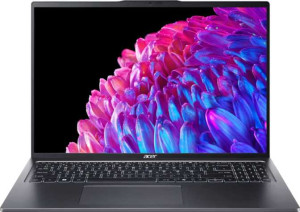
Acer Swift Go 16 16" Intel Core Ultra 9 185H 2.3GHz / 32GB RAM / 1TB SSD
Dell XPS 13 (2024) 13.4"
VS
Lenovo Yoga 7 2-in-1 14IML9 14" Intel Core Ultra 7 155H 1.4GHz / 32GB RAM / 1TB SSD
Dell XPS 13 (2024) 13.4"
VS
Lenovo Legion Pro 7i Gen 10 16" (RTX 5080 Laptop / 32GB RAM / 1TB)
Dell XPS 13 (2024) 13.4"
VS
Lenovo Yoga 7 2-in-1 14IML9 14" Intel Core Ultra 7 155H 1.4GHz / 16GB RAM / 512GB SSD
Dell XPS 13 (2024) 13.4"
VS
Microsoft Surface Laptop 7 13.8" Qualcomm Snapdragon X Elite (X1E-80-100) 3.4GHz / 32GB RAM / 1TB SSD