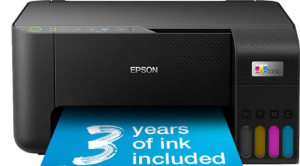
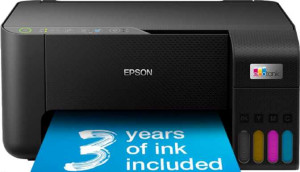
Epson EcoTank ET-2860 All-in-One specifications and in-depth review

Epson EcoTank ET-2860 All-in-One

Manufacturer: Epson

The Epson EcoTank ET-2860 All-in-One is a compact inkjet printer designed for home and small-office use, covering the three core document tasks of printing, copying, and scanning from a single device. It supports Wi-Fi, Wi-Fi Direct, AirPrint, and Mopria, making it straightforward to print wirelessly from a range of devices, and a dedicated smartphone app extends that convenience further. The unit weighs 3,900 g and fits within dimensions of 375 × 179 × 347 mm, keeping its footprint manageable on a desk or shelf.

On the print side, the ET-2860 delivers a maximum resolution of 5760 x 1440 dpi in color, with a black print speed of 33 ppm and a color print speed of 15 ppm. It ships with a single 100-sheet input tray and a 30-sheet output tray, though it does not support automatic duplex printing. The flatbed scanner does not include an ADF, duplex scanning, or scan-to-PDF functionality. Connectivity options include one USB port, while Ethernet, Bluetooth, and NFC are absent. Operating power consumption sits at 12 W, dropping to 0.7 W in standby, and the printer carries a 3-year warranty.

Pros
  • Supports Wi-Fi, Wi-Fi Direct, AirPrint, and Mopria, covering a wide range of wireless printing options
  • Black print speed of 33 ppm makes it reasonably fast for text-heavy documents
  • High print resolution of 5760 x 1440 dpi enables detailed color output
  • Comes with a dedicated smartphone app for managing print jobs remotely
  • Low standby power consumption of 0.7 W helps reduce idle energy use
  • Backed by a 3-year warranty
Cons
  • No duplex printing, so double-sided documents require manual page flipping
  • Does not support scan-to-PDF, auto scan mode, or duplex scanning, limiting its scanning versatility
  • Lacks Ethernet connectivity, restricting wired network options
  • No touch screen or page preview screen, which may make navigation less intuitive
  • Output tray holds only 30 sheets, requiring frequent unloading during larger print runs
  • No OCR support, meaning scanned documents cannot be converted into editable text
Who is this for?

This printer fits well in home or small-office settings where the primary needs are everyday printing, basic copying, and occasional flatbed scanning. Users who rely on wireless printing from phones, tablets, or laptops will benefit from the broad wireless support, including AirPrint, Mopria, and Wi-Fi Direct. The 33 ppm black print speed and dedicated smartphone app also make it a practical choice for individuals or small households that print moderate volumes of text documents on a regular basis.

Who is this NOT for?

This printer is a poor fit for users who regularly need duplex printing or duplex scanning, as neither is supported, making double-sided workflows entirely manual and time-consuming. It also falls short for anyone who requires more advanced document handling, such as scan-to-PDF, OCR for editable text output, or an ADF for multi-page scanning. Additionally, environments that demand a wired network connection via Ethernet or integration with voice assistants like Alexa or Google Assistant will find those options completely absent.

General info:

printer functions Print, Copy, Scan
feeder tray capacity 100 sheets
output tray capacity 30
Has an Automatic Document Feeder (ADF)
number of input trays 1
volume 23292.375 cm³
operating power consumption 12W
standby power consumption 0.7W
height 347 mm
thickness 179 mm
width 375 mm
Is a flatbed scanner
Has a multi-feed detection
warranty period 3 years
weight 3900 g

The Epson EcoTank ET-2860 All-in-One handles printing, copying, and scanning from a single unit, with a flatbed scanner built in. It features one input tray with a capacity of 100 sheets and an output tray that holds up to 30 sheets; there is no Automatic Document Feeder or multi-feed detection. The printer measures 375 × 179 × 347 mm and weighs 3,900 g, occupying a total volume of 23,292.375 cm³. Operating power consumption is rated at 12 W, falling to just 0.7 W in standby mode, and the unit is covered by a 3-year warranty.

Print quality:

Can print in color
Can print duplex
print resolution 5760 x 1440 dpi
black print speed 33 ppm
Is a laser printer
print speed color 15 ppm
1st copy out time - black 10 seconds
1st copy out time - color 16 seconds
Has adjustable copy density

This is an inkjet-based printer capable of producing both black and color output, reaching a maximum print resolution of 5760 x 1440 dpi. Black pages are printed at 33 ppm, while color output runs at 15 ppm; the first black copy is ready in 10 seconds and the first color copy in 16 seconds. Duplex printing is not supported, and copy density cannot be adjusted.

Scan quality:

scans documents to PDF
Has an Auto Scan Mode
Has a duplex scanning feature

The scanner does not support scan-to-PDF, auto scan mode, or duplex scanning, meaning documents can only be scanned one side at a time and saved in formats other than PDF.

Connectivity:

supports Wi-Fi
supports AirPrint
supports Wi-Fi Direct printing
supports Mopria
has an external memory slot
Has Bluetooth
supports Ethernet
works with Alexa
compatible with Google Assistant
USB ports 1
has NFC

Wireless connectivity is well covered, with support for Wi-Fi, Wi-Fi Direct, AirPrint, and Mopria, allowing the printer to be used from a range of devices without a wired network connection. A single USB port is available for direct wired connections. Ethernet, Bluetooth, and NFC are not supported, and the printer does not work with Alexa or Google Assistant. There is also no external memory slot for printing directly from a storage device.

Features:

has borderless printing
has a touch screen
Has a dedicated smartphone app
Has an Optical Character Recognition (OCR)
Has a page preview screen
Has a Skip Blank Page function
Can synchronize your documents with a USB drive
Has an answering machine

The printer includes a dedicated smartphone app as its primary software feature. It does not offer a touch screen, page preview screen, or borderless printing, and there is no skip-blank-page function. OCR is absent, so scanned documents cannot be converted to editable text. USB document synchronization and fax or answering machine functionality are also not available.

Final Verdict

The Epson EcoTank ET-2860 All-in-One is a straightforward inkjet printer that covers the essentials of printing, copying, and flatbed scanning for home or small-office users. Its broad wireless connectivity — spanning Wi-Fi, Wi-Fi Direct, AirPrint, and Mopria — alongside a solid black print speed and a 3-year warranty make it a reliable choice for everyday document tasks. That said, the absence of duplex printing, scan-to-PDF, OCR, and Ethernet means it is best suited to lighter, less demanding workflows rather than more document-intensive environments. For users whose needs align with its capabilities, the ET-2860 delivers a dependable and energy-efficient experience without unnecessary complexity.

Popular Comparisons

Epson EcoTank ET-2860 All-in-One
VS
Canon Pixma TS8750
Canon Pixma TS8750
Epson EcoTank ET-2860 All-in-One
VS
Epson EcoTank ET-2870
Epson EcoTank ET-2860 All-in-One
VS
Epson Ecotank ET-2864