Genius DX-111 specifications and in-depth review

Genius DX-111

Manufacturer: Genius

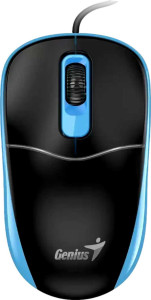
The Genius DX-111 is a no-frills productivity mouse designed for straightforward daily use. Its ambidextrous shape makes it equally suited for left- and right-handed users, and the lightweight 74 g body keeps fatigue low during extended sessions. With a compact footprint — 105 mm long, 59.6 mm wide, and 36.7 mm thick — it sits comfortably within a standard workspace without demanding much desk space.

On the technical side, the DX-111 connects via USB and operates at a 125 Hz polling rate, reporting its position to the system 125 times per second. The optical sensor runs at a fixed 1200 DPI with no adjustment option, meaning the sensitivity stays constant throughout use. The mouse offers three buttons and no side buttons, programmable inputs, or onboard memory profiles. It also omits RGB lighting, a tilting scroll wheel, and adjustable weights, keeping the design simple and functional. The attached cable measures 1.5 m in length, providing a reasonable reach for most desktop setups.

Pros
  • Ambidextrous design makes it accessible to both left- and right-handed users without any physical adjustment
  • At 74 g, the mouse is light enough to reduce hand fatigue during prolonged use
  • The 1.5 m cable provides a comfortable reach for most standard desk configurations
  • A compact footprint of 105 mm x 59.6 mm x 36.7 mm fits well on smaller desks without occupying excessive space
  • USB connectivity ensures immediate plug-and-play use without requiring software or driver setup
Cons
  • Fixed 1200 DPI with no adjustment option limits flexibility for users who need to switch sensitivity levels for different tasks
  • The 125 Hz polling rate is relatively low, resulting in less frequent position updates compared to higher-refresh input devices
  • No programmable buttons means the mouse cannot be customized to support shortcuts or workflow-specific actions
  • The absence of side buttons removes quick-access controls that many users rely on for navigation or application switching
  • Zero onboard memory profiles mean no settings can be stored on the device itself
  • No DPI or profile switching buttons further restrict on-the-fly adjustments during use
Who is this for?

This mouse is well suited for users who need a reliable, no-frills input device for everyday office and productivity tasks such as document editing, web browsing, and general navigation. Its ambidextrous design makes it a practical option for both left- and right-handed users sharing a workstation, while the lightweight 74 g body and compact dimensions reduce physical strain during extended use. The straightforward USB plug-and-play connectivity also makes it a solid fit for environments where simplicity and quick setup are prioritized, such as shared workspaces or basic desktop configurations.

Who is this NOT for?

Users who require precise, on-the-fly sensitivity control will find this mouse limiting, as the fixed 1200 DPI sensor with no adjustment capability cannot accommodate varying task demands. The 125 Hz polling rate makes it poorly suited for fast-paced or input-sensitive activities where higher update frequencies are expected. Additionally, users who rely on side buttons, programmable inputs, or onboard memory profiles for workflow customization — such as those working in creative, technical, or gaming-oriented environments — will find the feature set too restrictive for their needs.

Performance:

polling rate 125 Hz
maximum DPI 1200 DPI
minimum DPI 1200 DPI
has adjustable DPI

The Genius DX-111 operates at a fixed 1200 DPI sensitivity, with both the minimum and maximum values set at the same level, meaning the sensor offers no adjustable DPI settings. The mouse reports input at a 125 Hz polling rate, sending positional updates to the system 125 times per second. This straightforward performance profile suits users who prefer a consistent, unchanging sensitivity without the need for on-the-fly adjustments.

General info:

Type Productivity
connection type USB
onboard memory profiles 0
has gesture support

The Genius DX-111 is classified as a productivity mouse and connects to a computer via USB, making setup straightforward without the need for wireless configuration. It carries no onboard memory profiles, so no settings are stored directly on the device. Gesture support is also absent, keeping the interaction model simple and focused on standard point-and-click use.

Buttons:

number of buttons 3
number of side buttons 0
number of programmable buttons 0
has a DPI switching button
has a profile switching button

The Genius DX-111 features 3 buttons in total, with no side buttons included. None of the buttons are programmable, and the mouse lacks both a DPI switching button and a profile switching button, reflecting its straightforward, fixed-function design intended for standard everyday use.

Design:

Orientation Ambidextrous
weight 74 g
has RGB lighting
has a tilting scroll wheel
has a thumb scroll wheel
has extra weights
cable length 1.5 m
volume 229.6686 cm³
thickness 36.7 mm
height 105 mm
width 59.6 mm

The Genius DX-111 is built with an ambidextrous orientation, making it usable with either hand, and weighs 74 g across a body that measures 105 mm in height, 59.6 mm in width, and 36.7 mm in thickness, with a total volume of 229.6686 cm³. The attached cable runs 1.5 m in length, offering a reasonable reach for typical desk setups. The mouse does not include RGB lighting, a tilting scroll wheel, a thumb scroll wheel, or adjustable extra weights, keeping the physical design clean and uncomplicated.
Final Verdict

The Genius DX-111 is a straightforward productivity mouse that delivers on its core promise: simple, reliable input with minimal complexity. Its ambidextrous build and lightweight 74 g frame make it a practical choice for users who spend long hours at a desk and need a comfortable, uncomplicated pointing device. That said, the fixed DPI, limited button count, and absence of customization options mean it is firmly positioned for basic everyday use rather than specialized or demanding workflows. For users whose needs align with that scope, the DX-111 is a competent and no-nonsense tool — but those requiring greater flexibility or control should look elsewhere within their own requirements.