Genius DX-Mini specifications and in-depth review

Genius DX-Mini

Manufacturer: Genius

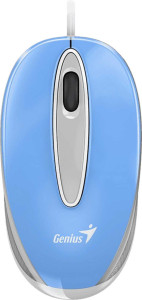
The Genius DX-Mini is a compact, ambidextrous productivity mouse designed for everyday computing tasks. Built around simplicity and ease of use, it features a symmetrical form factor that accommodates both left- and right-handed users equally well. At just 65 g, the mouse keeps things light and unobtrusive on the desk, and its RGB lighting adds a touch of visual personality despite the otherwise straightforward feature set.

On the technical side, the DX-Mini connects via USB and operates at a 125 Hz polling rate, with a fixed DPI of 1200, meaning sensitivity cannot be adjusted. It offers three buttons and no programmable inputs, side buttons, or onboard memory profiles. The cable measures 1.5 m in length, and the mouse itself has a footprint of 95 mm in height, 50.7 mm in width, and 34 mm in thickness, putting it firmly in the compact size bracket.

Pros
  • The ambidextrous design makes it suitable for both left- and right-handed users without any adaptation
  • At 65 g, the mouse is light enough for extended use without causing fatigue
  • RGB lighting adds visual customization to an otherwise minimal device
  • The 1.5 m cable provides enough reach for most standard desk setups
  • Its compact dimensions make it easy to use on smaller desk surfaces
Cons
  • DPI is fixed at 1200 and cannot be adjusted, limiting flexibility across different tasks or screen resolutions
  • The 125 Hz polling rate is on the lower end, which may result in less smooth cursor tracking during fast movements
  • With only 3 buttons and no programmable inputs, the mouse offers very limited functionality for complex workflows
  • The absence of side buttons removes quick-access shortcuts that many users rely on for productivity
  • No onboard memory means no settings can be stored on the device itself
  • The scroll wheel has no tilting function, restricting horizontal scrolling to other input methods
Who is this for?

This mouse is a solid fit for users who need a no-fuss input device for everyday computing tasks such as web browsing, document editing, or light office work. Its ambidextrous design makes it particularly well-suited for shared workspaces or users who alternate hands, and the lightweight 65 g build keeps things comfortable during long sessions at a desk. The compact dimensions also make it a practical choice for users with limited desk space or those who prefer a smaller mouse footprint.

Who is this NOT for?

Users who require precise cursor control across varying tasks will find the fixed 1200 DPI with no adjustment options to be a significant limitation. Gamers and power users who depend on fast, accurate tracking will also be held back by the 125 Hz polling rate, which lacks the responsiveness expected for fast-paced or precision-driven applications. Additionally, those who rely on programmable buttons or onboard memory profiles for complex workflows or multi-device setups will find this mouse ill-equipped for those demands.

Performance:

polling rate 125 Hz
maximum DPI 1200 DPI
minimum DPI 1200 DPI
has adjustable DPI

The Genius DX-Mini operates at a polling rate of 125 Hz, meaning it reports its position to the system 125 times per second. It runs at a fixed sensitivity of 1200 DPI, with no option to adjust this value — the minimum and maximum DPI are both set at 1200, and there is no DPI switching functionality available.

General info:

Type Productivity
connection type USB
onboard memory profiles 0
has gesture support

The Genius DX-Mini is a productivity mouse that connects to a computer via USB, offering a straightforward wired setup without any wireless complexity. It carries no onboard memory profiles, so custom settings cannot be stored directly on the device, and it does not support gesture-based input of any kind.

Buttons:

number of buttons 3
number of side buttons 0
number of programmable buttons 0
has a DPI switching button
has a profile switching button

The Genius DX-Mini features a total of 3 buttons, keeping the layout minimal and focused. There are no side buttons and no programmable buttons, which means users cannot assign custom actions to any input. The mouse also lacks both a DPI switching button and a profile switching button, reflecting its straightforward, no-frills approach to button configuration.

Design:

Orientation Ambidextrous
weight 65 g
has RGB lighting
has a tilting scroll wheel
has a thumb scroll wheel
has extra weights
cable length 1.5 m
volume 163.761 cm³
thickness 34 mm
height 95 mm
width 50.7 mm

The Genius DX-Mini is built with an ambidextrous orientation, making it equally usable for left- and right-handed users, and it weighs just 65 g without any provision for additional weights. It includes RGB lighting, adding some visual flair to an otherwise compact form. The mouse measures 95 mm in height, 50.7 mm in width, and 34 mm in thickness, with a total volume of 163.761 cm³, placing it on the smaller end of the size spectrum. Its attached cable runs 1.5 m in length, and the scroll wheel is a standard design — there is no tilting mechanism and no thumb scroll wheel included.
Final Verdict

The Genius DX-Mini is a straightforward productivity mouse that delivers exactly what its specifications promise — a simple, lightweight input device suited to everyday computing. Its ambidextrous design combined with a 65 g weight makes it genuinely comfortable for a wide range of users in shared or low-demand environments. That said, the fixed DPI, limited button count, and modest polling rate place a clear ceiling on what it can offer, making it best appreciated by users whose needs align with its no-frills feature set. For basic daily use, the DX-Mini is a functional and uncomplicated choice; for anything more demanding, its technical constraints will quickly become apparent.