Gigabyte M27UA 27" specifications and in-depth review

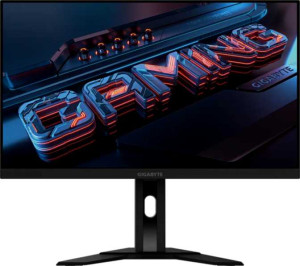
Gigabyte M27UA 27"

Manufacturer: Gigabyte

The Gigabyte M27UA is a 27-inch gaming monitor built around an IPS display with a 3840 x 2160 resolution, delivering a pixel density of 163 ppi across its LED-backlit panel. It carries a 160Hz refresh rate alongside a 1ms response time, making it a spec-forward option for users who prioritize both image clarity and motion handling. The screen includes an anti-glare coating, and while it does not feature a matte or glossy panel classification in the traditional sense, the anti-glare treatment addresses reflections in typical use environments.

On the connectivity side, the M27UA offers two HDMI 2.1 ports, one DisplayPort 1.4 output, a USB Type-C port, and a total of five USB ports, giving users a broad range of input options. AMD FreeSync adaptive sync is supported, and the display covers 128% of the sRGB color space with a brightness rating of 400 nits and a contrast ratio of 1000:1. The monitor also includes built-in stereo speakers rated at 2 x 3W, a 3.5mm audio jack, a Picture-in-Picture mode, and VESA mount compatibility, rounding out a feature set that spans both multimedia and desktop productivity use cases.

Pros
  • The 4K IPS panel with a 160Hz refresh rate and 1ms response time covers both sharp image detail and fast motion handling in a single display
  • AMD FreeSync adaptive sync support helps reduce screen tearing during gameplay
  • Wide 178-degree viewing angles both horizontally and vertically ensure consistent image quality across a broad range of seating positions
  • Two HDMI 2.1 ports and a DisplayPort 1.4 output provide flexible input options for multiple devices
  • The inclusion of five USB ports plus USB Type-C makes the monitor a practical hub for peripherals
  • VESA mount support gives users the option to wall-mount or use a third-party arm instead of the built-in stand
Cons
  • The stand does not support swivel adjustment or portrait mode rotation, limiting ergonomic flexibility
  • Color calibration is not supported, which may matter to users who need precise color accuracy
  • No Thunderbolt connectivity, which restricts use with certain high-bandwidth devices
  • Built-in speakers are limited to 2 x 3W with no support for Dolby Digital, Dolby Digital Plus, or DTS Surround
  • There is no Wi-Fi, Ethernet, or AirPlay support, making the monitor fully dependent on wired connections to source devices
Who is this for?

This monitor is well-suited to PC gamers who want a large 4K display with a fast 160Hz refresh rate and 1ms response time without sacrificing image quality. The IPS panel with 178-degree viewing angles and wide sRGB coverage also makes it a solid fit for users who do creative work alongside gaming, such as photo editing at a casual level. The generous connectivity — including two HDMI 2.1 ports, USB Type-C, and five USB ports — makes it a practical choice for multi-device setups where a variety of peripherals need to be connected simultaneously.

Who is this NOT for?

Users who require precise color calibration for professional photo, video, or graphic design work will find this monitor lacking, as factory calibration support is absent. The stand's limited ergonomics — with no swivel and no portrait mode — make it a poor fit for those who need flexible positioning or a vertical screen orientation, such as coders or writers who prefer a rotated display. Additionally, users looking for a wireless or smart display experience will be disappointed, as the monitor has no Wi-Fi, Ethernet, AirPlay, or smart TV functionality.

Display:

Display type IPS, LED-backlit, LCD
response time 1 ms
screen size 27"
resolution 3840 x 2160 px
pixel density 163 ppi
Adaptive synchronization AMD FreeSync
has anti-glare coating
refresh rate 160Hz
maximum horizontal viewing angle 178º
maximum vertical viewing angle 178º
has a matte panel
has a glossy panel
has a touch screen

The display on this monitor uses an IPS, LED-backlit LCD panel measuring 27 inches, delivering a 4K resolution of 3840 x 2160 pixels at a pixel density of 163 ppi. It runs at a 160Hz refresh rate with a 1ms response time and supports AMD FreeSync adaptive synchronization. Viewing angles reach 178 degrees both horizontally and vertically, and an anti-glare coating is present to reduce reflections. The panel is neither matte nor glossy in its classification and does not include touch screen functionality.

General info:

Type Gaming
supports total tilt
Has a swivel stand
Supports VESA mount
height 367.35 mm
width 615.11 mm
thickness 42.21 mm
weight 5870 g
supports portrait mode
volume 9537.799395285 cm³

This is a gaming-type monitor with physical dimensions of 615.11 mm wide, 367.35 mm tall, and 42.21 mm thick, with a total volume of approximately 9537.80 cm³ and a weight of 5870 g. The stand supports tilt adjustment and the monitor is compatible with VESA mounting, offering some flexibility in how it can be set up. However, it does not include a swivel stand and cannot be rotated into portrait mode.

Colors:

brightness (typical) 400 nits
supports color calibration
display colors 1070 million
contrast ratio 1000:1
sRGB coverage 128%

The display produces a wide color output of 1070 million colors and covers 128% of the sRGB color space, indicating a broad gamut relative to the standard range. Typical brightness is rated at 400 nits, and the contrast ratio stands at 1000:1. Color calibration is not supported on this monitor.

Connectivity:

HDMI ports 2
supports Thunderbolt
DisplayPort outputs 1
DisplayPort version DisplayPort 1.4
has a socket for a 3.5 mm audio jack
has a DVI connector
USB ports 5
Has USB Type-C
HDMI version HDMI 2.1
supports Ethernet
supports Wi-Fi
has AirPlay
mini DisplayPort outputs 0
has a VGA connector

The monitor offers a well-rounded set of wired inputs, including two HDMI 2.1 ports, one DisplayPort 1.4 output, a USB Type-C port, and five USB ports in total. A 3.5mm headset jack is also present for audio connectivity. There is no DVI, VGA, or mini DisplayPort connector, and the monitor does not support Thunderbolt, Ethernet, Wi-Fi, or AirPlay.

Power:

operating power consumption 34W
standby power consumption 0.5W

During normal operation, the monitor draws 34W of power, while in standby mode that figure drops to just 0.5W.

Features:

has PiP
has stereo speakers
has built-in smart TV
audio output power 2 x 3W
has a remote control
supports Dolby Digital
supports Dolby Digital Plus
has DTS Surround
has an ambient light sensor
has a front camera

The monitor includes built-in stereo speakers rated at 2 x 3W and supports Picture-in-Picture (PiP) functionality. It does not feature a remote control, ambient light sensor, or front camera, and there is no built-in smart TV platform. On the audio side, Dolby Digital, Dolby Digital Plus, and DTS Surround are all absent.
Final Verdict

The Gigabyte M27UA brings together a 4K IPS panel and a 160Hz refresh rate with 1ms response time in a package clearly aimed at gamers who want both visual clarity and motion fluency from a single display. Its broad connectivity — highlighted by dual HDMI 2.1 ports, USB Type-C, and a full array of USB ports — adds genuine day-to-day practicality beyond gaming alone. Where it falls short, particularly in stand ergonomics and the absence of color calibration, reflects the trade-offs of its gaming-focused positioning rather than fundamental oversights. For users whose primary goal is a large, fast, high-resolution display for gaming and general desktop use, the M27UA delivers a coherent and well-specified option.

Popular Comparisons

Gigabyte M27UA 27"
Gigabyte M27UA 27"
VS
Asus ROG Strix XG27UCS 27"
Gigabyte M27UA 27"
Gigabyte M27UA 27"
VS
Asus ROG Strix XG27ACS 27"
Gigabyte M27UA 27"
Gigabyte M27UA 27"
VS
Asus ROG Strix XG27UCG 27"
Gigabyte M27UA 27"
Gigabyte M27UA 27"
VS
MSI MAG 274QRFW 27"
MSI MAG 274QRFW 27"
Gigabyte M27UA 27"
Gigabyte M27UA 27"
VS
Samsung Odyssey G7 27" (G70D)