Gigabyte Z890 Aero D specifications and in-depth review

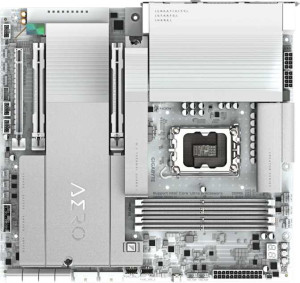
Gigabyte Z890 Aero D

Manufacturer: Gigabyte

The Gigabyte Z890 Aero D is an E-ATX motherboard designed around Intel's LGA 1851 platform and the Z890 chipset, offering a broad feature set suited to high-performance desktop builds. It includes built-in Wi-Fi 7 (802.11be) alongside Bluetooth 5.4, and supports overclocking both through its chipset and via memory profiles reaching up to 9500 MHz with compatible DDR5 kits.

On the expansion side, the board provides two PCIe 5.0 x16 slots and one PCIe x4 slot, while four M.2 sockets and eight SATA 3 connectors give ample storage flexibility, including full RAID 0, 1, 5, and 10 support. Rear connectivity includes eight USB 3.2 Gen 2 Type-A ports, dual RJ45 jacks, HDMI 2.1, one DisplayPort output, and eight fan headers, with the board backed by a three-year warranty.

Pros
  • Supports Wi-Fi 7 along with all previous generations back to Wi-Fi 4, offering broad wireless compatibility
  • Four M.2 sockets combined with eight SATA 3 connectors provide extensive storage configuration options
  • Two PCIe 5.0 x16 slots allow for high-bandwidth expansion card installations
  • DDR5 memory can be overclocked up to 9500 MHz across four slots with a maximum capacity of 256 GB
  • Eight fan headers give thorough control over system cooling layout
  • Dual RJ45 ports enable simultaneous wired network connections or link aggregation setups
Cons
  • No dual BIOS means there is no automatic fallback option if a firmware update fails
  • Lacks an easy CMOS reset mechanism, making BIOS recovery more cumbersome
  • No USB Type-C ports on the rear I/O despite having a USB Type-C header internally
  • ECC memory is not supported, limiting use in error-sensitive workloads
  • Only two analog audio connectors are present and there is no S/PDIF digital output
  • No USB 2.0, USB 4, or Thunderbolt 3 rear ports, reducing legacy and high-speed peripheral options
Who is this for?

This board is well-matched for users building high-end desktop systems who need extensive storage flexibility, given its four M.2 sockets and eight SATA 3 connectors alongside RAID 0, 1, 5, and 10 support. The E-ATX form factor and dual PCIe 5.0 x16 slots make it a strong fit for workstation-style builds that require multiple high-bandwidth expansion cards running simultaneously. Users who rely on wireless connectivity will also benefit from the full Wi-Fi 7 support and Bluetooth 5.4, while the eight fan headers suit those building thermally demanding systems that require detailed cooling control.

Who is this NOT for?

This board is a poor fit for users who need ECC memory support, such as those running error-sensitive professional workloads or server-adjacent tasks, as this feature is entirely absent. The lack of a dual BIOS and easy CMOS reset also makes it less appropriate for users who frequently experiment with BIOS settings and need a reliable recovery path. Additionally, the absence of Thunderbolt 3 and USB 4 ports means it will not satisfy users who depend on those interfaces for high-speed peripherals or external storage devices.

General info:

CPU socket LGA 1851
chipset Z890
form factor E-ATX
supports Wi-Fi
Wi-Fi version Wi-Fi 4 (802.11n), Wi-Fi 5 (802.11ac), Wi-Fi 6 (802.11ax), Wi-Fi 6E (802.11ax), Wi-Fi 7 (802.11be)
Has Bluetooth
Bluetooth version 5.4
HDMI version HDMI 2.1
Easy to overclock
has RGB lighting
Easy to reset BIOS
Has dual BIOS
has aptX
CPU sockets 1
Has integrated graphics
warranty period 3 years
height 285 mm
width 305 mm
Has integrated CPU

The Gigabyte Z890 Aero D uses an LGA 1851 CPU socket paired with the Z890 chipset and comes in the E-ATX form factor, measuring 305 mm wide and 285 mm tall. It supports overclocking and includes RGB lighting, while lacking a dual BIOS or an easy CMOS reset button. The board has a single CPU socket, no integrated CPU or graphics, and carries a three-year warranty. Wireless connectivity covers Wi-Fi 7 (802.11be) along with all previous generations back to Wi-Fi 4, complemented by Bluetooth 5.4, though aptX audio is not supported. Video output is handled through an HDMI 2.1 port.

Memory:

maximum memory amount 256GB
RAM speed (max) 6400 MHz
overclocked RAM speed 9500 MHz
memory slots 4
DDR memory version 5
memory channels 2
Supports ECC memory

The board features four DDR5 memory slots arranged in a dual-channel configuration, supporting a maximum capacity of 256 GB. Standard RAM operation tops out at 6400 MHz, while overclocked profiles can push speeds up to 9500 MHz. ECC memory is not supported.

Ports:

USB 3.2 Gen 2 ports (USB-A) 6
USB 3.2 Gen 1 ports (USB-A) 2
USB 3.2 Gen 2 ports (USB-C) 0
USB 3.2 Gen 1 ports (USB-C) 0
USB 2.0 ports 0
USB 3.2 Gen 2x2 ports 0
USB 4 20Gbps ports 0
Thunderbolt 3 ports 0
has an HDMI output
DisplayPort outputs 1
RJ45 ports 2
Has USB Type-C
eSATA ports 0
DVI outputs 0
has a VGA connector
PS/2 ports 0

The rear I/O panel provides six USB 3.2 Gen 2 Type-A ports alongside two USB 3.2 Gen 1 Type-A ports, while also including at least one USB Type-C port. There are no USB 2.0, USB 3.2 Gen 2x2, USB 4, or Thunderbolt 3 ports present. Video output is covered by one HDMI and one DisplayPort output, with no DVI or VGA connectors included. Network connectivity is handled by dual RJ45 ports, and legacy interfaces such as eSATA and PS/2 are absent.

Connectors:

USB 3.2 Gen 1 ports (through expansion) 4
USB 3.2 Gen 2x2 ports (through expansion) 1
USB 2.0 ports (through expansion) 4
SATA 3 connectors 8
fan headers 8
USB 3.0 ports (through expansion) 4
M.2 sockets 4
Has TPM connector
U.2 sockets 0
Has mSATA connector
SATA 2 connectors 0

For internal expansion, the board offers four M.2 sockets and eight SATA 3 connectors for storage, with no SATA 2, U.2, or mSATA options available. USB expansion headers cover four USB 3.2 Gen 1 ports, four USB 3.0 ports, one USB 3.2 Gen 2x2 port, and four USB 2.0 ports, providing solid flexibility for front-panel and add-in connectivity. Cooling is well catered for with eight fan headers on board, and a TPM connector is also present for security module use.

Expansion slots:

PCIe 4.0 x16 slots 0
PCIe 5.0 x16 slots 2
PCIe 3.0 x16 slots 0
PCIe x1 slots 0
PCI slots 0
PCIe 2.0 x16 slots 0
PCIe x4 slots 1
PCIe x8 slots 0

The expansion slot layout centers on two PCIe 5.0 x16 slots, making it well-suited for high-bandwidth add-in cards, alongside a single PCIe x4 slot for additional expansion needs. There are no PCIe 4.0, 3.0, 2.0, x8, or x1 slots, and no legacy PCI slots are present.

Audio:

Has S/PDIF Out port
audio connectors 2

Audio connectivity is handled through two analog audio connectors, and there is no S/PDIF digital output port included.

Storage:

Supports RAID 1
Supports RAID 10 (1+0)
Supports RAID 5
Supports RAID 0
Supports RAID 0+1

The board supports RAID 0, 1, 5, and 10 (1+0) configurations, covering a range of performance and redundancy setups. RAID 0+1 is not supported.
Final Verdict

The Gigabyte Z890 Aero D is a feature-dense E-ATX motherboard that makes a strong case for demanding desktop builds, anchored by its dual PCIe 5.0 x16 slots, extensive M.2 and SATA storage options, and full Wi-Fi 7 support. Its DDR5 memory subsystem with overclocking headroom up to 9500 MHz and eight fan headers further reinforce its positioning toward users who prioritize expandability and system control. That said, the absence of ECC support, dual BIOS, and high-speed front-facing USB connectivity are real trade-offs that narrow its appeal for certain professional or power-user scenarios. Overall, the Z890 Aero D is a well-equipped platform for enthusiast desktop builds that demand modern connectivity and broad storage flexibility, provided its limitations align with the builder's specific requirements.

Popular Comparisons

Gigabyte Z890 Aero D
VS
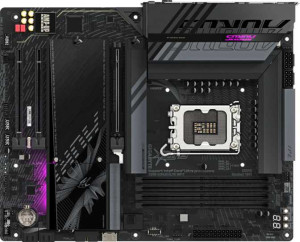
Gigabyte Z890 Aorus Elite WiFi7