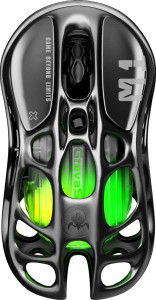
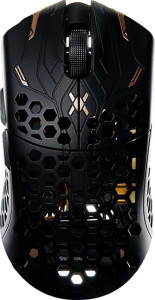
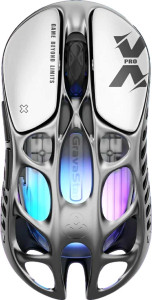
GravaStar Mercury M2 specifications and in-depth review

GravaStar Mercury M2

Manufacturer: GravaStar

The GravaStar Mercury M2 is a right-handed wireless gaming mouse built around a tri-mode connection setup, supporting 2.4GHz wireless, USB wired, and Bluetooth 5 simultaneously. At 79 g and with a compact footprint of 120 x 60 x 40 mm, it is designed with portability and extended sessions in mind. RGB lighting is included, and the mouse can be used while charging, making battery depletion less of an interruption during longer gaming sessions.

The M2 is equipped with the PixArt PAW3395 sensor, which supports a DPI range spanning from 100 to 26000, with a maximum tracking speed of 650 IPS and a maximum acceleration of 50G. The polling rate runs at 1000 Hz, and all five buttons are fully programmable, including two dedicated side buttons and a DPI switching button. Battery life is rated at 70 hours on a single charge, and connectivity over Bluetooth 5 broadens its compatibility across devices. There are no onboard memory profiles, no profile switching button, and no tilt scroll wheel or thumb scroll wheel.

Pros
  • Tri-mode connectivity via 2.4GHz wireless, USB, and Bluetooth 5 offers flexibility across different setups
  • Battery life rated at 70 hours per charge reduces the frequency of interruptions during extended use
  • The mouse can be used while charging, so a depleted battery does not force a pause in use
  • All 5 buttons are fully programmable, including 2 side buttons and a dedicated DPI switching button
  • A wide DPI range from 100 to 26000 allows precise sensitivity tuning across very different use cases
  • At 79 g, the mouse is lightweight enough for extended sessions without adding significant physical fatigue
Cons
  • No onboard memory profiles means settings cannot be stored on the device and recalled across different systems
  • The battery is not removable, so replacement requires servicing rather than a simple swap
  • No profile switching button on the mouse itself limits on-the-fly profile changes
  • Right-handed only orientation excludes left-handed users entirely
  • No tilting or thumb scroll wheel limits scrolling input options for users who rely on those features
Who is this for?

The GravaStar Mercury M2 is well suited to right-handed gamers who want the flexibility of tri-mode connectivity — switching between 2.4GHz wireless, USB, and Bluetooth 5 depending on their setup. The 70-hour battery life combined with use-while-charging support makes it a practical choice for users who game in long sessions and cannot afford downtime. The broad DPI range from 100 to 26000 and a 1000 Hz polling rate also cater to users who regularly adjust sensitivity settings across different game types, while the lightweight 79 g build suits those who prefer a less fatiguing mouse over extended periods of use.

Who is this NOT for?

Left-handed users are entirely excluded by the right-handed-only design, making this mouse unsuitable for that group regardless of other preferences. Users who rely on onboard memory profiles to carry their settings between different machines will find the lack of any profile storage a meaningful limitation. Those who prefer advanced scroll input options will also find the absence of a tilting or thumb scroll wheel restrictive, and anyone who wants to switch between configurations directly from the mouse will miss the lack of a profile switching button.

Performance:

polling rate 1000 Hz
maximum speed 650 IPS
maximum acceleration 50G
maximum DPI 26000 DPI
minimum DPI 100 DPI
has adjustable DPI

The mouse operates at a polling rate of 1000 Hz and offers an adjustable DPI range running from 100 to 26000, giving users fine-grained control over cursor sensitivity across a wide spectrum of use cases. Tracking performance is rated at a maximum speed of 650 IPS and a maximum acceleration of 50G, reflecting a sensor tuned for fast and responsive input.

General info:

Type Gaming
connection type 2.4GHz wireless, USB, Bluetooth
sensor PixArt PAW3395
onboard memory profiles 0
Bluetooth version 5
has gesture support
Battery life 70 hours
can use while charging
has a rechargeable battery
has a removable battery
warranty period 1 years

This is a gaming mouse built around the PixArt PAW3395 sensor and designed to connect via 2.4GHz wireless, USB, or Bluetooth 5, though gesture support is not included. The rechargeable battery is rated for 70 hours of use on a single charge, and the mouse can continue to be used while charging; the battery is not removable. There are no onboard memory profiles available for storing settings directly on the device. The product carries a one-year warranty.

Buttons:

number of buttons 5
number of side buttons 2
number of programmable buttons 5
has a DPI switching button
has a profile switching button

The mouse features 5 buttons in total, all of which are programmable, including 2 dedicated side buttons and a DPI switching button for on-the-fly sensitivity adjustments. A profile switching button is not present, so switching between configuration profiles cannot be done directly from the mouse itself.

Design:

Orientation Right-handed
weight 79 g
has RGB lighting
has a tilting scroll wheel
has a thumb scroll wheel
has extra weights
cable length 1.8 m
volume 288 cm³
thickness 40 mm
height 120 mm
width 60 mm

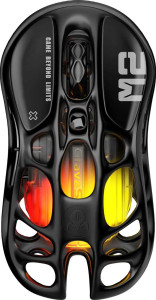
The mouse is designed exclusively for right-handed use and weighs 79 g, with dimensions of 120 mm in height, 60 mm in width, and 40 mm in thickness, giving it a volume of 288 cm³. RGB lighting is included, while a tilting scroll wheel, thumb scroll wheel, and extra swappable weights are not part of the design. A 1.8 m cable is provided for wired connection use, though no additional weights are bundled for those who prefer a heavier feel.
Final Verdict

The GravaStar Mercury M2 is a right-handed gaming mouse that builds a coherent case around flexibility and endurance, with tri-mode connectivity and a 70-hour battery life forming the core of its practical appeal. The PixArt PAW3395 sensor, wide DPI range, and 1000 Hz polling rate give it solid tracking credentials, while the lightweight 79 g build and use-while-charging support make it a reasonable companion for extended gaming sessions. Some users will find the absence of onboard memory profiles and a profile switching button limiting, and the right-handed-only design narrows its audience by default. For the right-handed gamer who values wireless versatility and long battery endurance above all, the Mercury M2 delivers a well-rounded and capable package.

Popular Comparisons

GravaStar Mercury M2
VS
Glorious Model O 2 Mini Wireless
GravaStar Mercury M2
VS
GravaStar Mercury M1 Pro
GravaStar Mercury M2
VS
Finalmouse UltralightX
GravaStar Mercury M2
VS
GravaStar Mercury X
GravaStar Mercury X
GravaStar Mercury M2
VS
GravaStar Mercury X Pro
GravaStar Mercury M2
VS
Logitech G Pro X Superlight 2
GravaStar Mercury M2
VS
Razer Viper V3 Pro
Razer Viper V3 Pro
GravaStar Mercury M2
VS
WLmouse Beast X Max
WLmouse Beast X Max