HP MC425 specifications and in-depth review

HP MC425

Manufacturer: HP

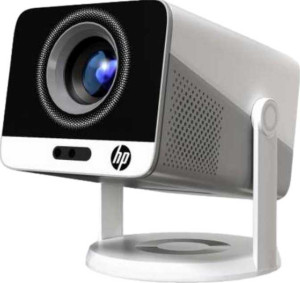
The HP MC425 is a compact projector designed for straightforward home or personal use, offering 1080p output resolution in a lightweight 1000 g chassis that measures 120 x 160 x 100 mm. It includes a dedicated smartphone app, AirPlay, and built-in smart TV functionality, making it reasonably self-contained for everyday streaming and playback needs.

Connectivity options include one HDMI port, one USB port, Bluetooth, Wi-Fi, and DLNA certification, while a 3.5 mm audio jack and a built-in mono speaker rated at 3W handle basic audio output. The projector supports a minimum throw distance of 0.7 m and can project up to 100 inches, though it relies on manual rather than motorized focus adjustments and does not support HDR10, Dolby Vision, or 3D content.

Pros
  • Supports AirPlay, Wi-Fi, and Bluetooth, allowing flexible wireless connectivity without relying on physical cables
  • Built-in smart TV removes the need for an external streaming device
  • Comes with a remote control for convenient operation from a distance
  • Can project images up to 100 inches from a minimum throw distance of just 0.7 m, suitable for smaller rooms
  • Compact and lightweight at 1000 g, making it easy to move and position
  • Includes a 3.5 mm audio jack for wired headphone or speaker output
Cons
  • No motorized or manual focus adjustment available, which limits fine-tuning of image sharpness
  • Does not support HDR10, HDR10+, Dolby Vision, or HLG, restricting the range of displayable content quality
  • Single built-in speaker at 3W with no stereo configuration, limiting audio output capability
  • No lens shift in either horizontal or vertical direction, reducing placement flexibility
  • No external memory slot, preventing direct local media playback from storage cards
  • Lacks an RJ45 port, so wired network connection is not possible
Who is this for?

The HP MC425 is well suited to casual home users who want a compact, wireless-friendly projector for everyday streaming and content playback without a complex setup. Its built-in smart TV functionality, AirPlay, and DLNA support make it a practical choice for those who prefer cable-free use, while the short minimum throw distance of 0.7 m means it can work reasonably well even in smaller living spaces or bedrooms. The dedicated smartphone app and remote control add further convenience for users who value straightforward, accessible operation.

Who is this NOT for?

This projector is not a good fit for users who require advanced image quality features such as HDR10, Dolby Vision, or HLG support, as none of these are available. Home cinema enthusiasts or those with flexible installation needs will also find the lack of lens shift and any focus adjustment mechanism limiting, since precise image alignment cannot be achieved through optical controls. Additionally, users who need robust audio output or want to play media directly from a memory card will be disappointed by the single 3W mono speaker and the absence of an external memory slot.

General info:

has laser light source
operating power consumption 55W
width 120 mm
height 100 mm
thickness 160 mm
weight 1000 g
Has a dedicated smartphone app
volume 1920 cm³

The HP MC425 has a compact physical footprint, measuring 120 mm wide, 160 mm deep, and 100 mm tall, with a total volume of 1920 cm³ and a weight of 1000 g. It runs on 55W of operating power and does not use a laser light source. A dedicated smartphone app is included, adding a layer of mobile control to the unit.

Projection quality:

output resolution 1080p
has motorized focus
displays 3D with glasses
maximum projection size 100"
has motorized zoom
supports HDR10+
bit depth 8-bit
has manual focus
minimum throw distance 0.7 m
supports Dolby Vision
supports HDR10
supports HLG

The HP MC425 delivers a 1080p output resolution at 8-bit color depth and can project images up to 100 inches in size, with a minimum throw distance of 0.7 m. Focus and zoom are both handled manually, as neither motorized focus nor motorized zoom is available. The projector does not support HDR10, HDR10+, Dolby Vision, or HLG, and 3D content displayed with glasses is not supported.

Connectivity:

HDMI ports 1
has AirPlay
Has Bluetooth
supports Wi-Fi
USB ports 1
has a VGA connector
is DLNA-certified
has a DVI connector
RJ45 ports 0
Has S/PDIF Out port

The HP MC425 offers a straightforward set of connectivity options, including Wi-Fi, Bluetooth, and AirPlay for wireless use, along with DLNA certification for network media streaming. On the wired side, there is one HDMI port and one USB port, while RJ45, VGA, DVI, and S/PDIF connections are not present.

Features:

has stereo speakers
has lens shift (vertical)
has lens shift (horizontal)
has a remote control
has built-in smart TV
has a built-in speaker
audio output power 1 x 3W
has a socket for a 3.5 mm audio jack
has Dolby Atmos
has an external memory slot
has voice commands

The HP MC425 includes built-in smart TV functionality and comes with a remote control, making it reasonably self-sufficient for everyday use without additional devices. Audio is handled by a single built-in speaker rated at 3W, and a 3.5 mm headset jack is available for wired audio output; stereo speakers and Dolby Atmos are not supported. Lens shift in either direction is absent, and there is no external memory slot or voice command capability.
Final Verdict

The HP MC425 is a compact 1080p projector that makes a reasonable case for itself among casual users looking for a simple, wireless-ready setup in a small living space. Its built-in smart TV with AirPlay and Wi-Fi support means most users can get up and running without additional hardware, and the short throw capability adds some flexibility in tighter rooms. That said, the absence of any HDR support, lens adjustment options, and meaningful audio output means it falls short for those with higher expectations around image fidelity or installation precision. As a lightweight, self-contained unit aimed at everyday streaming rather than serious home cinema use, the HP MC425 fulfills its core purpose — but users with more demanding requirements will quickly encounter its boundaries.