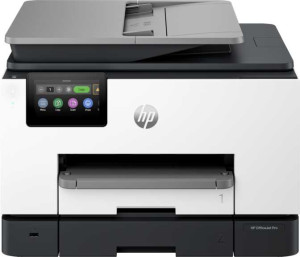
HP OfficeJet Pro 9125e All-in-One specifications and in-depth review

HP OfficeJet Pro 9125e All-in-One

Manufacturer: HP

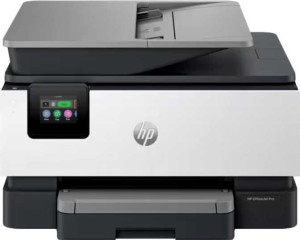
The HP OfficeJet Pro 9125e All-in-One is a color inkjet printer designed for office environments that need reliable print, copy, and scan capabilities in a single unit. It features a flatbed scanner with an Automatic Document Feeder, a 2.7-inch touchscreen for local control, and a 285-sheet input tray that keeps paper handling manageable for moderate daily workloads. A dedicated smartphone app is available, and documents can be synced directly via USB.

Print output reaches 22 ppm in black and 18 ppm in color at a maximum resolution of 4800 x 1200 dpi, with duplex printing supported and a recommended monthly volume of 1,500 pages against a maximum duty cycle of 25,000 pages. The printer holds 512MB of memory and connects via Wi-Fi 5, Wi-Fi Direct, Ethernet, or two USB ports, with AirPrint and Mopria also supported. It also includes fax capability with 100-page memory at 300 x 300 dpi, and carries a top energy efficiency rating. Bluetooth, NFC, and external memory slots are not present, and duplex scanning is not supported.

Pros
  • Duplex printing is supported, allowing automatic double-sided output without manual intervention
  • The 285-sheet input tray reduces how frequently paper needs to be refilled during longer print runs
  • AirPrint, Wi-Fi Direct, and Mopria support cover a wide range of wireless printing scenarios from different devices
  • A 2.7-inch touchscreen provides hands-on control directly at the printer without requiring a connected device
  • Fax functionality with 100-page memory is built in, useful for offices that still rely on fax communication
  • The printer holds a top energy efficiency rating, indicating low energy consumption relative to its category
Cons
  • Duplex scanning is not supported, so two-sided documents must be scanned one page at a time
  • The output tray holds only 60 sheets, which may cause interruptions during longer print jobs
  • There is no multi-feed detection, leaving the printer unable to alert users when multiple pages are pulled through simultaneously
  • OCR is not available, limiting the usefulness of scanned documents for text extraction or editing
  • Bluetooth and NFC are absent, restricting short-range wireless printing options
  • Borderless printing is not supported, which limits the printer for photo or full-bleed document output
Who is this for?

The HP OfficeJet Pro 9125e is well-suited to small or medium office environments that need a reliable all-in-one unit for everyday document workflows. Its 285-sheet input tray, duplex printing, and 1,500-page recommended monthly volume make it a practical fit for teams handling a steady flow of standard office documents. The built-in fax with 100-page memory, combined with AirPrint, Wi-Fi Direct, and Mopria support, also makes it a good match for mixed office setups where different devices and legacy communication methods are still in use. Users who want basic hands-on control will appreciate the 2.7-inch touchscreen and dedicated smartphone app for flexible management.

Who is this NOT for?

Users who regularly scan double-sided documents will find the lack of duplex scanning a significant limitation, as every reverse side must be handled manually. The 60-sheet output tray is also a constraint for anyone running longer unattended print jobs, since it will fill quickly and require frequent emptying. Those who need OCR functionality to convert scanned documents into editable or searchable text will need to look elsewhere, as this feature is absent. Similarly, creative or marketing professionals requiring borderless photo or full-bleed document output will find this printer unsuitable for that type of work.

General info:

printer functions Print, Copy, Scan
feeder tray capacity 285 sheets
output tray capacity 60
Has an Automatic Document Feeder (ADF)
number of input trays 1
volume 41588.226 cm³
standby power consumption 1.22W
height 342 mm
thickness 277 mm
width 439 mm
Is a flatbed scanner
Has a multi-feed detection
weight 9289 g

The HP OfficeJet Pro 9125e handles print, copy, and scan functions through a single-tray setup with a 285-sheet feeder capacity and a 60-sheet output tray. It includes an Automatic Document Feeder and a flatbed scanner, though multi-feed detection is not present. The unit measures 439 mm wide, 277 mm deep, and 342 mm tall, weighing approximately 9.3 kg, and draws just 1.22W in standby.

Print quality:

Can print in color
Can print duplex
print resolution 4800 x 1200 dpi
black print speed 22 ppm
Is a laser printer
print speed color 18 ppm
1st copy out time - black 10 seconds
recommended monthly prints 1500
1st copy out time - color 11 seconds
Has adjustable copy density
printer duty cycle 25000

This is an inkjet — not a laser — printer capable of both color and duplex printing, reaching 22 ppm in black and 18 ppm in color at a maximum resolution of 4800 x 1200 dpi. The first copy out time is 10 seconds for black and 11 seconds for color, and copy density is adjustable. It carries a recommended monthly volume of 1,500 pages with a maximum duty cycle of 25,000 pages, positioning it for moderate but consistent office use.

Scan quality:

scans documents to PDF
Has an Auto Scan Mode
Has a duplex scanning feature

The scanner supports direct-to-PDF output, making it straightforward to digitise and save documents in a widely compatible format. However, it does not offer an Auto Scan Mode or duplex scanning, meaning double-sided documents must be scanned one side at a time manually.

Connectivity:

supports Wi-Fi
supports AirPrint
supports Wi-Fi Direct printing
supports Mopria
has an external memory slot
Has Bluetooth
supports Ethernet
Wi-Fi version Wi-Fi 5 (802.11ac), Wi-Fi 4 (802.11n)
works with Alexa
compatible with Google Assistant
USB ports 2
has NFC
USB-C ports 0

The printer connects over Wi-Fi 5 (802.11ac) and Wi-Fi 4 (802.11n), with Ethernet also available for wired network setups. It supports AirPrint, Wi-Fi Direct printing, and Mopria, covering a range of wireless printing scenarios from mobile devices. Two standard USB ports are present, though there are no USB-C ports and no external memory slot. Bluetooth and NFC are not supported, and the printer has no compatibility with Alexa or Google Assistant.

Features:

has borderless printing
screen size 2.7"
has a touch screen
maximum print memory 512MB
Has a dedicated smartphone app
Has an Optical Character Recognition (OCR)
Has a page preview screen
printer memory 512MB
Has a Skip Blank Page function
Can synchronize your documents with a USB drive
Has an answering machine
fax page memory 100
fax resolution 300 x 300 dpi

The printer features a 2.7-inch touchscreen for local navigation and a dedicated smartphone app for remote management, though there is no page preview screen. It holds 512MB of memory and supports document synchronisation with a USB drive. Fax functionality is included with a 100-page memory capacity and a resolution of 300 x 300 dpi, though there is no answering machine. Borderless printing, OCR, and skip blank page functions are not available.

Miscellaneous:

has top energy efficiency rating

The HP OfficeJet Pro 9125e carries a top energy efficiency rating, indicating it meets the highest tier of energy consumption standards for its category.

Final Verdict

The HP OfficeJet Pro 9125e All-in-One is a well-rounded office printer that covers the core bases for small to medium workplaces — print, copy, scan, and fax — with a solid feature set built around duplex printing, broad wireless connectivity, and a 285-sheet input capacity. Its top energy efficiency rating and 25,000-page duty cycle point to a unit designed for consistent daily use rather than occasional light tasks. That said, the absence of duplex scanning and OCR does narrow its appeal for document-heavy workflows where those capabilities matter. For offices with standard document printing and communication needs, the 9125e represents a dependable and functionally complete solution.

Popular Comparisons

HP OfficeJet Pro 9125e All-in-One
VS
HP OfficeJet Pro 8139e All-in-One
HP OfficeJet Pro 9125e All-in-One
VS
HP OfficeJet Pro 8122e All-in-One
HP OfficeJet Pro 9125e All-in-One
VS
HP OfficeJet Pro 8132e All-in-One
HP OfficeJet Pro 9125e All-in-One
VS
HP OfficeJet Pro 9135e All-in-One