Huion Kamvas 13 (Gen 3) specifications and in-depth review

Huion Kamvas 13 (Gen 3)

Manufacturer: Huion

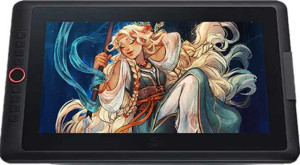
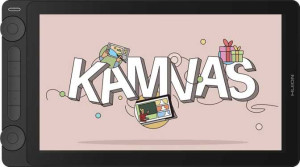
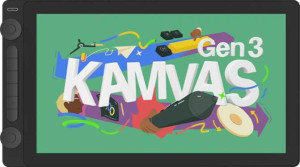
The Huion Kamvas 13 (Gen 3) is a pen display drawing tablet designed for use with Windows, Mac, and Chromebook systems. It features a 13.3-inch screen and comes with a stylus, pen stand, and fold-out legs included in the box. The tablet has a 293 x 165 mm² active drawing area and weighs 865 g, with a slim 11 mm profile that keeps the overall footprint compact. A detachable cable adds convenience, though wireless use is not supported.

The display outputs at 1920 x 1080 px with a pixel density of 166 ppi, a contrast ratio of 1000:1, and a typical brightness of 200 nits. Viewing angles reach 178° both horizontally and vertically. On the pen side, the included stylus delivers 16384 pressure levels, a resolution of 5080 LPI, a report rate of 260 RPS, and tilt sensitivity up to 60° with 3 buttons on the pen itself. Connectivity is handled through a single USB 3.2 Gen 1 USB-C port, and the tablet includes 5 physical buttons along its body.

Pros
  • The pen supports 16384 pressure levels and a tilt capacity of 60°, giving precise control over stroke weight and angle
  • Fold-out legs are built into the unit, allowing for an angled working position without needing a separate stand
  • The cable is detachable, which reduces wear on the port over time and makes storage or replacement more straightforward
  • A pen stand is included in the box, providing a dedicated resting place for the stylus
  • Wide 178° viewing angles both horizontally and vertically mean the screen stays readable across a broad range of positions
  • The slim 11 mm thickness and moderate weight of 865 g make it reasonably easy to move between workspaces
Cons
  • Resolution of 1920 x 1080 px on a 13.3-inch screen results in a pixel density of only 166 ppi, which may show visible pixelation on fine linework
  • Typical brightness of 200 nits is relatively low and may make the display harder to see in well-lit environments
  • Anti-reflection coating is absent, which can cause glare issues when working near windows or under overhead lighting
  • Connectivity is limited to a single USB 3.2 Gen 1 USB-C port with no HDMI, DisplayPort, or additional USB ports available
  • Wireless use is not supported, so the tablet always requires a physical cable connection
  • No travel bag is included, offering no built-in solution for transporting or protecting the device
Who is this for?

This pen display is well suited to illustrators, digital artists, and designers who work at a desk and need a dedicated screen for drawing. The 16384 pressure levels combined with 60° tilt sensitivity make it a capable tool for those who rely on nuanced brush and pen strokes, while the built-in fold-out legs and included pen stand add practical convenience for a stationary setup. Users who work across Windows, Mac, and Chromebook environments will appreciate the broad system compatibility, and the detachable cable makes desk management and storage noticeably easier.

Who is this NOT for?

This tablet is less suited to users who need a highly portable or travel-ready setup, as there is no wireless capability and no travel bag is included, making on-the-go use cumbersome. Those who work in bright or high-ambient-light environments may find the 200-nit brightness and lack of anti-reflection coating limiting, as glare and visibility can become a real issue. Additionally, professionals who require a sharp, high-density display for fine detail work — such as pixel-level illustration or print-resolution design — may find the 166 ppi pixel density and 1920 x 1080 resolution on a 13.3-inch panel insufficient for their needs.

General info:

Type Pen display
Compatibility Chromebook, Windows, Mac
Has a display
active drawing area 293 x 165 mm²
number of tablet buttons 5
Can be used wirelessly
volume 802.142 cm³
has a socket for a 3.5 mm audio jack
has fold-out legs
pen stand included
has a detachable cable
weight 865 g
width 361 mm
thickness 11 mm
height 202 mm
travel bag is included
number of microphones 0
Stylus included

The Huion Kamvas 13 (Gen 3) is a pen display tablet compatible with Chromebook, Windows, and Mac systems. Its active drawing area measures 293 x 165 mm², and the unit itself is 361 mm wide, 202 mm tall, and just 11 mm thick, with a total volume of 802.142 cm³ and a weight of 865 g. The tablet includes a stylus and pen stand, features fold-out legs for angled positioning, and has a detachable cable for easier handling. Five physical buttons are built into the body, while wireless use, a 3.5 mm audio jack, microphones, and a travel bag are not part of the package.

Display:

screen size 13.3"
resolution 1920 x 1080 px
pixel density 166 ppi
response time 25 ms
has anti-reflection coating
maximum horizontal viewing angle 178º
maximum vertical viewing angle 178º
brightness (typical) 200 nits
contrast ratio 1000:1

The display on this tablet measures 13.3″ and renders at 1920 x 1080 px, resulting in a pixel density of 166 ppi. Brightness is rated at a typical 200 nits, with a contrast ratio of 1000:1 and a response time of 25 ms. Both the horizontal and vertical viewing angles reach 178°, allowing the image to remain visible from nearly any position. Anti-reflection coating is not included on this model.

Pen:

pen pressure levels 16384
pen resolution 5080 LPI
report rate 260 RPS
Has tilt sensitivity
pen tilt capacity 60°
number of pen buttons 3

The included stylus offers 16384 levels of pressure sensitivity alongside a resolution of 5080 LPI and a report rate of 260 RPS. Tilt sensitivity is supported, with a tilt capacity of up to 60°, allowing for more nuanced stroke control based on pen angle. The pen itself has 3 buttons for additional input options during use.

Connectivity:

HDMI ports 0
DisplayPort outputs 0
Has Bluetooth
USB 3.2 Gen 2 ports (USB-A) 0
USB 3.2 Gen 2 ports (USB-C) 0
USB 3.2 Gen 1 ports (USB-C) 1
USB 3.2 Gen 1 ports (USB-A) 0
USB 2.0 ports 0
mini DisplayPort outputs 0

Connectivity on this tablet is handled through a single USB 3.2 Gen 1 USB-C port, which serves as the sole physical connection option. There are no HDMI ports, DisplayPort or mini DisplayPort outputs, USB-A ports of any generation, or USB 2.0 ports. Bluetooth is also not built in, making wired USB-C the only supported connection method.
Final Verdict

The Huion Kamvas 13 (Gen 3) is a competent pen display for desktop-based digital artists who want a dedicated drawing surface with responsive, expressive input. Its 16384 levels of pressure sensitivity and 60° tilt support give it a strong foundation for illustration and design work, and practical touches like fold-out legs, a detachable cable, and broad system compatibility make it a well-rounded workstation companion. That said, its display brightness, pixel density, and wired-only connectivity mean it is best suited to controlled indoor environments rather than mobile or demanding professional workflows. For artists seeking a reliable, feature-complete pen display for everyday creative work at a fixed desk, the Kamvas 13 Gen 3 delivers where it counts most.

Popular Comparisons

Huion Kamvas 13 (Gen 3)
VS
Huion Kamvas 16 (Gen 3)
Huion Kamvas 13 (Gen 3)
VS
XP-Pen Artist 15.6 Pro V2
Huion Kamvas 13 (Gen 3)
VS
Wacom Movink 13
Wacom Movink 13