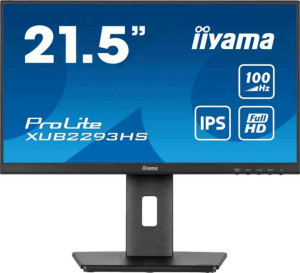
iiyama Prolite XUB2293HS-B6 22" specifications and in-depth review

iiyama Prolite XUB2293HS-B6 22"

Manufacturer: iiyama

The iiyama Prolite XUB2293HS-B6 is a 21.5-inch standard desktop monitor built on an IPS LCD panel with LED backlighting, designed to serve general productivity and everyday computing needs. One of its more practical attributes is its fully adjustable stand, which supports tilt, swivel, and portrait mode rotation — giving users meaningful flexibility in how they position and orient the screen. The matte, anti-glare surface helps keep reflections manageable in typical office or home environments, and VESA mount compatibility means the stand can be swapped out entirely if preferred.

The panel runs at a 100Hz refresh rate with a 1ms response time and resolves at 1920x1080, producing a pixel density of 102 ppi across the 21.5-inch screen. Color output covers 96% of the sRGB color space across 16.7 million colors, with a typical brightness of 300 nits and a contrast ratio of 1000:1. Connectivity includes one HDMI 1.4 port, one DisplayPort 1.2 output, a USB Type-C port, and a 3.5mm headset jack, though there are no USB-A ports, no Thunderbolt support, and no network connectivity of any kind. Built-in stereo speakers rated at 2x2W are included, and power draw sits at 17W during operation and 0.5W in standby.

Pros
  • The stand supports tilt, swivel, and portrait mode rotation, offering a genuinely flexible ergonomic range for a monitor in this category
  • VESA mount compatibility allows the stand to be replaced with a third-party arm or wall bracket for further positioning flexibility
  • The IPS panel delivers 178-degree viewing angles both horizontally and vertically, keeping image quality consistent across a wide range of positions
  • A 100Hz refresh rate combined with a 1ms response time handles fast-moving content smoothly for everyday and casual use
  • USB Type-C is included alongside HDMI 1.4 and DisplayPort 1.2, broadening source device compatibility without adapters
  • Operating power draw is rated at just 17W, reflecting an efficient energy profile for a 21.5-inch display
Cons
  • No adaptive synchronization technology is supported, which can lead to screen tearing during variable frame rate content
  • Color calibration is not supported, limiting the monitor's suitability for workflows that require hardware-level color profiling
  • There are no USB-A ports whatsoever, meaning the monitor cannot function as a peripheral hub for connected devices
  • The absence of Ethernet, Wi-Fi, and AirPlay leaves the monitor with no network connectivity options of any kind
  • Picture-in-Picture is not available, restricting multisource display flexibility for users who work with multiple inputs simultaneously
Who is this for?

The iiyama Prolite XUB2293HS-B6 is well-suited to office and home desktop users who prioritize ergonomic flexibility alongside a clean, functional display. The stand's support for tilt, swivel, and portrait mode makes it a practical fit for users who frequently adjust their screen orientation or share a workspace, while the IPS panel with 178-degree viewing angles ensures the image remains consistent regardless of seating position. Those connecting a mix of source devices will appreciate the inclusion of USB Type-C alongside HDMI and DisplayPort inputs, and users who want to free up desk space can take advantage of VESA mount compatibility to mount the screen on an arm or wall bracket.

Who is this NOT for?

This monitor is not well-matched for users who need smooth, tear-free visuals in variable frame rate scenarios, as no adaptive synchronization technology is available. Color-critical professionals — including photographers, video editors, or designers who require hardware-level profiling — will find the lack of color calibration support a meaningful barrier. Users who rely on their monitor as a peripheral hub will also be disappointed, given the complete absence of USB-A ports, leaving no option to connect keyboards, drives, or other standard USB devices directly through the display. Those seeking immersive audio from built-in speakers should look elsewhere, as the 2x2W stereo output with no surround sound support is suited only to casual, low-volume listening.

Display:

Display type IPS, LCD, LED-backlit
response time 1 ms
screen size 21.5"
resolution 1920 x 1080 px
pixel density 102 ppi
Adaptive synchronization None
has anti-glare coating
refresh rate 100Hz
maximum horizontal viewing angle 178º
maximum vertical viewing angle 178º
has a matte panel
has a glossy panel
has a touch screen

Built on an IPS LCD panel with LED backlighting, the 21.5-inch display resolves at 1920x1080 with a pixel density of 102 ppi. It refreshes at 100Hz with a 1ms response time, making it capable of rendering fast motion with minimal blur, though no adaptive synchronization technology is on offer. The matte, anti-glare surface keeps reflections under control without the use of a glossy finish, and touch input is not supported. Viewing angles extend to 178 degrees both horizontally and vertically, ensuring the image stays consistent when viewed from off-axis positions.

General info:

Type Standard
EU energy label E
supports total tilt
Has a swivel stand
Supports VESA mount
height 286.5 mm
width 492 mm
thickness 45 mm
weight 3900 g
supports portrait mode
volume 6343.11 cm³

The XUB2293HS-B6 is a standard-type monitor with a physical footprint of 492mm wide, 286.5mm tall, and 45mm thick, weighing 3,900 grams. Its stand offers a notably flexible ergonomic range, supporting tilt, swivel, and portrait mode rotation, which gives users considerable freedom in adjusting the screen to suit their workspace. VESA mount compatibility is also included for those who prefer a third-party arm or wall bracket. The monitor carries an EU energy label of E.

Colors:

brightness (typical) 300 nits
supports color calibration
display colors 16.7 million
contrast ratio 1000:1
sRGB coverage 96%

The display renders 16.7 million colors at a typical brightness of 300 nits, with a contrast ratio of 1000:1 providing a reasonable degree of depth between light and dark areas. sRGB coverage reaches 96%, which supports consistent color representation for general productivity and content consumption within that color space. Hardware color calibration is not supported, making this panel better suited to standard use than to workflows that demand precise, profiled color output.

Connectivity:

HDMI ports 1
supports Thunderbolt
DisplayPort outputs 1
DisplayPort version DisplayPort 1.2
has a socket for a 3.5 mm audio jack
has a DVI connector
USB ports 0
Has USB Type-C
HDMI version HDMI 1.4
supports Ethernet
supports Wi-Fi
has AirPlay
mini DisplayPort outputs 0
has a VGA connector

Video input options consist of one HDMI 1.4 port, one DisplayPort 1.2 output, and a USB Type-C connection, covering a reasonable range of source devices without requiring adapters in most standard setups. A 3.5mm headset jack is also present for audio output. There are no USB-A ports, no Thunderbolt support, and no DVI or VGA connectors available. Network connectivity is absent entirely, with no Ethernet, Wi-Fi, or AirPlay functionality included.

Power:

operating power consumption 17W
standby power consumption 0.5W

The XUB2293HS-B6 consumes 17W during normal operation and drops to just 0.5W in standby, reflecting a modest and efficient power draw for a 21.5-inch desktop monitor.

Features:

has PiP
has stereo speakers
has built-in smart TV
audio output power 2 x 2W
has a remote control
supports Dolby Digital
supports Dolby Digital Plus
has DTS Surround
has an ambient light sensor
has a front camera

The monitor comes with built-in stereo speakers delivering 2x2W of audio output, offering a basic sound solution without the need for external speakers. There is no support for Dolby Digital, Dolby Digital Plus, or DTS Surround, and no remote control is included. Additional features such as Picture-in-Picture, an ambient light sensor, a front camera, and smart TV functionality are all absent from this model.

Final Verdict

The iiyama Prolite XUB2293HS-B6 makes a coherent case for itself as a dependable standard desktop monitor aimed at everyday productivity and general-purpose use. Its most distinguishing characteristic is the stand's full ergonomic range — tilt, swivel, and portrait mode — which sets it apart from more basic fixed-stand alternatives at this screen size and gives users genuine freedom in how they arrange their workspace. The IPS panel, 100Hz refresh rate, and 96% sRGB coverage round out a specification set that is honest and well-matched to its intended audience. Where it concedes ground — in peripheral connectivity depth, color calibration, and the absence of adaptive sync — those trade-offs are consistent with a monitor designed for simplicity and everyday reliability rather than specialized or demanding workloads. For users whose needs align with that scope, the XUB2293HS-B6 delivers a well-considered and ergonomically capable display solution.