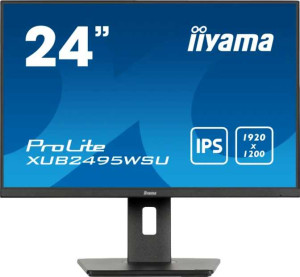
iiyama Prolite XUB2495WSU-B7 24" specifications and in-depth review

iiyama Prolite XUB2495WSU-B7 24"

Manufacturer: iiyama

The iiyama Prolite XUB2495WSU-B7 is a 24-inch standard desktop monitor built around an IPS panel with LED backlighting. Designed with office and professional workflows in mind, it features a 1920 x 1200 pixel resolution at a pixel density of 93 ppi, giving it slightly more vertical screen real estate than a typical 1080p display. The matte, anti-glare panel surface helps reduce reflections in typical indoor working environments, and the stand supports tilt, swivel, height adjustment, and portrait rotation for flexible positioning.

On the display side, the panel delivers a brightness of 300 nits, a contrast ratio of 1000:1, and 99% sRGB color coverage across 16.7 million colors, with wide viewing angles of 178 degrees both horizontally and vertically. Connectivity options include one HDMI 1.4 port, one DisplayPort 1.2 output, and a USB Type-C port alongside four USB 3.1 ports, plus a 3.5 mm audio jack. The monitor also integrates stereo speakers rated at 2 x 2W. Power consumption sits at 17W during operation and drops to 0.5W in standby, and the display supports VESA mounting for alternative installation setups.

Pros
  • The stand supports tilt, swivel, height adjustment, and portrait mode rotation, offering solid ergonomic flexibility for different workstation setups
  • A resolution of 1920 x 1200 pixels provides more vertical screen space than a standard 1080p panel, which is useful for document-heavy or productivity-focused work
  • 99% sRGB color coverage makes the display well-suited for tasks requiring consistent color accuracy within that color space
  • Four USB 3.1 ports including a USB Type-C connection allow multiple peripherals to be connected directly through the monitor
  • The matte, anti-glare panel surface helps manage reflections under typical indoor lighting conditions
  • VESA mount support gives the option to use third-party monitor arms or wall mounts instead of the included stand
Cons
  • No adaptive synchronization support limits the display's suitability for gaming or fast-motion content
  • The HDMI port is limited to version 1.4, which has lower bandwidth compared to more current HDMI standards
  • Hardware color calibration is not supported, which restricts accuracy workflows that require profiling the display
  • The EU energy label rating of D indicates relatively lower energy efficiency within its class
  • Built-in speakers are limited to 2 x 2W with no support for Dolby Digital, Dolby Digital Plus, or DTS Surround, making them suitable only for basic audio needs
Who is this for?

This monitor is a solid fit for office and productivity-oriented users who spend long hours working with documents, spreadsheets, or web-based tools, as the 1920 x 1200 resolution provides more vertical space than a standard 1080p display. The 99% sRGB coverage and matte anti-glare panel also make it appropriate for color-sensitive work within the sRGB gamut, such as graphic design or photo editing at a non-professional level. Users who value ergonomic flexibility will benefit from the stand's full range of adjustments, including portrait mode, making it equally practical for developers or writers who prefer a vertical screen orientation.

Who is this NOT for?

This display is not well-suited for gaming or high-motion use cases, as it lacks adaptive synchronization support and is limited to a 75Hz refresh rate, which may result in screen tearing or less fluid motion during fast-paced content. Users requiring professional-grade color accuracy beyond the sRGB color space — such as those working in print, video production, or wide-gamut workflows — will find the absence of hardware calibration support and coverage data for other color spaces a notable limitation. Additionally, the HDMI 1.4 port makes it a poor match for users who rely on high-bandwidth HDMI connections from modern source devices.

Display:

Display type IPS, LCD, LED-backlit
response time 4 ms
screen size 24"
resolution 1920 x 1200 px
pixel density 93 ppi
Adaptive synchronization None
has anti-glare coating
refresh rate 75Hz
maximum horizontal viewing angle 178º
maximum vertical viewing angle 178º
has a matte panel
has a glossy panel
has a touch screen

The iiyama Prolite XUB2495WSU-B7 uses an IPS LCD panel with LED backlighting, measuring 24 inches and delivering a resolution of 1920 x 1200 pixels at a pixel density of 93 ppi. It has a refresh rate of 75Hz and a response time of 4 ms, with no adaptive synchronization technology supported. Both horizontal and vertical viewing angles reach 178 degrees, and the panel features a matte, anti-glare coating — it is not a glossy or touch-enabled display.

General info:

Type Standard
EU energy label D
supports total tilt
Has a swivel stand
Supports VESA mount
height 371 mm
width 533 mm
thickness 209 mm
weight 5100 g
supports portrait mode
volume 41328.287 cm³

This is a standard-type monitor with an EU energy label of D, measuring 533 mm wide, 371 mm tall, and 209 mm deep, with a total weight of 5100 g. The stand offers tilt, swivel, and portrait mode support, giving users a reasonable degree of ergonomic flexibility in how they position the screen. It also supports VESA mounting, allowing the display to be attached to compatible third-party arms or wall mounts.

Colors:

brightness (typical) 300 nits
supports color calibration
display colors 16.7 million
contrast ratio 1000:1
sRGB coverage 99%

The display produces 16.7 million colors with a typical brightness of 300 nits and a contrast ratio of 1000:1. It covers 99% of the sRGB color space, making it well-suited for work that relies on consistent and accurate color representation within that gamut. Hardware color calibration is not supported on this monitor.

Connectivity:

HDMI ports 1
supports Thunderbolt
DisplayPort outputs 1
DisplayPort version DisplayPort 1.2
has a socket for a 3.5 mm audio jack
has a DVI connector
USB ports 4
USB version 3.1
Has USB Type-C
HDMI version HDMI 1.4
supports Ethernet
supports Wi-Fi
has AirPlay
mini DisplayPort outputs 0
has a VGA connector

The monitor provides one HDMI 1.4 port and one DisplayPort 1.2 output for video input, with no VGA, DVI, mini DisplayPort, or Thunderbolt connectivity. On the USB side, there are four USB 3.1 ports including a USB Type-C connector, making it straightforward to connect peripherals directly through the display. A 3.5 mm audio jack is also present for headset or speaker use. Wireless options such as Wi-Fi, Ethernet, and AirPlay are not supported.

Power:

operating power consumption 17W
standby power consumption 0.5W

During normal operation, the monitor draws 17W of power, while standby consumption drops to a minimal 0.5W.

Features:

has PiP
has stereo speakers
has built-in smart TV
audio output power 2 x 2W
has a remote control
supports Dolby Digital
supports Dolby Digital Plus
has DTS Surround
has an ambient light sensor
has a front camera

The monitor includes built-in stereo speakers rated at 2 x 2W, providing basic audio output without the need for external speakers. It does not support Dolby Digital, Dolby Digital Plus, or DTS Surround audio formats. There is no PiP functionality, no ambient light sensor, no front camera, no remote control, and no built-in smart TV platform.

Final Verdict

The iiyama Prolite XUB2495WSU-B7 is a well-rounded productivity monitor that brings together a useful set of specifications for office and professional desktop use. Its 1920 x 1200 IPS panel with 99% sRGB coverage makes it a dependable choice for users who need accurate, consistent color rendering in day-to-day work, while the fully adjustable stand — supporting tilt, swivel, and portrait mode — adds a level of ergonomic practicality that suits long working sessions. The connectivity options, including USB Type-C and four USB 3.1 ports, add genuine desk utility. Where it falls short is in areas like adaptive sync support and hardware calibration, which place it outside the scope of gaming or advanced color-critical workflows. Overall, the XUB2495WSU-B7 is a thoughtfully specified display for productivity-focused users who prioritize screen real estate, ergonomics, and color consistency over high-refresh-rate performance.