iiyama Prolite XUB2793HS-B7 27" specifications and in-depth review

iiyama Prolite XUB2793HS-B7 27"

Manufacturer: iiyama

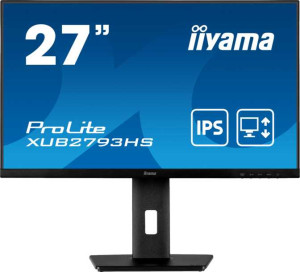
The iiyama Prolite XUB2793HS-B7 is a 27-inch standard desktop monitor built around an IPS panel with LED backlighting. It offers 178-degree horizontal and vertical viewing angles, a matte, anti-glare surface, and a fully adjustable stand that supports tilt, swivel, height adjustment, and portrait mode rotation — giving users considerable flexibility in how they set up their workspace.

Running at a 100Hz refresh rate with a 1ms response time, the display outputs a 1920x1080 resolution at 81 ppi with a contrast ratio of 1300:1 and a typical brightness of 300 nits, reproducing up to 16.7 million colors. Connectivity includes one HDMI 1.4 port, one DisplayPort 1.2 output, and a 3.5mm audio jack, while built-in stereo speakers deliver 2x2W of audio output. The monitor draws 22W during normal operation and drops to just 0.5W in standby, and it supports VESA mounting for those who prefer a third-party arm or wall bracket.

Pros
  • The stand supports tilt, swivel, height adjustment, and portrait mode rotation, offering a wide range of ergonomic positioning options
  • Wide 178-degree viewing angles both horizontally and vertically ensure consistent image quality across a broad range of viewing positions
  • The matte panel with anti-glare coating helps reduce reflections in bright environments
  • VESA mount support allows the monitor to be used with third-party arms or wall brackets
  • Standby power consumption of just 0.5W keeps idle energy draw very low
  • Built-in stereo speakers eliminate the immediate need for external audio equipment
Cons
  • No USB ports of any kind are available, limiting peripheral connectivity directly through the monitor
  • The 1920x1080 resolution at 27 inches results in a relatively low pixel density of 81 ppi, which may be noticeable at close viewing distances
  • Color calibration is not supported, which may be a limitation for color-sensitive work
  • Only a single HDMI port is provided, and it is version 1.4, which restricts bandwidth for users with multiple devices
  • There is no USB-C connectivity, which limits compatibility with modern laptops and devices that rely on that interface
Who is this for?

This monitor is a solid fit for everyday office and productivity use, where its ergonomic stand with tilt, swivel, and portrait mode support allows users to configure the display to suit their working style over long sessions. The matte, anti-glare panel makes it practical for well-lit office environments where reflections are a common concern. Users who occasionally connect a single PC or laptop via HDMI or DisplayPort and need a reliable, no-frills 27-inch screen for document work, web browsing, or general desktop tasks will find the feature set adequate for those purposes. The VESA mount support also makes it a reasonable option for those setting up a multi-arm desk arrangement.

Who is this NOT for?

Users involved in color-critical work such as photo editing or graphic design will find this monitor limiting, as it lacks color calibration support and tops out at 81 ppi — a pixel density that may feel visibly coarse on a 27-inch panel at typical desk distances. Those looking for a modern, versatile connectivity setup will also run into friction, as there are no USB ports, no USB-C, and only a single HDMI 1.4 input, which restricts use with multiple sources or newer devices. Additionally, users interested in competitive or fast-paced gaming may find the 100Hz refresh rate and the absence of adaptive sync mentions in the specs insufficient compared to displays purpose-built for that use case.

Display:

Display type IPS, LCD, LED-backlit
response time 1 ms
screen size 27"
resolution 1920 x 1080 px
pixel density 81 ppi
has anti-glare coating
refresh rate 100Hz
maximum horizontal viewing angle 178º
maximum vertical viewing angle 178º
has a matte panel
has a glossy panel
has a touch screen

The display uses an IPS LCD panel with LED backlighting, spanning 27 inches at a 1920x1080 pixel resolution and a pixel density of 81 ppi. It runs at a 100Hz refresh rate with a 1ms response time, making for a reasonably fluid viewing experience in everyday use. Both the horizontal and vertical viewing angles reach 178 degrees, and the panel comes with a matte, anti-glare coating — there is no glossy finish, and touch input is not supported.

General info:

Type Standard
supports total tilt
Has a swivel stand
Supports VESA mount
height 435 mm
width 611 mm
thickness 189 mm
weight 5400 g
supports portrait mode
volume 50233.365 cm³

This is a standard-type monitor measuring 611 mm wide, 435 mm tall, and 189 mm deep, with a total weight of 5400 g. The stand offers a solid range of ergonomic adjustments, including tilt, swivel, and portrait mode rotation, allowing the screen to be repositioned to suit different working preferences. It also supports VESA mounting, making it compatible with third-party arms and wall brackets for those who prefer an alternative to the included stand.

Colors:

brightness (typical) 300 nits
supports color calibration
display colors 16.7 million
contrast ratio 1300:1

The display reproduces 16.7 million colors with a typical brightness of 300 nits and a contrast ratio of 1300:1, providing a reasonable depth between light and dark areas of the image. Color calibration is not supported on this monitor.

Connectivity:

HDMI ports 1
supports Thunderbolt
DisplayPort outputs 1
DisplayPort version DisplayPort 1.2
has a socket for a 3.5 mm audio jack
has a DVI connector
USB ports 0
Has USB Type-C
HDMI version HDMI 1.4
supports Ethernet
supports Wi-Fi
has AirPlay
mini DisplayPort outputs 0
has a VGA connector

For video input, the monitor offers one HDMI 1.4 port and one DisplayPort 1.2 output, covering the most common wired connection types for desktop use. A 3.5mm audio jack is also present for headset or speaker output. There are no USB ports of any kind, including no USB Type-C, and the monitor does not include a DVI or VGA connector. Wireless connectivity is absent entirely — Wi-Fi, Ethernet, AirPlay, and Thunderbolt are all unsupported.

Power:

operating power consumption 22W
standby power consumption 0.5W

The monitor draws 22W during normal operation and drops to just 0.5W in standby mode, reflecting a modest power footprint for a 27-inch display.

Features:

has PiP
has stereo speakers
has built-in smart TV
audio output power 2 x 2W
has a remote control
supports Dolby Digital
supports Dolby Digital Plus
has DTS Surround
has an ambient light sensor
has a front camera

The monitor includes built-in stereo speakers with a combined output of 2x2W, providing basic audio without the need for external speakers. Beyond that, the feature set is fairly minimal — there is no PiP support, no remote control, no ambient light sensor, and no front camera. Audio enhancements such as Dolby Digital, Dolby Digital Plus, and DTS Surround are not supported, and the monitor does not function as a smart TV.
Final Verdict

The iiyama Prolite XUB2793HS-B7 is a straightforward 27-inch IPS monitor that delivers where it counts for everyday desktop use — its fully adjustable ergonomic stand with tilt, swivel, and portrait rotation combined with wide 178-degree viewing angles and a practical matte, anti-glare panel make it a genuinely comfortable display for long working sessions in typical office conditions. Connectivity is lean and the 1080p resolution sits at the lower end of pixel density for this screen size, which means users with more demanding visual or multi-device requirements may find it falls short. For general productivity tasks in a single-source desktop setup, however, the XUB2793HS-B7 offers a well-rounded, no-frills package that prioritises usability and ergonomic flexibility over feature depth.

Popular Comparisons

iiyama Prolite XUB2793HS-B7 27"
VS
iiyama Prolite XU2793HS-B6 27"