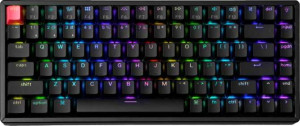
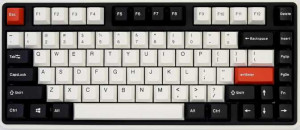
The Keychron K2 QMK Wireless is a compact 75% gaming and mechanical keyboard with a standard profile, connecting via Bluetooth 5.2 or USB, with both wireless and wired modes supported. It uses a plate-mount construction, operates at a 1000 Hz polling rate over USB, and is rated for 190 hours of battery life on a single charge. The keyboard measures 311.14 mm wide, 121.14 mm tall, and 41.01 mm thick, weighing 813 g, and comes with a detachable cable for added convenience. It is designed with Mac compatibility in mind and carries a 1-year warranty.
The Keychron K2 QMK Wireless is built with a combined plastic and aluminum case and an aluminum plate, available exclusively in black. The keyboard features a backlit layout with north-facing RGB lighting for even key illumination, and adjustable feet allow the typing angle to be modified to suit individual preferences. No wrist rest is included in the package.
The Keychron K2 QMK Wireless uses Keychron Super Mechanical linear switches, offering a smooth, bump-free keystroke feel with a consistent 2 mm actuation point, 45 g actuation force, and 4 mm of total travel distance. The switches are hot-swappable, meaning they can be replaced without soldering, giving users the freedom to change to different compatible switches at any time without specialized tools.
The Keychron K2 QMK Wireless supports N-key rollover (NKRO), ensuring every simultaneous keypress is individually registered without conflict, and includes QMK firmware support for deep, code-level keyboard customization. It does not support ZMK or VIA, meaning configuration is limited to the QMK ecosystem. Advanced input features such as analog input, rapid trigger, dual actuation, and adjustable actuation are absent, and there is no USB passthrough port or onboard display.
The Keychron K2 QMK Wireless follows an ANSI (United States) layout with a standard key arrangement, using double-shot PBT shine-through keycaps in a Cherry profile for a familiar and durable typing surface that allows RGB lighting to pass through clearly. Media functions are accessible via the Fn key combination rather than dedicated standalone keys, and there is no rotary dial present on the board.