Lenovo Magic Bay specifications and in-depth review

Lenovo Magic Bay

Manufacturer: Lenovo

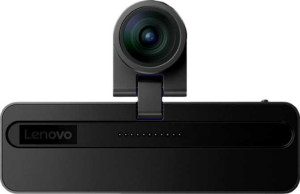
The Lenovo Magic Bay is a compact webcam designed for Windows-based systems, offering a straightforward mounting solution with a form factor that keeps things unobtrusive on a desk setup. At 69.5 g and 113 mm wide, it sits at a manageable size for everyday use. One of its more practical inclusions is a built-in privacy shutter, giving users a physical way to block the lens when the camera is not in use.

On the imaging side, the Magic Bay captures video at 2160p at 30 frames per second through a CMOS sensor paired with a glass lens, with a 90° field of view that can be adjusted to suit different environments. It supports HDR mode and automatic light correction, and includes continuous autofocus during recording. The camera connects via USB 3.0 Type-C with a 2-meter cable and offers first-party live streaming support, though it does not include a built-in microphone, speaker, or Bluetooth, and is not compatible with macOS, Android, iOS, or Chrome OS.

Pros
  • Records video at 2160p/30fps with a glass lens and CMOS sensor, providing a solid imaging setup for a webcam
  • The 90° field of view is adjustable, offering flexibility for different desk setups or framing preferences
  • Includes a physical privacy shutter for blocking the lens when not in use
  • Built-in HDR mode and automatic light correction help maintain consistent image quality in varying lighting
  • Continuous autofocus during recording reduces the need for manual focus adjustments
  • First-party live streaming support is available out of the box
Cons
  • No built-in microphone of any kind, requiring a separate audio solution for calls or recordings
  • Compatible only with Windows, limiting use across macOS, Android, iOS, and Chrome OS environments
  • No indicator light to signal when the camera is actively in use
  • Does not support vertical video recording
  • Lacks Bluetooth, HDMI output, and a 3.5 mm audio jack, restricting connectivity options
  • No tripod mount, limiting flexible positioning outside of its default placement
Who is this for?

The Lenovo Magic Bay is well-suited to Windows-only desktop or laptop setups where users need a capable webcam for video calls or live streaming without relying on a separate microphone solution they may already have. Its 4K/30fps recording with HDR and automatic light correction makes it a reasonable fit for users who want cleaner image quality in home office or studio environments with variable lighting. Those who value privacy will also appreciate the physical privacy shutter, making it a practical choice for users who keep the camera connected but want a reliable, hardware-level way to block the lens when not in use.

Who is this NOT for?

This camera is not a good fit for users who need built-in audio capture, as it includes no microphone whatsoever, making it impractical for anyone seeking an all-in-one communication device without a separate mic. Users working across macOS, Chrome OS, iOS, or Android will find it entirely incompatible, ruling it out for mixed-platform environments or mobile setups. It also falls short for those who require flexible physical positioning, since the absence of a tripod mount limits mounting options beyond its standard placement.

Design:

has a privacy shutter
has an indicator light
has a tripod mount
has a video light
has a motion sensor
thickness 75 mm
height 23.35 mm
weight 69.5 g
width 113 mm

The Lenovo Magic Bay has a compact physical profile, measuring 113 mm wide, 23.35 mm tall, and 75 mm thick, with a lightweight build of 69.5 g. It includes a privacy shutter, offering a straightforward way to physically cover the lens when not in use. The camera does not feature an indicator light, tripod mount, video light, or motion sensor.

Videography:

video recording (main camera) 2160 x 30 fps
has automatic light correction
has continuous autofocus when recording movies
field of view 90°
has an adjustable field of view
can record vertical video
has first-party support for live streaming
has a built-in HDR mode

The Lenovo Magic Bay records video at 2160p at 30 fps with a 90° field of view that can be adjusted to suit different framing needs. It supports continuous autofocus during recording, automatic light correction, and a built-in HDR mode, helping maintain consistent image quality across varying lighting conditions. First-party live streaming support is included, though the camera does not offer vertical video recording.

Optics:

has a glass lens
has a CMOS sensor

The Lenovo Magic Bay is equipped with a glass lens and a CMOS sensor, forming the core optical setup of the camera.

Audio:

has a noise-canceling microphone
has a built-in microphone
number of microphones 0
has a built-in speaker

The Lenovo Magic Bay includes no built-in microphones — noise-canceling or otherwise — and carries a microphone count of zero. It also lacks a built-in speaker, meaning audio input and output must be handled through separate, external devices.

Connectivity & Features:

USB version 3
Has USB Type-C
cable length 2 m
Is compatible with Android
Is compatible with Windows
is compatible with Chrome OS
Is compatible with iOS
Is compatible with Mac OS X
Has Bluetooth
has an HDMI output
has a socket for a 3.5 mm audio jack

The Lenovo Magic Bay connects via USB 3.0 Type-C and comes with a 2-meter cable, making it compatible exclusively with Windows-based systems — it does not support macOS, Android, iOS, or Chrome OS. The camera has no Bluetooth, HDMI output, or 3.5 mm headset jack, keeping its connectivity straightforward and limited to its USB connection.

Miscellaneous:

supports a remote smartphone
has a remote control

The Lenovo Magic Bay does not include a remote control and does not support remote smartphone operation, meaning the camera cannot be managed wirelessly from a separate device.
Final Verdict

The Lenovo Magic Bay is a Windows-exclusive webcam that delivers a focused, no-frills imaging experience built around 4K/30fps video with HDR and automatic light correction, making it a competent choice for users who prioritize clean video output in a home office or streaming setup. Its physical privacy shutter and adjustable field of view add practical day-to-day value, though the complete absence of a built-in microphone and its strict platform limitation to Windows mean it works best as part of a wider audio-visual setup rather than a standalone solution. For the right user in the right environment, it covers the imaging fundamentals well.

Popular Comparisons

Lenovo Magic Bay
Lenovo Magic Bay
VS
Insta360 Link 2C
Insta360 Link 2C