Lenovo Yoga Pro Mouse specifications and in-depth review

Lenovo Yoga Pro Mouse

Manufacturer: Lenovo

The Lenovo Yoga Pro Mouse is positioned as a dual-purpose device aimed at both gaming and productivity use, connecting via USB or Bluetooth 5 to suit different working setups. At just 60 g, it carries a notably lightweight build for a full-featured mouse, which makes it comfortable for extended sessions without added fatigue. It supports use while charging and comes backed by a two-year warranty.

On the technical side, the Yoga Pro Mouse offers a DPI range from 100 to 4000, with adjustable sensitivity and a dedicated DPI switching button for quick on-the-fly changes. It operates at a 1000 Hz polling rate and is rated for a maximum speed of 400 IPS and acceleration of 50G. All six buttons are fully programmable, and a profile switching button provides access to five onboard memory profiles. The mouse includes RGB lighting, measures 127 mm long, 70 mm wide, and 41 mm thick, and comes with a 1.8 m cable for wired or charging use. Battery life is rated at 2,160 hours.

Pros
  • All six buttons are fully programmable, offering complete input customisation without leaving any button locked to a fixed function
  • Dual connectivity via USB and Bluetooth 5 allows the mouse to switch between different devices or connection preferences
  • Five onboard memory profiles mean personalised configurations can be stored and recalled directly on the mouse without relying on software
  • At just 60 g, the mouse is notably light for a six-button device, reducing hand fatigue during long sessions
  • A 1000 Hz polling rate delivers responsive cursor reporting suited to both fast-paced and precision-focused tasks
  • The rechargeable battery is rated for 2,160 hours and can be used while charging, preventing any interruption to workflow
Cons
  • The design is right-handed only, making it unsuitable for left-handed users
  • There is no tilting scroll wheel, which limits horizontal scrolling to button-based input only
  • No extra weights are included, so users who prefer a heavier mouse have no built-in way to adjust the feel
  • Gesture support is absent, removing an input option relevant to certain productivity workflows
Who is this for?

The Lenovo Yoga Pro Mouse is a strong fit for users who move between multiple devices or connection types, thanks to its dual USB and Bluetooth 5 connectivity paired with five onboard memory profiles that keep configurations readily accessible. Its 60 g weight and 1000 Hz polling rate make it well suited to users who want a light, responsive mouse for both sustained productivity work and occasional gaming sessions. The 2,160-hour battery life and use-while-charging capability further suit anyone who values uninterrupted daily operation without worrying about power management.

Who is this NOT for?

Left-handed users are excluded entirely by the right-handed-only shell design, making this mouse unsuitable regardless of other specifications. Users who rely on horizontal scrolling via a tilting scroll wheel will find that capability absent here, which can be a genuine limitation in spreadsheet-heavy or wide-canvas workflows. Those who prefer a heavier mouse and like to fine-tune physical feel through adjustable weights will also find no provision for that, as no extra weights are included and the 60 g fixed weight leaves no room for customisation in that regard.

Performance:

polling rate 1000 Hz
maximum speed 400 IPS
maximum acceleration 50G
maximum DPI 4000 DPI
minimum DPI 100 DPI
has adjustable DPI

The Lenovo Yoga Pro Mouse runs at a 1000 Hz polling rate, reporting its position to the system 1000 times per second for responsive cursor movement. Its sensor supports an adjustable DPI range from 100 to 4000, covering very slow, precise tracking at the low end through to faster cursor speeds at the top of its range. The mouse is also rated for a maximum speed of 400 IPS and a maximum acceleration of 50G, reflecting its capability for varied movement patterns during use.

General info:

Type Gaming, Productivity
connection type USB, Bluetooth
onboard memory profiles 5
Bluetooth version 5
has gesture support
Battery life 2160 hours
can use while charging
has a rechargeable battery
warranty period 2 years

The Lenovo Yoga Pro Mouse is classified for both gaming and productivity use, connecting via USB or Bluetooth 5 to accommodate different device setups. It holds five onboard memory profiles, allowing users to store and switch between configurations directly on the device. The rechargeable battery is rated for 2,160 hours of use, and the mouse remains fully functional while charging, avoiding any forced downtime. Gesture support is not available on this model. A two-year warranty is included.

Buttons:

number of buttons 6
number of side buttons 2
number of programmable buttons 6
has a DPI switching button
has a profile switching button

The Lenovo Yoga Pro Mouse has six buttons in total, all of which are fully programmable, giving users complete control over the function of every input. Two of the six are side buttons, positioned for thumb access during use. A dedicated DPI switching button allows tracking sensitivity to be adjusted on the fly, while a profile switching button makes it straightforward to cycle through the onboard stored configurations without accessing any software.

Design:

Orientation Right-handed
weight 60 g
has RGB lighting
has a tilting scroll wheel
has a thumb scroll wheel
has extra weights
cable length 1.8 m
volume 364.49 cm³
thickness 41 mm
height 127 mm
width 70 mm

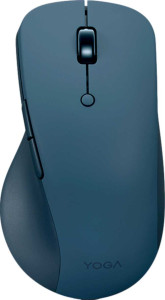
The Lenovo Yoga Pro Mouse is designed for right-handed use and stands out for its notably low weight of 60 g, which contributes to a lighter feel during extended sessions. It measures 127 mm in length, 70 mm wide, and 41 mm thick, with a volume of 364.49 cm³. The mouse includes RGB lighting and comes with a 1.8 m cable for wired or charging use. The scroll wheel does not tilt or feature a thumb variant, and no additional weights are included in the package.
Final Verdict

The Lenovo Yoga Pro Mouse is a well-rounded right-handed mouse that covers a broad range of daily use cases through a combination of flexible connectivity and a genuinely capable feature set. Its fully programmable six-button layout paired with five onboard memory profiles gives users a level of configurability that works equally well across productivity and light gaming contexts, while the dual USB and Bluetooth 5 support adds practical versatility for multi-device setups. The fixed right-handed form and absence of a tilting scroll wheel do narrow its audience somewhat, but for users whose needs align with what it offers, the Yoga Pro Mouse presents a coherent and functionally complete package that earns a confident recommendation.