LG UltraGear OLED 45GS95QE-B 45" specifications and in-depth review

LG UltraGear OLED 45GS95QE-B 45"

Manufacturer: LG

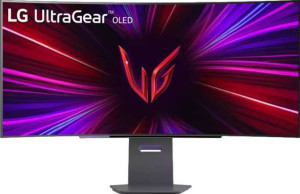
The LG UltraGear OLED 45GS95QE-B 45″ is a curved ultrawide gaming monitor built around a 44.5″ OLED panel, combining a widescreen format with the contrast and response characteristics that OLED technology brings to the table. Its 240Hz refresh rate makes it a natural fit for fast-paced gaming, and the curved design adds to the sense of immersion that a display of this width is intended to deliver. The monitor supports tilt, swivel, VESA mounting, and portrait mode, giving users solid flexibility in how they set it up.

The display resolves at 3440 x 1440 pixels across its 44.5″ panel, landing at 84 ppi, with a contrast ratio of 1,500,000:1 and 1.07 billion colors supported. Typical brightness sits at 275 nits, and the matte panel with anti-glare coating helps manage reflections in varied lighting conditions. Adaptive sync support spans Nvidia G-Sync, AMD FreeSync Premium Pro, and VESA Adaptive Sync. Connectivity includes two HDMI 2.1 ports, one DisplayPort 1.4 output, three USB ports, and a 3.5mm headset jack, though there is no USB Type-C, Thunderbolt, Ethernet, or Wi-Fi. Operating power consumption is rated at 57.5W, and the monitor includes Picture-in-Picture support but no built-in speakers or smart TV functionality.

Pros
  • A 0.03ms response time on the OLED panel keeps motion handling tight for fast-paced gaming
  • The 240Hz refresh rate supports smooth gameplay at the monitor's native ultrawide resolution
  • A contrast ratio of 1,500,000:1 reflects the deep black levels typical of OLED technology
  • Adaptive sync support spans Nvidia G-Sync, AMD FreeSync Premium Pro, and VESA Adaptive Sync, covering a broad range of GPU setups
  • The stand supports tilt, swivel, and portrait mode, with VESA mount compatibility for added flexibility
  • Two HDMI 2.1 ports allow high-bandwidth connections from multiple sources simultaneously
Cons
  • Typical brightness of 275 nits is relatively modest for a display of this size and type
  • No USB Type-C port limits connectivity options for users with modern laptops or devices that rely on it
  • The monitor has no built-in speakers, requiring a separate audio solution for any sound output
  • There is no Ethernet or Wi-Fi support, though these are uncommon features for a monitor of this category
  • At 12,292 g, the physical weight may make repositioning or mounting more cumbersome than lighter alternatives
  • No ambient light sensor means the display cannot automatically adjust brightness based on room conditions
Who is this for?

This monitor is well-suited to dedicated PC gamers who want a large ultrawide curved display with serious motion performance, given its 240Hz refresh rate and 0.03ms response time combined with broad adaptive sync support across both Nvidia and AMD GPU ecosystems. The 3440 x 1440 resolution across a 44.5″ curved panel also makes it a strong fit for users who value an immersive workspace, and the stand's support for tilt, swivel, and portrait mode adds ergonomic flexibility for those who spend long hours in front of a screen. Users who regularly switch between two input sources will also appreciate the dual HDMI 2.1 ports and Picture-in-Picture functionality.

Who is this NOT for?

Users who need a bright display for high-ambient-light environments may find the 275 nit typical brightness insufficient for comfortable viewing under strong overhead or natural lighting. The absence of USB Type-C connectivity makes this a poor fit for users with modern laptops or mobile workstations that depend on a single-cable connection for video and data. It is also not suited to anyone who needs integrated audio, since there are no built-in speakers and no smart TV or standalone media functionality — making it a purely display-focused peripheral that requires external devices for a complete setup.

Display:

Display type OLED/AMOLED
response time 0.03 ms
screen size 44.5"
resolution 3440 x 1440 px
pixel density 84 ppi
Adaptive synchronization Nvidia G-Sync, AMD FreeSync Premium Pro, Nvidia G-Sync Compatible, VESA Adaptive Sync
has anti-glare coating
refresh rate 240Hz
maximum horizontal viewing angle 178º
maximum vertical viewing angle 178º
has a matte panel
has a glossy panel
has a touch screen

The LG UltraGear OLED 45GS95QE-B 45″ uses an OLED panel measuring 44.5″ with a 3440 x 1440 resolution at 84 ppi, delivering a wide ultrawide canvas with a response time of just 0.03 ms. The display runs at 240Hz and supports a broad range of adaptive sync technologies, including Nvidia G-Sync, AMD FreeSync Premium Pro, Nvidia G-Sync Compatible, and VESA Adaptive Sync. Viewing angles reach 178° both horizontally and vertically, and the matte panel includes an anti-glare coating to reduce reflections — it is not a glossy or touch-enabled display.

General info:

Type Gaming, Ultrawide, Curved
supports total tilt
Has a swivel stand
Supports VESA mount
height 457 mm
width 993 mm
thickness 218 mm
weight 12292 g
supports portrait mode
volume 98928.618 cm³

The LG UltraGear OLED 45GS95QE-B 45″ is a gaming, ultrawide, curved monitor measuring 993 mm wide, 457 mm tall, and 218 mm deep, with a weight of 12,292 g. Its stand supports tilt, swivel, and portrait mode, offering a reasonable range of ergonomic adjustments for different desk configurations. VESA mount support is also included, giving users the option to replace the stand with a third-party arm or wall mount if preferred.

Colors:

brightness (typical) 275 nits
supports color calibration
display colors 1070 million
contrast ratio 1500000:1

The display supports 1.07 billion colors with a contrast ratio of 1,500,000:1, reflecting the deep blacks and wide tonal range that OLED panels are capable of producing. Typical brightness is rated at 275 nits, and color calibration is supported, giving users the ability to fine-tune the display's color output to their specific requirements.

Connectivity:

HDMI ports 2
supports Thunderbolt
DisplayPort outputs 1
DisplayPort version DisplayPort 1.4
has a socket for a 3.5 mm audio jack
has a DVI connector
USB ports 3
Has USB Type-C
HDMI version HDMI 2.1
supports Ethernet
supports Wi-Fi
has AirPlay
mini DisplayPort outputs 0
has a VGA connector

The LG UltraGear OLED 45GS95QE-B 45″ offers a focused connectivity layout built around two HDMI 2.1 ports and one DisplayPort 1.4 output, along with three USB ports and a 3.5 mm headset jack for audio passthrough. There is no USB Type-C, DVI, VGA, mini DisplayPort, Thunderbolt, Ethernet, Wi-Fi, or AirPlay support, keeping the connection options straightforward and oriented toward standard wired desktop and gaming setups.

Power:

operating power consumption 57.5W
standby power consumption 0.5W

The LG UltraGear OLED 45GS95QE-B 45″ has an operating power consumption of 57.5W under normal use, while standby power draw drops to a minimal 0.5W when the display is not actively in use.

Features:

has PiP
has stereo speakers
has built-in smart TV
has a remote control
supports Dolby Digital
supports Dolby Digital Plus
has DTS Surround
has an ambient light sensor
has a front camera

The LG UltraGear OLED 45GS95QE-B 45″ includes Picture-in-Picture (PiP) support, allowing two input sources to be displayed on screen simultaneously. Beyond that, the feature set is minimal — there are no built-in stereo speakers, no smart TV functionality, no remote control, no Dolby Digital or DTS Surround audio support, no ambient light sensor, and no front camera.
Final Verdict

The LG UltraGear OLED 45GS95QE-B 45″ is a purpose-built gaming monitor that delivers where it counts for its intended audience — the 240Hz refresh rate paired with a 0.03ms OLED response time and wide adaptive sync compatibility make it a technically capable display for fast-paced PC gaming on a large ultrawide curved panel. Color depth, contrast, and ergonomic flexibility round out a well-considered spec sheet for a dedicated gaming setup. That said, its modest brightness ceiling and the absence of USB Type-C and built-in audio mean it works best as part of a broader, carefully assembled workstation rather than a catch-all solution. For users building a gaming-focused desktop environment where raw display performance and screen real estate are the priority, it represents a coherent and technically focused choice.