Logitech MX Brio specifications and in-depth review

Logitech MX Brio

Manufacturer: Logitech

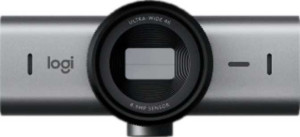
The Logitech MX Brio is a feature-rich webcam designed for users who need reliable video quality and practical versatility in a compact form. Weighing just 137 g and measuring 98 × 44 × 36 mm, it fits comfortably on most monitor setups and includes a tripod mount for added flexibility. A built-in privacy shutter and an indicator light round out its thoughtfully designed exterior, giving users straightforward control over their camera's visibility at any time.

On the technical side, the MX Brio captures video at 2160p/30fps with a 90° field of view that can be adjusted to suit different shooting preferences. Its 8.5 MP CMOS sensor sits behind a glass lens and benefits from automatic light correction and HDR support, while continuous autofocus keeps subjects sharp during recording. Audio is handled by two built-in noise-canceling microphones, and the 1.5 m detachable USB-C cable ensures a tidy, adaptable desk setup. The camera is compatible with Windows, Mac OS X, and Chrome OS, and it also supports remote smartphone connectivity.

Pros
  • Records video at 2160p/30fps with a 90° field of view that can be adjusted to suit different framing needs
  • Continuous autofocus, automatic light correction, and a built-in HDR mode help maintain consistent image quality in varied lighting
  • The detachable 1.5 m USB-C cable keeps the setup tidy and makes cable replacement straightforward
  • Two built-in noise-canceling microphones reduce ambient sound without requiring an external audio device
  • Includes a privacy shutter and an indicator light, giving users direct physical control over camera access
  • Compatible with Windows, Mac OS X, and Chrome OS, covering a broad range of desktop environments
Cons
  • Limited to 30fps at 4K, with no higher frame rate option available at that resolution
  • Does not support Android or iOS, restricting use to desktop operating systems only
  • No stereo microphone support, meaning audio capture is mono rather than dual-channel
  • Lacks Bluetooth, an HDMI output, and a 3.5 mm headset jack, limiting its connectivity options
  • No built-in speaker, so audio output relies entirely on the connected device
Who is this for?

This webcam is a solid fit for remote professionals and content creators who need reliable 4K video output with adjustable framing and consistent image quality across different lighting conditions. The built-in HDR mode, automatic light correction, and continuous autofocus make it well-suited for video calls, online meetings, and live streaming in environments where lighting is not always controllable. Users working on Windows, Mac OS X, or Chrome OS desktops will find the detachable USB-C connection and privacy shutter particularly practical for day-to-day use.

Who is this NOT for?

This camera is not a good fit for users who need mobile or cross-platform flexibility, as it offers no Android or iOS support and lacks Bluetooth connectivity. Those looking to record fast-moving content may find the 30fps ceiling at 4K restrictive, particularly if smoother motion is a priority. It is also a poor match for users who require integrated audio output or stereo microphone capture, since the device includes no built-in speaker and records audio in mono only.

Design:

has a privacy shutter
has an indicator light
has a tripod mount
has a video light
has a motion sensor
warranty period 2 years
thickness 36 mm
height 44 mm
weight 137 g
width 98 mm

The Logitech MX Brio has a compact physical footprint, measuring 98 mm wide, 44 mm tall, and 36 mm thick, with a lightweight body of 137 g that sits unobtrusively on a monitor or desk. It includes a privacy shutter and an indicator light, giving users clear visual feedback and manual control over the camera lens. A tripod mount adds mounting flexibility, though the device does not feature a video light or a motion sensor. Logitech backs the product with a 2-year warranty.

Videography:

video recording (main camera) 2160 x 30 fps
has automatic light correction
has continuous autofocus when recording movies
field of view 90°
has an adjustable field of view
has first-party support for live streaming
has a built-in HDR mode

The Logitech MX Brio records video at 2160p/30fps with a 90° field of view that can be adjusted to better frame different scenes or environments. Continuous autofocus keeps subjects sharp throughout a recording, while automatic light correction and a built-in HDR mode help maintain consistent image quality across varying lighting conditions. The camera also includes first-party live streaming support, making it suitable for broadcast use straight out of the box.

Optics:

megapixels (main camera) 8.5 MP
has a glass lens
has branded damage-resistant glass
has a CMOS sensor

The Logitech MX Brio uses an 8.5 MP CMOS sensor paired with a glass lens to capture its main camera image. The glass lens contributes to optical clarity, though the camera does not feature branded damage-resistant glass of any kind.

Audio:

has a noise-canceling microphone
has a built-in microphone
number of microphones 2
has a stereo microphone
has a built-in speaker

The Logitech MX Brio features two built-in noise-canceling microphones designed to reduce unwanted ambient sound during calls or recordings. The configuration does not support stereo capture, so audio is recorded in mono, and the camera includes no built-in speaker.

Connectivity & Features:

Has gesture control
Has USB Type-C
cable length 1.5 m
has a detachable cable
Is compatible with Android
Is compatible with Windows
is compatible with Chrome OS
Is compatible with iOS
Is compatible with Mac OS X
Has Bluetooth
has an HDMI output
has a socket for a 3.5 mm audio jack

The Logitech MX Brio connects via USB Type-C using a 1.5 m detachable cable, making cable management and replacement straightforward. It is compatible with Windows, Mac OS X, and Chrome OS, but does not support Android or iOS devices. The camera lacks Bluetooth, an HDMI output, a 3.5 mm headset jack, and gesture control functionality.

Miscellaneous:

supports a remote smartphone
has a remote control

The Logitech MX Brio supports remote smartphone connectivity, allowing a smartphone to be used as a remote device, though it does not come with a dedicated remote control.
Final Verdict

The Logitech MX Brio is a capable webcam built around a clear set of priorities: sharp 4K video, adaptable framing, and dependable image quality in variable lighting conditions. Its adjustable field of view combined with HDR support and continuous autofocus makes it a well-rounded choice for remote professionals and live streamers who spend significant time on camera. While its connectivity is limited to desktop operating systems and the audio output is mono-only, these constraints are unlikely to affect its core audience. For users working within a Windows, Mac, or Chrome OS environment who need a reliable, privacy-conscious webcam with practical build quality and solid video performance, the MX Brio delivers a focused and coherent package.

Popular Comparisons

Logitech MX Brio
Logitech MX Brio
VS
Insta360 Link 2
Insta360 Link 2
Logitech MX Brio
Logitech MX Brio
VS
Obsbot Meet 2
Obsbot Meet 2