Logitech MX Ergo S specifications and in-depth review

Logitech MX Ergo S

Manufacturer: Logitech

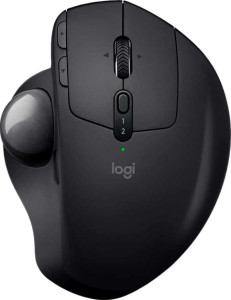
The Logitech MX Ergo S is a right-handed productivity mouse built around a trackball form factor, offering both 2.4GHz wireless and Bluetooth 5 connectivity for flexible desktop setups. Its 2880-hour battery life is one of its more notable specs, and the rechargeable battery can continue powering the device even while it is being charged, reducing downtime during long work sessions.

On the technical side, the MX Ergo S uses Logitech's Advanced Optical Tracking sensor with a DPI range of 512 to 2048, adjustable to suit different precision needs, alongside a polling rate of 125 Hz. The mouse features 8 buttons in total, 6 of which are programmable, plus a tilting scroll wheel and a thumb scroll wheel for additional input options. Weighing 259 g and measuring 132.5 mm in height, 99.8 mm in width, and 51.4 mm in thickness, it is designed exclusively for right-handed use and carries a one-year warranty.

Pros
  • Exceptionally long battery life of 2880 hours on a single charge
  • Can be used while charging, preventing forced downtime
  • Supports both 2.4GHz wireless and Bluetooth 5, offering flexible connectivity options
  • Includes both a tilting scroll wheel and a thumb scroll wheel for versatile navigation
  • 6 of its 8 buttons are programmable, allowing for meaningful input customization
  • DPI is adjustable between 512 and 2048, giving users control over tracking sensitivity
Cons
  • Designed only for right-handed users, excluding left-handed users entirely
  • At 259 g, the mouse is relatively heavy for extended daily use
  • No wireless charging support, requiring a physical cable to recharge
  • Polling rate of 125 Hz is on the lower end for a mouse in this category
  • Does not include a profile switching button, limiting on-the-fly profile changes
  • No RGB lighting, which may matter to users who prefer visual customization
Who is this for?

This mouse is well suited to right-handed office and desk-bound users who spend long hours at a computer and prioritize comfort over speed. The 2880-hour battery life and the ability to use the device while charging make it a reliable choice for professionals who cannot afford interruptions. The dual connectivity via 2.4GHz wireless and Bluetooth 5 also makes it practical for users who switch between multiple devices, while the 6 programmable buttons cater to those who rely on custom shortcuts to streamline repetitive workflows.

Who is this NOT for?

This mouse is not a good fit for left-handed users, as it is built exclusively for right-handed use with no ambidextrous option. Users who require fast, precise cursor control — such as those engaged in competitive or fast-paced gaming — will find the 125 Hz polling rate and 2048 DPI ceiling limiting. Additionally, those who need on-the-fly profile switching or frequently move between very different input configurations will be constrained by the absence of a dedicated profile switching button.

Performance:

polling rate 125 Hz
maximum DPI 2048 DPI
minimum DPI 512 DPI
has adjustable DPI

The MX Ergo S operates at a polling rate of 125 Hz and offers an adjustable DPI range spanning from 512 to 2048 DPI, giving users the flexibility to dial in tracking sensitivity to match their workflow. The ability to switch between sensitivity levels makes it straightforward to balance precision and speed depending on the task at hand.

General info:

Type Productivity
connection type 2.4GHz wireless, Bluetooth
sensor Logitech Advanced Optical Tracking
Bluetooth version 5
has gesture support
Battery life 2880 hours
can use while charging
has wireless charging
has a rechargeable battery
has a removable battery
warranty period 1 years

The MX Ergo S is a productivity mouse that connects via 2.4GHz wireless or Bluetooth 5, and uses Logitech Advanced Optical Tracking as its sensor. It does not support gesture input or wireless charging, but it does feature a rechargeable battery rated at 2880 hours that cannot be removed. The mouse can be used while it is charging, which helps avoid interruptions, though the battery is not user-replaceable. It does not include wireless charging support, and comes with a one-year warranty.

Buttons:

number of buttons 8
number of side buttons 2
number of programmable buttons 6
has a DPI switching button
has a profile switching button

The MX Ergo S features a total of 8 buttons, including 2 side buttons, with 6 of them programmable for custom input assignments. A dedicated DPI switching button is present, making it easy to adjust tracking sensitivity on the fly, while a profile switching button is not included.

Design:

Orientation Right-handed
weight 259 g
has RGB lighting
has a tilting scroll wheel
has a thumb scroll wheel
has extra weights
volume 679.6879 cm³
thickness 51.4 mm
height 132.5 mm
width 99.8 mm

The MX Ergo S is designed exclusively for right-handed use and has a weight of 259 g, with dimensions of 132.5 mm in height, 99.8 mm in width, and 51.4 mm in thickness, giving it a volume of 679.69 cm³. It includes both a tilting scroll wheel and a thumb scroll wheel, adding extra scrolling flexibility to the layout. The mouse does not feature RGB lighting and does not come with extra swappable weights.
Final Verdict

The Logitech MX Ergo S is a well-defined productivity mouse that makes a clear case for right-handed desk users who value endurance and flexibility over raw performance. Its 2880-hour battery life combined with dual wireless connectivity sets it apart as a reliable daily driver for professionals who move between devices and need a mouse that simply keeps working. The adjustable DPI, multiple programmable buttons, and dual scroll wheels round out a feature set that suits focused office work rather than demanding or fast-paced tasks. Users with more intensive precision requirements or those who are left-handed will find its scope limited, but within its intended niche, the MX Ergo S delivers a coherent and practical specification set that holds up well for sustained productivity use.

Popular Comparisons

Logitech MX Ergo S
Logitech MX Ergo S
VS
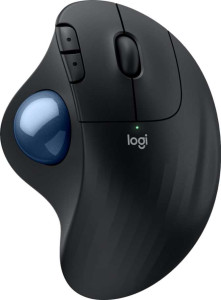
Logitech Ergo M575S
Logitech Ergo M575S