Mancer Horizon Z2 MCR-HZN24-BL2 24" specifications and in-depth review

Mancer Horizon Z2 MCR-HZN24-BL2 24"

Manufacturer: Mancer

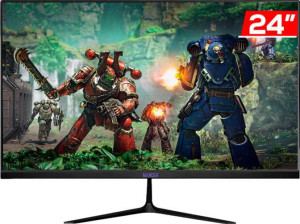
The Mancer Horizon Z2 MCR-HZN24-BL2 is a 24-inch gaming monitor built around a VA-type LCD panel with LED backlighting. Designed with desktop gaming setups in mind, it offers a 1ms response time alongside a glossy panel finish and a reasonably compact physical footprint. The stand supports tilt, swivel, and portrait mode rotation, and the display is also VESA mount compatible, giving users some flexibility in how they position or mount it.

Running at a 100Hz refresh rate with a native resolution of 1920x1080 pixels at 91 ppi, the display delivers a contrast ratio of 3000:1 and a typical brightness of 230 nits. Color output is rated at 8-bit depth covering 16.7 million colors, with sRGB coverage reaching 104.2% and Adobe RGB at 77.3%. Connectivity is limited to a single HDMI 1.3 port and a VGA connector, with no DisplayPort, USB, or audio jack present. Power draw is rated at 30W during operation and 0.3W in standby.

Pros
  • The stand supports tilt, swivel, and portrait mode rotation, offering meaningful ergonomic flexibility for different workspace setups
  • VESA mount compatibility allows the display to be used with third-party monitor arms or wall mounts
  • Wide 178-degree viewing angles both horizontally and vertically help maintain image consistency across different seating positions
  • The 1ms response time suits fast-paced usage where motion clarity matters
  • sRGB coverage of 104.2% provides a broad color range for everyday gaming and general use
  • Standby power consumption is very low at 0.3W, reducing idle energy draw
Cons
  • The glossy panel finish without any anti-glare coating can cause noticeable reflections in bright environments
  • Connectivity is very limited, with only a single HDMI 1.3 port and a VGA input and no DisplayPort, USB, or audio jack
  • No built-in speakers and no audio output jack mean external audio requires a separate source connection
  • Typical brightness of 230 nits is relatively modest and may be insufficient in well-lit rooms
  • Color calibration is not supported, leaving no option for hardware or software-based calibration adjustments
  • The 100Hz refresh rate, while adequate, leaves little headroom for higher frame rate content compared to higher-tier gaming displays
Who is this for?

This monitor is a reasonable fit for casual and entry-level gamers who primarily play at 1080p resolution and benefit from the 1ms response time for smoother motion handling. Users working in smaller desk setups will appreciate the compact 24-inch footprint combined with the flexible stand that supports tilt, swivel, and portrait mode rotation, as well as VESA compatibility for those who prefer a monitor arm. It also suits users who connect via legacy hardware, given the inclusion of a VGA port alongside HDMI.

Who is this NOT for?

Users who require a more immersive or high-fidelity visual experience will find the 230-nit brightness and glossy panel limiting, particularly in bright or naturally lit rooms where reflections can become a persistent issue. Content creators or anyone working with color-critical material will be held back by the absence of color calibration support and the relatively modest 77.3% Adobe RGB coverage. Similarly, users who depend on a well-connected workstation setup will find the lack of DisplayPort, USB ports, and a 3.5mm audio jack a significant practical limitation.

Display:

Display type LED-backlit, LCD, VA
response time 1 ms
screen size 24"
resolution 1920 x 1080 px
pixel density 91 ppi
has anti-glare coating
refresh rate 100Hz
maximum horizontal viewing angle 178º
maximum vertical viewing angle 178º
has a matte panel
has a glossy panel
has a touch screen

The display on this monitor uses an LED-backlit LCD panel with a VA matrix, sized at 24 inches and running at a native resolution of 1920x1080 pixels with a pixel density of 91 ppi. It supports a 100Hz refresh rate and a 1ms response time, making it reasonably suited for fast-paced content. The panel has a glossy finish without any anti-glare coating and is not a matte panel, nor does it include touch screen functionality. Viewing angles reach 178 degrees both horizontally and vertically, which is typical of VA panels at this size.

General info:

Type Gaming
supports total tilt
Has a swivel stand
Supports VESA mount
height 317 mm
width 539 mm
thickness 36 mm
weight 3500 g
supports portrait mode
volume 6151.068 cm³

This is a gaming-type monitor with a physical footprint of 539mm wide, 317mm tall, and 36mm thick, weighing 3,500g. The stand offers a solid range of adjustability, supporting tilt, swivel, and portrait mode rotation, which gives users meaningful flexibility in how they orient the screen. It also supports VESA mounting, allowing the display to be attached to compatible third-party arms or wall mounts. The total volume of the unit measures approximately 6,151 cm³.

Colors:

brightness (typical) 230 nits
supports color calibration
display colors 16.7 million
bit depth 8-bit
contrast ratio 3000:1
Adobe RGB coverage 77.3%
sRGB coverage 104.2%

The display renders 16.7 million colors at an 8-bit depth, with a typical brightness of 230 nits and a contrast ratio of 3000:1. Color space coverage is rated at 104.2% sRGB and 77.3% Adobe RGB, indicating a reasonably wide gamut for an entry-level gaming panel. Color calibration is not supported out of the box, so no factory calibration data or hardware calibration option is included.

Connectivity:

HDMI ports 1
supports Thunderbolt
DisplayPort outputs 0
has a socket for a 3.5 mm audio jack
has a DVI connector
USB ports 0
Has USB Type-C
HDMI version HDMI 1.3
supports Ethernet
supports Wi-Fi
has AirPlay
mini DisplayPort outputs 0
has a VGA connector

Connectivity on this monitor is minimal, limited to a single HDMI 1.3 port and a VGA connector as the only video inputs. There are no DisplayPort, mini DisplayPort, DVI, or USB Type-C outputs, and the unit includes no USB ports of any kind. Audio connectivity is also absent, as there is no 3.5mm headset jack. Network features are not present either — the monitor does not support Ethernet, Wi-Fi, or AirPlay.

Power:

operating power consumption 30W
standby power consumption 0.3W

The monitor draws 30W during normal operation and drops to a low 0.3W in standby mode, reflecting a modest power profile consistent with a 24-inch display of this type.

Features:

has PiP
has stereo speakers
has built-in smart TV
has a remote control
supports Dolby Digital
supports Dolby Digital Plus
has DTS Surround
has an ambient light sensor
has a front camera

This monitor does not include built-in stereo speakers, and there is no support for Dolby Digital, Dolby Digital Plus, or DTS Surround audio formats. Picture-in-Picture functionality is absent, and the unit comes with no remote control. It also lacks a front camera, an ambient light sensor, and any built-in smart TV platform, positioning it as a straightforward display without supplementary smart or multimedia features.
Final Verdict

The Mancer Horizon Z2 MCR-HZN24-BL2 is a straightforward 24-inch gaming monitor that covers the essentials for casual use without overreaching. Its 1ms response time paired with a 100Hz refresh rate gives it a practical edge for everyday gaming at 1080p, and the ergonomic stand with tilt, swivel, portrait mode, and VESA support adds genuine flexibility that is not always standard at this level. That said, the glossy panel, limited connectivity, modest brightness, and lack of color calibration mean it is best suited for users with contained expectations and simple setup needs. For anyone seeking a no-frills gaming display with decent adjustability and acceptable color output, the Horizon Z2 is a functional option — though those with more demanding visual or connectivity requirements will quickly find its boundaries.

Popular Comparisons

Mancer Horizon Z2 MCR-HZN24-BL2 24"
VS
LG 24MS500-B 24"
LG 24MS500-B 24"