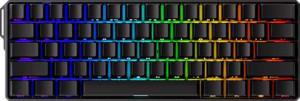
The MonsGeek FUN60 Ultra is a gaming keyboard built in a compact 60% layout with a standard profile and tray mount design, measuring 293 mm wide, 102.5 mm deep, and 28.5 mm thick at a weight of 1023 g. Connectivity covers USB, Bluetooth 5.0, and 2.4 GHz wireless, with wired and wireless modes both supported and a detachable cable included. The polling rate reaches 8000 Hz, and wireless use is backed by a rated battery life of 200 hours. The keyboard is not designed specifically for Mac, and it carries a one-year warranty.
The FUN60 Ultra features a case built from a combination of plastic and aluminum with an aluminum plate, and is available in both black and white colorways. The keyboard includes RGB backlighting with a south-facing LED direction, and both a wrist rest and adjustable feet are included in the package. Adjustable feet allow for some flexibility in typing angle, rounding out a design that balances functional accessories with a straightforward material construction.
The FUN60 Ultra comes equipped with the Akko Glare Magnetic Switch, a Hall effect switch with a linear feel and an actuation force of 40 g. The total travel distance is 3.4 mm, and the actuation point is adjustable across a range from 0.1 mm down to a minimum of 0.1 mm up to the full 3.4 mm, giving a wide window for customization. The switches are hot-swappable, allowing them to be replaced without soldering.
The FUN60 Ultra supports a strong set of input features, including rapid trigger, dual actuation, adjustable actuation, and analog input, all of which take advantage of its Hall effect switch technology. Full N-key rollover (NKRO) is also present, ensuring every simultaneous keypress is registered accurately. On the other hand, the keyboard does not include USB passthrough, a display, or support for QMK, ZMK, or VIA, meaning customization is handled outside of those open-source firmware ecosystems.
The FUN60 Ultra uses an ANSI (United States) layout with a standard key arrangement and PBT shine-through keycaps in an OEM profile. Media functions are accessible via the Fn key rather than dedicated keys, and the keyboard does not include a rotary dial.