MSI Modern MD342CQP 34" specifications and in-depth review

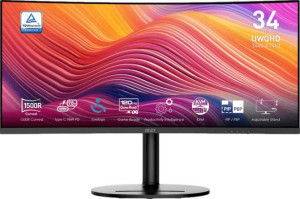
MSI Modern MD342CQP 34"

Manufacturer: MSI

The MSI Modern MD342CQP is a 34-inch ultrawide monitor built around a VA panel with LED backlighting, targeting users who need a wide workspace without stepping into high-refresh gaming territory. It carries a 3440 x 1440 resolution across its curved ultrawide canvas, delivering a pixel density of 109 ppi, and ships with a matte, anti-glare coating that reduces unwanted reflections in typical office or studio environments. The stand offers tilt, swivel, and height adjustment, and the display can also be rotated into portrait mode, giving it a reasonable degree of physical flexibility for varied desk setups.

On the color side, the MD342CQP covers 92% of Adobe RGB and 119% of sRGB, with a reported 1070 million colors at 8-bit depth and a contrast ratio of 3500:1, figures consistent with the VA panel technology used here. Brightness is rated at 300 nits, and AMD FreeSync Premium is supported at up to 120Hz with a 4ms response time. Connectivity includes two HDMI 2.0b ports, one DisplayPort 1.4 output, USB-C, and three USB 3.1 ports, alongside a 3.5mm audio jack. The monitor also integrates stereo speakers rated at 2 x 3W and supports picture-in-picture, while operating power consumption sits at 31W.

Pros
  • The stand supports tilt, swivel, height adjustment, and portrait mode, offering meaningful ergonomic flexibility for different working setups
  • VESA mount compatibility allows the monitor to be used with third-party arms or wall brackets
  • Connectivity includes two HDMI 2.0b ports, one DisplayPort 1.4, USB Type-C, and three USB 3.1 ports, covering a broad range of devices from a single hub
  • Picture-in-picture support allows two sources to be displayed at the same time, which is useful for multitasking across different inputs
  • The matte anti-glare panel reduces reflections, making it more practical in environments with ambient lighting
  • 92% Adobe RGB and 119% sRGB coverage, combined with support for color calibration, make it suitable for color-sensitive work
Cons
  • Standby power consumption drops to 0.5W, but the operating draw of 31W reflects the EU energy label of F, indicating relatively low energy efficiency
  • There is no Thunderbolt support, which limits compatibility with certain high-bandwidth devices and daisy-chaining setups
  • The 8-bit panel without hardware-level dithering or higher bit depth may be a limitation for users requiring precise color gradations
  • Built-in stereo speakers output only 2 x 3W with no Dolby Digital or DTS Surround support, making them limited for audio-focused use
  • No Ethernet or Wi-Fi connectivity means the monitor cannot serve as a network hub in any capacity
  • No front camera is included, which may be inconvenient for users who rely on video calls at their workstation
Who is this for?

This monitor is a solid fit for users who spend long hours working across multiple applications, thanks to its 34-inch ultrawide format at 3440 x 1440 resolution and picture-in-picture support, which together provide a wide, organized workspace. The wide Adobe RGB and sRGB coverage, paired with color calibration support, also make it appropriate for creative professionals handling photo editing or graphic design work that demands accurate color reproduction. The flexible stand with tilt, swivel, and portrait mode adjustments, combined with VESA compatibility, further suits those who need an adaptable ergonomic setup at a fixed desk.

Who is this NOT for?

Users looking for a competitive gaming display will find the 120Hz refresh rate and 4ms response time modest compared to what dedicated gaming monitors offer at this screen size, making it less suited to fast-paced or esports-oriented gaming. The lack of Thunderbolt connectivity rules it out for users who rely on high-bandwidth daisy-chaining or single-cable setups common in Apple-centric or creative studio workflows. Additionally, the EU energy label of F and the absence of any wireless connectivity mean this monitor is not well suited for users prioritizing energy efficiency or a cable-free desk environment.

Display:

Display type VA, LCD, LED-backlit
response time 4 ms
screen size 34"
resolution 3440 x 1440 px
pixel density 109 ppi
Adaptive synchronization AMD FreeSync Premium
has anti-glare coating
refresh rate 120Hz
maximum horizontal viewing angle 178º
maximum vertical viewing angle 178º
has a matte panel
has a glossy panel
has a touch screen

The MSI Modern MD342CQP uses a VA LCD panel with LED backlighting, measuring 34 inches and delivering a resolution of 3440 x 1440 px at a pixel density of 109 ppi. It runs at a refresh rate of 120Hz with a 4ms response time, and supports AMD FreeSync Premium for adaptive synchronization. Both horizontal and vertical viewing angles reach 178 degrees, and the panel features a matte, anti-glare coating — it is not glossy and does not support touch input.

General info:

Type Ultrawide
EU energy label F
supports total tilt
Has a swivel stand
Supports VESA mount
height 362.4 mm
width 808 mm
thickness 125.3 mm
weight 8050 g
supports portrait mode
volume 36690.24576 cm³

This is an ultrawide monitor with physical dimensions of 808 mm wide, 362.4 mm tall, and 125.3 mm deep, weighing 8050 g. The stand supports tilt, swivel, and portrait mode, offering a reasonable range of ergonomic adjustment for different desk configurations. VESA mount compatibility is included for those who prefer an aftermarket arm or wall bracket. The monitor carries an EU energy label of F, and its total volume is approximately 36690 cm³.

Colors:

brightness (typical) 300 nits
supports color calibration
display colors 1070 million
bit depth 8-bit
contrast ratio 3500:1
Adobe RGB coverage 92%
sRGB coverage 119%

The display operates at a typical brightness of 300 nits with a contrast ratio of 3500:1, which is characteristic of VA panel technology. It renders 1070 million colors at an 8-bit depth and covers 92% of Adobe RGB alongside 119% of sRGB, giving it a broad color output for both creative and general use. Color calibration is supported, allowing for adjustments to better match specific color accuracy requirements.

Connectivity:

HDMI ports 2
supports Thunderbolt
DisplayPort outputs 1
DisplayPort version DisplayPort 1.4
has a socket for a 3.5 mm audio jack
has a DVI connector
USB ports 3
USB version 3.1
Has USB Type-C
HDMI version HDMI 2.0b
supports Ethernet
supports Wi-Fi
has AirPlay
mini DisplayPort outputs 0
has a VGA connector

The monitor provides two HDMI 2.0b ports and one DisplayPort 1.4 output for video input, with no mini DisplayPort, DVI, or VGA connectors included. For peripheral connectivity, it offers three USB 3.1 ports alongside a USB Type-C port, making it reasonably versatile as a desktop hub. A 3.5mm audio jack is also present for headset or speaker use. Wireless connectivity is not available — there is no Wi-Fi, Ethernet, AirPlay, or Thunderbolt support on this model.

Power:

operating power consumption 31W
standby power consumption 0.5W

The MSI Modern MD342CQP draws 31W during normal operation and drops to just 0.5W in standby mode, reflecting a modest power profile for a 34-inch ultrawide display.

Features:

has PiP
has stereo speakers
has built-in smart TV
audio output power 2 x 3W
has a remote control
supports Dolby Digital
supports Dolby Digital Plus
has DTS Surround
has an ambient light sensor
has a front camera

The monitor includes built-in stereo speakers rated at 2 x 3W and supports picture-in-picture (PiP), allowing two input sources to be displayed simultaneously. It does not have a remote control, front camera, or ambient light sensor, and there is no smart TV functionality built in. On the audio side, Dolby Digital, Dolby Digital Plus, and DTS Surround are all absent, keeping the audio feature set straightforward.

Final Verdict

The MSI Modern MD342CQP is a well-rounded ultrawide monitor that positions itself clearly toward productivity-focused and color-aware users rather than performance-driven ones. Its 34-inch 3440 x 1440 VA panel with broad color space coverage and color calibration support makes it a credible option for those who need a wide canvas with reasonably accurate color reproduction, while the ergonomic stand and VESA compatibility add practical value for fixed desk setups. Where it falls short — moderate refresh rate, no Thunderbolt, and limited audio — reflects a deliberate focus on content creation and multitasking workflows over gaming or studio-grade connectivity. For users whose priorities align with those strengths, it delivers a coherent and capable feature set.

Popular Comparisons

MSI Modern MD342CQP 34"
VS
Dell Plus S3425DW 34"
MSI Modern MD342CQP 34"
VS
MSI MAG 345CQR 34"
MSI MAG 345CQR 34"
MSI Modern MD342CQP 34"
VS
MSI MAG 341CQP QD-OLED 34"
MSI Modern MD342CQP 34"
VS
AOC CU34G2XPD/BK 34"
MSI Modern MD342CQP 34"
VS
Samsung ViewFinity S6 S34C652VAU 34"