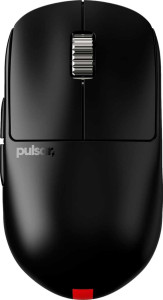
Pulsar X2H eS specifications and in-depth review

Pulsar X2H eS

Manufacturer: Pulsar

The Pulsar X2H eS is a wireless gaming mouse built around an ambidextrous form factor, making it a practical option for a broad range of users regardless of hand preference. Weighing just 65 grams, the design prioritizes a low-mass construction without adding RGB lighting or extra weights, keeping the focus on functional essentials across its compact 120.4 mm × 65 mm × 39.5 mm frame.

At the core of the X2H eS sits the PixArt PAW3395 sensor, which supports a DPI range of 500 to 26,000 and tracks at up to 650 IPS with a maximum acceleration of 50G. The mouse connects via 2.4 GHz wireless or USB, operates at a 4000 Hz polling rate, and carries a rated 100-hour battery life on a rechargeable internal cell that supports use during charging. It offers five programmable buttons including two side buttons and a dedicated DPI switch, and backs the package with a two-year warranty.

Pros
  • The ambidextrous shape makes it accessible to both left- and right-handed users
  • A 4000 Hz polling rate ensures very frequent position reporting to the system
  • All 5 buttons are programmable, offering full customization of the input layout
  • At 65 grams, the mouse is notably light, which reduces hand fatigue during extended sessions
  • A rated 100-hour battery life means infrequent recharging is needed
  • The mouse can continue to be used while the battery is charging, avoiding forced downtime
Cons
  • No onboard memory profiles means settings cannot be stored directly on the mouse
  • Wireless charging is not supported, requiring a physical connection to recharge
  • The scroll wheel does not tilt, limiting horizontal scrolling without button remapping
  • There is no profile switching button, so switching between configurations on the fly is not possible
  • RGB lighting is absent, which may matter to users who prefer visual customization options
Who is this for?

This mouse is well-suited to users who prioritize a lightweight, ambidextrous build for extended sessions, as the 65-gram frame and symmetrical shape accommodate both hands without adding unnecessary bulk. The 4000 Hz polling rate combined with the PixArt PAW3395 sensor and a wide DPI range from 500 to 26,000 makes it a strong fit for users who need precise, responsive tracking across varying sensitivity settings. The 100-hour battery life and the ability to use the mouse while charging also make it practical for users who need reliable wireless operation over long and uninterrupted work or play sessions.

Who is this NOT for?

Users who rely on onboard memory profiles to store and switch between different configurations directly on the device will find this mouse lacking, as it supports none. It is also a poor fit for those who frequently switch between multiple sensitivity presets on the fly, since there is no profile switching button. Additionally, users who prefer horizontal scrolling via a tilting scroll wheel or who want visual customization through RGB lighting will not find those features here, making it less appealing for that segment of users.

Performance:

polling rate 4000 Hz
maximum speed 650 IPS
maximum acceleration 50G
maximum DPI 26000 DPI
minimum DPI 500 DPI
has adjustable DPI

The Performance section of the Pulsar X2H eS centers on a 4000 Hz polling rate, which allows the mouse to report its position to the system at a notably high frequency. It tracks movement at up to 650 IPS with a maximum acceleration of 50G, and its adjustable DPI spans from a minimum of 500 up to a maximum of 26,000 DPI, giving users a wide range of sensitivity options to configure according to their needs.

General info:

Type Gaming
connection type 2.4GHz wireless, USB
sensor PixArt PAW3395
onboard memory profiles 0
has gesture support
Battery life 100 hours
can use while charging
has wireless charging
has a rechargeable battery
has a removable battery
warranty period 2 years

The Pulsar X2H eS is a gaming mouse that connects via 2.4GHz wireless or USB and is equipped with a PixArt PAW3395 sensor. It carries a rechargeable internal battery rated for 100 hours of use and supports continued operation while charging, though it does not offer wireless charging or a removable battery. The mouse stores no onboard memory profiles and does not include gesture support. It covers these features under a 2-year warranty.

Buttons:

number of buttons 5
number of side buttons 2
number of programmable buttons 5
has a DPI switching button
has a profile switching button

The Pulsar X2H eS features 5 buttons in total, all of which are programmable, giving users full control over the mouse's input layout. Two of these are side buttons, and a dedicated DPI switching button is also present for on-the-fly sensitivity adjustments. The mouse does not include a profile switching button.

Design:

Orientation Ambidextrous
weight 65 g
has RGB lighting
has a tilting scroll wheel
has a thumb scroll wheel
has extra weights
volume 309.127 cm³
thickness 39.5 mm
height 120.4 mm
width 65 mm

The Pulsar X2H eS is built around an ambidextrous design, measuring 120.4 mm in height, 65 mm in width, and 39.5 mm in thickness, with a volume of 309.127 cm³. It weighs 65 grams and does not include RGB lighting, extra weights, a tilting scroll wheel, or a thumb scroll wheel, keeping the physical layout straightforward and uncluttered.

Final Verdict

The Pulsar X2H eS is a focused wireless gaming mouse that makes a clear case for users who value low weight, ambidextrous ergonomics, and responsive tracking above all else. Its 4000 Hz polling rate paired with the PixArt PAW3395 sensor and a broad DPI range positions it well for users who demand precise, configurable input, while the 100-hour battery life and charge-while-use support add practical day-to-day reliability. The absence of onboard memory profiles, a profile switching button, and a tilting scroll wheel does narrow its appeal for users who need deeper on-device configurability, but for those whose priorities align with its strengths, the X2H eS delivers a streamlined, capable package with little excess.

Popular Comparisons

Pulsar X2H eS
Pulsar X2H eS
VS
Razer Viper V3 Pro
Razer Viper V3 Pro
Pulsar X2H eS
Pulsar X2H eS
VS
Pulsar X2H V3
Pulsar X2H V3