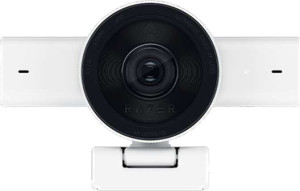
Razer Kiyo V2 specifications and in-depth review

Razer Kiyo V2

Manufacturer: Razer

The Razer Kiyo V2 is a webcam designed with both streamers and remote workers in mind, offering a capable feature set within a compact form factor. It includes a privacy shutter and an indicator light, along with a tripod mount for flexible positioning. The detachable USB Type-C cable and smartphone remote support add a layer of versatility to everyday use.

On the imaging side, the Kiyo V2 is built around an 8.3MP back-illuminated CMOS sensor capable of recording at 2160p and 30fps, with continuous autofocus, automatic light correction, and a built-in HDR mode. Its adjustable 93° field of view gives users control over framing, while the stereo microphone handles audio capture without requiring external hardware. Connectivity is limited to Windows via USB Type-C, and the 2-meter cable is detachable for easier storage or replacement.

Pros
  • Supports 4K recording at 30fps with continuous autofocus and automatic light correction for a stable image
  • The adjustable 93° field of view gives users control over how much of the scene is framed
  • A built-in HDR mode helps handle scenes with mixed or challenging lighting conditions
  • The detachable USB Type-C cable makes replacement easy and reduces cable management hassle
  • Includes a privacy shutter and indicator light, useful for maintaining visual awareness of camera activity
  • Stereo microphone is built in, removing the need for a separate audio device for basic capture
Cons
  • Compatible only with Windows, excluding users on Mac OS, Chrome OS, Android, and iOS
  • No noise-canceling microphone, meaning ambient sounds will be picked up during recording or streaming
  • The lens is not glass, which may affect optical clarity compared to glass-lens alternatives
  • No 3.5 mm headset jack, HDMI output, or Bluetooth, limiting audio and connectivity options
  • Does not include a video light, so users in low-light environments may need external lighting
Who is this for?

This webcam is well-suited to Windows-based streamers and content creators who need reliable 4K recording with built-in first-party live streaming support. The adjustable field of view, continuous autofocus, and HDR mode make it a practical choice for users recording in varied lighting conditions without relying on manual adjustments. Those who value privacy and desk flexibility will also appreciate the built-in privacy shutter and tripod mount, which allow for more deliberate and controlled setups.

Who is this NOT for?

Users working on Mac OS, Chrome OS, iOS, or Android will find this webcam incompatible with their systems, making it unsuitable for mixed-platform or non-Windows environments. Those requiring noise-canceling audio for use in loud or acoustically challenging spaces will need to supplement the built-in stereo microphone with an external solution. Additionally, users who need to connect to a wider range of devices or peripherals will be limited by the absence of Bluetooth, HDMI output, and a 3.5 mm headset jack.

Design:

has a privacy shutter
has an indicator light
has a tripod mount
has a video light
has a motion sensor
thickness 27 mm
height 27 mm
weight 255 g
width 116 mm

The Razer Kiyo V2 has a compact physical footprint, measuring 116 mm wide, 27 mm in height, and 27 mm in thickness, with a weight of 255 g. It includes a privacy shutter and an indicator light as standard features, while a tripod mount allows for flexible placement options. The webcam does not include a video light or a motion sensor.

Videography:

video recording (main camera) 2160 x 30 fps
has automatic light correction
has continuous autofocus when recording movies
field of view 93°
has an adjustable field of view
has first-party support for live streaming
has a built-in HDR mode

The webcam supports video recording at 2160p and 30fps, paired with continuous autofocus and automatic light correction to help maintain a stable and well-exposed image during capture. It features a built-in HDR mode for handling scenes with varied lighting conditions, and its 93° field of view is adjustable, giving users control over how much of the scene is captured. First-party live streaming support is also included.

Optics:

megapixels (main camera) 8.3 MP
has a glass lens
has a BSI sensor
has branded damage-resistant glass
has a CMOS sensor

The main camera resolves at 8.3 MP and is built around a CMOS sensor with back-side illumination, a design that generally improves light capture at the sensor level. The lens is not glass, and the unit does not feature any branded damage-resistant glass covering.

Audio:

has a noise-canceling microphone
has a built-in microphone
has a stereo microphone
has a built-in speaker

The Razer Kiyo V2 includes a built-in stereo microphone, allowing audio to be captured directly through the webcam without the need for a separate device. It does not feature noise cancellation, so background sounds will not be filtered at the hardware level. There is no built-in speaker.

Connectivity & Features:

release date October 2025
Has USB Type-C
cable length 2 m
has a detachable cable
Is compatible with Android
Is compatible with Windows
is compatible with Chrome OS
Is compatible with iOS
Is compatible with Mac OS X
Has Bluetooth
has an HDMI output
has a socket for a 3.5 mm audio jack

The Razer Kiyo V2 connects via USB Type-C and comes with a 2-meter detachable cable, making it straightforward to replace or swap out if needed. Compatibility is limited to Windows; the webcam does not support Android, iOS, Mac OS X, or Chrome OS. There is no Bluetooth, HDMI output, or 3.5 mm headset jack on this device.

Miscellaneous:

supports a remote smartphone
has a remote control

The Razer Kiyo V2 supports remote smartphone control, allowing a smartphone to be used to manage the webcam remotely. It does not include a dedicated physical remote control.

Final Verdict

The Razer Kiyo V2 is a capable webcam built around a clear set of priorities: solid image quality through its 4K recording with continuous autofocus and HDR support, practical design touches like the privacy shutter and detachable USB Type-C cable, and straightforward live streaming functionality. Its Windows-only compatibility and limited audio processing do narrow its appeal, making it best suited to dedicated Windows users who want a reliable, feature-complete webcam without relying on external accessories. For that specific audience, the Kiyo V2 delivers a well-rounded specification set that covers the essentials of both recording and streaming.