Razer Kiyo V2 X specifications and in-depth review

Razer Kiyo V2 X

Manufacturer: Razer

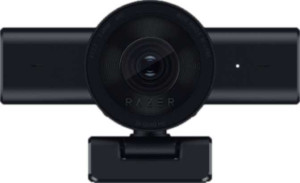
The Razer Kiyo V2 X is a webcam built for users who want reliable, high-resolution video output without a complicated setup. It features a privacy shutter and an indicator light, along with a tripod mount that gives some flexibility in positioning. The unit weighs 160 g and measures 109 mm wide, keeping its physical footprint relatively compact. One of its more practical design touches is the detachable 1.5 m cable, which makes storage and transport more manageable.

On the imaging side, the Kiyo V2 X uses a BSI CMOS sensor rated at 3.7 MP, capable of recording at 1440 x 60fps with an 80° field of view that can be adjusted to suit different framing needs. It supports automatic light correction and continuous autofocus during recording, and includes a built-in HDR mode. The camera also offers first-party live streaming support and remote smartphone compatibility. Audio is handled by a built-in stereo microphone, and connectivity runs over USB 2.0. Compatibility is listed for Windows only, with no support noted for Mac OS X, Chrome OS, Android, or iOS.

Pros
  • Records at 1440p and 60fps, delivering a high-resolution, smooth video output for streaming and recording
  • The adjustable field of view gives users control over how much of the scene is captured without repositioning the camera
  • A built-in HDR mode and automatic light correction help maintain usable image quality under varying lighting conditions
  • Continuous autofocus keeps the subject in focus throughout a recording session without manual adjustment
  • The detachable cable makes the unit easier to store and allows for replacement if the cable is damaged
  • A privacy shutter provides a simple, physical way to block the lens when the camera is not in use
Cons
  • Compatible with Windows only, leaving Mac, Chrome OS, Android, and iOS users without supported access
  • The microphone does not include noise cancellation, so ambient sounds will be picked up during recordings
  • Connects via USB 2.0 without a Type-C connector, which limits compatibility with modern cable setups
  • No built-in speaker or 3.5 mm headset jack means all audio output must go through a separate device
  • Does not include a video light, so users in poorly lit environments must rely on external lighting solutions
Who is this for?

This webcam is a solid fit for Windows-based content creators and streamers who want a reliable, high-resolution camera with first-party live streaming support already built in. The 1440p at 60fps output, combined with continuous autofocus and automatic light correction, makes it well-suited for users who record in environments where lighting conditions shift and who need the camera to adapt without manual intervention. The adjustable field of view and tripod mount also make it a practical choice for desk setups where framing flexibility matters, while the privacy shutter adds a layer of reassurance for users who keep the camera connected throughout the workday.

Who is this NOT for?

Users working on Mac OS X, Chrome OS, iOS, or Android will find this camera entirely unsupported, making it a poor fit for anyone outside the Windows ecosystem. Those who rely on clean audio capture without additional equipment may also be frustrated by the lack of noise cancellation, as the built-in stereo microphone will pick up ambient sounds during recordings. Additionally, users who work in low-light or uncontrolled lighting environments without access to external lighting may struggle, since the camera includes no built-in video light to supplement available light sources.

Design:

has a privacy shutter
has an indicator light
has a tripod mount
has a video light
has a motion sensor
thickness 67.8 mm
height 67.8 mm
weight 160 g
width 109 mm

The Design section of the Razer Kiyo V2 X reflects a compact, straightforward build with a few thoughtful physical features. It includes a privacy shutter and an indicator light, both useful for daily use in shared or professional spaces. A tripod mount is also present, offering some flexibility in how the camera is positioned, while video light and motion sensor functionality are not part of this model. Dimensionally, the unit measures 109 mm wide with a thickness and height both sitting at 67.8 mm, and it tips the scales at a modest 160 g, making it a relatively lightweight device in its category.

Videography:

video recording (main camera) 1440 x 60 fps
has automatic light correction
has continuous autofocus when recording movies
field of view 80°
has an adjustable field of view
has first-party support for live streaming
has a built-in HDR mode

The Razer Kiyo V2 X records video at 1440p with a frame rate of 60 fps, giving it a solid output resolution for a webcam in this class. It covers an 80° field of view, which can be adjusted to better suit different shooting environments. Automatic light correction and a built-in HDR mode help manage varying lighting conditions during capture, while continuous autofocus keeps subjects sharp throughout a recording session. The camera also includes first-party support for live streaming, rounding out a videography feature set aimed at both recording and broadcast use cases.

Optics:

megapixels (main camera) 3.7 MP
has a BSI sensor
has branded damage-resistant glass
has a CMOS sensor

The Kiyo V2 X uses a BSI CMOS sensor as its imaging foundation, a combination that generally allows for better light capture by positioning the wiring behind the photodiodes rather than in front of them. The main camera resolves at 3.7 MP, which aligns with its 1440p recording capability. The lens does not feature branded damage-resistant glass, so the front optic lacks that additional layer of protection against scratches or impacts.

Audio:

has a noise-canceling microphone
has a built-in microphone
has a stereo microphone
has a built-in speaker

For audio, the Razer Kiyo V2 X includes a built-in stereo microphone, which captures sound from two channels rather than a single mono source. However, the microphone does not feature noise cancellation, so background sounds will not be filtered out at the hardware level. The unit does not have a built-in speaker, meaning audio playback relies entirely on an external output device.

Connectivity & Features:

release date October 2025
USB version 2
Has USB Type-C
cable length 1.5 m
has a detachable cable
Is compatible with Android
Is compatible with Windows
is compatible with Chrome OS
Is compatible with iOS
Is compatible with Mac OS X
Has Bluetooth
has an HDMI output
has a socket for a 3.5 mm audio jack

The Razer Kiyo V2 X connects via USB 2.0 and comes with a 1.5 m cable that is detachable, making it easier to replace or swap out if needed. The connector is not USB Type-C, so users will need a standard USB Type-A port. In terms of platform support, the camera is compatible with Windows only — Mac OS X, Chrome OS, Android, and iOS are all unsupported. There is no Bluetooth, no HDMI output, and no 3.5 mm headset jack, meaning the device relies solely on its USB connection for both data and power with no additional wired or wireless output options available.

Miscellaneous:

supports a remote smartphone
has a remote control

The Razer Kiyo V2 X supports remote smartphone control, allowing a smartphone to be used as a remote interface for the camera. It does not include a dedicated physical remote control, so that form of standalone operation is not available.
Final Verdict

The Razer Kiyo V2 X is a focused webcam that delivers where it counts for Windows-based users who prioritize video quality and streaming readiness. Its 1440p at 60fps recording with continuous autofocus, HDR, and automatic light correction gives it a technically capable imaging setup for both recorded content and live broadcasts, and practical touches like the detachable cable, privacy shutter, and adjustable field of view add genuine day-to-day utility. That said, its strict Windows-only compatibility and the absence of noise cancellation or a built-in video light mean it works best in a controlled, well-equipped setup rather than as a versatile plug-and-play solution across different platforms or environments. For the right user in the right setup, it presents a well-rounded feature set; for anyone outside the Windows ecosystem or working without supplementary audio and lighting gear, its limitations will be felt fairly quickly.