Samsung Essential Monitor S3 (S36GD) 27" specifications and in-depth review

Samsung Essential Monitor S3 (S36GD) 27"

Manufacturer: Samsung

The Samsung Essential Monitor S3 (S36GD) is a 27-inch curved display designed for everyday desktop use. Built around a VA panel with a glossy surface, it offers wide viewing angles of 178 degrees both horizontally and vertically. With a 100Hz refresh rate, it delivers reasonably smooth motion handling for general productivity and casual use. The monitor supports tilt, swivel, and portrait mode adjustments, and is VESA mount compatible, giving users a fair degree of flexibility in how they set it up.

On the technical side, the S36GD outputs a 1920 x 1080 resolution at a pixel density of 81 ppi across its 27-inch screen, with a native contrast ratio of 3000:1 and a brightness rating of 250 nits. Color reproduction covers 95% of the sRGB gamut, and the display renders up to 16.7 million colors with color calibration support. Connectivity is handled through a single HDMI 1.4 port and a VGA connector, alongside a 3.5mm audio jack. The monitor draws 35W during operation and weighs approximately 3.8 kg.

Pros
  • Supports tilt, swivel, and portrait mode adjustments, offering meaningful ergonomic flexibility for different setups
  • VESA mount compatibility allows use with third-party monitor arms or wall brackets
  • Wide 178-degree viewing angles both horizontally and vertically ensure consistent image quality across a broad range of positions
  • 95% sRGB coverage and support for color calibration make it reasonably capable for color-sensitive general use
  • A 3000:1 contrast ratio is notably strong for an LCD panel, contributing to deeper blacks and more defined tonal separation
  • The 100Hz refresh rate provides smoother motion than a standard 60Hz display for everyday tasks and casual use
Cons
  • The glossy panel without an anti-glare coating can produce distracting reflections in brightly lit environments
  • Only a single HDMI 1.4 port and a VGA connector are available, with no DisplayPort, USB-C, or additional video inputs
  • No USB ports of any kind limits the monitor's utility as a connectivity hub on the desk
  • Adaptive synchronization is not supported, which can result in screen tearing during fast-moving content
  • No built-in speakers or audio output beyond a 3.5mm jack means external audio hardware is always required
  • At 81 ppi, the pixel density is relatively low for a 27-inch panel, which may result in visibly soft text and images at normal viewing distances
Who is this for?

This monitor is a practical fit for users who need a straightforward desktop display for everyday office tasks, web browsing, and document work. The ergonomic flexibility — including tilt, swivel, portrait mode, and VESA compatibility — makes it well-suited for workspace setups where adjustability matters. Users who work primarily with standard digital content will also benefit from the 95% sRGB coverage and color calibration support, which provides a reasonably accurate color baseline without requiring a high-end panel. The 100Hz refresh rate also makes it a decent option for casual users who want slightly smoother motion than a basic 60Hz display offers.

Who is this NOT for?

This monitor is not a good fit for users who need a capable multi-source workstation setup, as the lack of DisplayPort, USB-C, additional HDMI ports, and any USB hub functionality severely limits connectivity options. The glossy panel without anti-glare coating makes it a poor choice for bright or naturally lit environments where reflections would be a persistent issue. Competitive or fast-paced gamers will also find it inadequate, given the absence of adaptive synchronization and the modest 81 ppi pixel density, which falls short for users who expect sharp, detailed visuals on a 27-inch screen.

Display:

Display type LED-backlit, LCD, VA
response time 4 ms
screen size 27"
resolution 1920 x 1080 px
pixel density 81 ppi
Adaptive synchronization None
has anti-glare coating
refresh rate 100Hz
maximum horizontal viewing angle 178º
maximum vertical viewing angle 178º
has a matte panel
has a glossy panel
has a touch screen

The Samsung Essential Monitor S3 (S36GD) uses an LED-backlit LCD panel with VA technology, sized at 27 inches and delivering a 1920 x 1080 resolution at 81 ppi. It runs at a 100Hz refresh rate with a 4ms response time, making for reasonably fluid on-screen motion. The display features a glossy panel without an anti-glare coating and does not support touch input. Viewing angles reach 178 degrees both horizontally and vertically, while adaptive synchronization is not included in this model.

General info:

Type Standard, Curved
supports total tilt
Has a swivel stand
Supports VESA mount
height 367 mm
width 622 mm
thickness 108 mm
weight 3800 g
supports portrait mode
maximum operating temperature 40 °C
lowest potential operating temperature 10 °C
volume 24653.592 cm³

This curved standard monitor measures 622 mm wide, 367 mm tall, and 108 mm thick, weighing in at 3,800 g. It offers a solid range of ergonomic adjustments, including tilt, swivel, and portrait mode support, along with VESA mount compatibility for those who prefer an aftermarket arm or wall bracket. Operating temperatures are rated between 10 °C and 40 °C, keeping typical indoor environments well within range.

Colors:

brightness (typical) 250 nits
supports color calibration
display colors 16.7 million
contrast ratio 3000:1
sRGB coverage 95%

The display reproduces 16.7 million colors with a 3000:1 contrast ratio, lending it a reasonably deep tonal range for an LCD panel. Typical brightness sits at 250 nits, and sRGB coverage reaches 95%, meaning most standard color content renders within the panel's gamut. Color calibration is also supported, giving users the option to fine-tune output accuracy to their preference.

Connectivity:

HDMI ports 1
supports Thunderbolt
DisplayPort outputs 0
has a socket for a 3.5 mm audio jack
has a DVI connector
USB ports 0
Has USB Type-C
HDMI version HDMI 1.4
supports Ethernet
supports Wi-Fi
has AirPlay
mini DisplayPort outputs 0
has a VGA connector

Connectivity on this monitor is straightforward, centered around a single HDMI 1.4 port and a VGA connector as the two video inputs. A 3.5mm audio jack is also present for headset or speaker use. The monitor does not include DisplayPort, mini DisplayPort, DVI, USB Type-C, or any USB ports, and there is no support for Thunderbolt, Ethernet, Wi-Fi, or AirPlay.

Power:

operating power consumption 35W

This monitor has an operating power consumption of 35W, reflecting a modest energy draw during normal use.

Features:

has PiP
has stereo speakers
has built-in smart TV
has a remote control
supports Dolby Digital
supports Dolby Digital Plus
has DTS Surround
has an ambient light sensor
has a front camera

This monitor is fairly stripped back in terms of extra features. It does not include stereo speakers, a front camera, or an ambient light sensor, and there is no Picture-in-Picture support. On the audio side, Dolby Digital, Dolby Digital Plus, and DTS Surround are all absent. It also lacks a remote control, built-in smart TV functionality, and any form of integrated display management beyond basic operation.
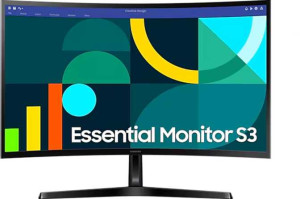
Final Verdict

The Samsung Essential Monitor S3 (S36GD) is a no-frills 27-inch curved display that covers the basics competently for everyday desktop use. Its strongest points lie in its ergonomic versatility and 95% sRGB coverage with color calibration support, which give it a practical edge in standard office or home environments. That said, its limited connectivity, glossy panel, and lack of adaptive synchronization mean it caters to a fairly narrow audience. Users with modest, single-source setups who prioritize adjustability and reasonable color accuracy over advanced features will find it serves that purpose well — but those seeking a more capable or versatile display will quickly run into its constraints.