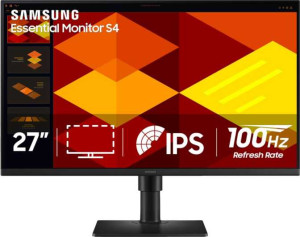
Samsung Essential Monitor S4 (S40GD) 27" specifications and in-depth review

Samsung Essential Monitor S4 (S40GD) 27"

Manufacturer: Samsung

The Samsung Essential Monitor S4 (S40GD) 27″ is a standard monitor designed for everyday use. Featuring a 27-inch LED-backlit display, it offers a smooth visual experience with a 100Hz refresh rate for fluid motion. The monitor is equipped with a glossy panel, making it a good choice for environments where lighting control is less critical.

Technical features include a 1920 x 1080 resolution for sharp details and a wide 178º horizontal and vertical viewing angle. The monitor has a 5 ms response time and supports various connectivity options, including two HDMI ports and a DisplayPort 1.2 output. It also supports VESA mounting, giving flexibility for setup and positioning.

Pros
  • Supports VESA mounting for flexible positioning and setup.
  • Has a swivel stand, allowing users to adjust the monitor's orientation.
  • Offers a wide 178º viewing angle both horizontally and vertically.
  • Supports color calibration for more accurate color reproduction.
Cons
  • No anti-glare coating, which may affect visibility in bright environments.
  • Lacks built-in stereo speakers, requiring external audio solutions.
  • Does not support adaptive synchronization, which could limit gaming performance.
  • No USB Type-C or Thunderbolt support, limiting modern connectivity options.
Who is this for?

The Samsung Essential Monitor S4 (S40GD) 27″ is ideal for users who require a reliable and basic display for everyday tasks. With a wide 178º viewing angle and color calibration support, it's suitable for office work, casual browsing, and light multimedia consumption. The VESA mount compatibility and swivel stand also make it a good choice for users who need flexible positioning in their workspace.

Who is this NOT for?

This monitor is not suitable for users seeking high-end performance for gaming or media editing. Its lack of adaptive synchronization and absence of stereo speakers make it less ideal for fast-paced gaming or immersive media experiences. Additionally, the lack of USB Type-C and Thunderbolt connectivity may hinder modern device integration for more advanced users.

Display:

Display type LED-backlit, LCD, IPS
response time 5 ms
screen size 27"
resolution 1920 x 1080 px
pixel density 91 ppi
Adaptive synchronization None
has anti-glare coating
refresh rate 100Hz
maximum horizontal viewing angle 178º
maximum vertical viewing angle 178º
has a matte panel
has a glossy panel
has a touch screen

The Samsung Essential Monitor S4 (S40GD) 27″ features a 27-inch IPS LCD display with a 1920 x 1080 resolution and a 100Hz refresh rate, delivering clear and smooth visuals. While the monitor does not include anti-glare or matte coatings, its glossy panel can enhance color vibrancy in controlled lighting environments. The display offers a wide 178º horizontal and vertical viewing angle, ensuring consistent image quality from different positions, though it does not support adaptive synchronization or touch functionality.

General info:

Type Standard
release date February 2025
supports total tilt
Has a swivel stand
Supports VESA mount
height 360 mm
width 612 mm
thickness 39 mm
weight 4000 g
supports portrait mode
maximum operating temperature 40 °C
lowest potential operating temperature 10 °C
volume 8592.48 cm³

The Samsung Essential Monitor S4 (S40GD) 27″ is a standard monitor with a range of ergonomic features. It supports total tilt and has a swivel stand, allowing users to adjust the monitor's position for improved comfort. The monitor also supports VESA mounting for easy wall or arm mounting. With a height of 360 mm and a width of 612 mm, it weighs 4000 g and has a volume of 8592.48 cm³. It can operate within a temperature range from 10°C to 40°C and is capable of being rotated into portrait mode for flexible display setups.

Colors:

brightness (typical) 250 nits
supports color calibration
display colors 16.7 million
contrast ratio 1000:1

The Samsung Essential Monitor S4 (S40GD) 27″ offers a typical brightness of 250 nits, providing a clear display under most lighting conditions. It supports color calibration for more accurate color reproduction, with the capability to display up to 16.7 million colors. The monitor features a contrast ratio of 1000:1, ensuring a decent level of contrast for a vivid viewing experience.

Connectivity:

HDMI ports 2
supports Thunderbolt
DisplayPort outputs 1
DisplayPort version DisplayPort 1.2
has a socket for a 3.5 mm audio jack
has a DVI connector
USB ports 3
Has USB Type-C
HDMI version HDMI 1.4
supports Ethernet
supports Wi-Fi
has AirPlay
mini DisplayPort outputs 0
has a VGA connector

The Samsung Essential Monitor S4 (S40GD) 27″ offers solid connectivity options with two HDMI ports, a DisplayPort 1.2 output, and three USB ports. It also includes a 3.5 mm audio jack for headset use, though it does not support Thunderbolt, DVI, or USB Type-C. The monitor is equipped with HDMI 1.4 and lacks Ethernet, Wi-Fi, AirPlay, or mini DisplayPort capabilities, offering a straightforward set of connections for general use.

Power:

Features:

has PiP
has stereo speakers
has built-in smart TV
has a remote control
supports Dolby Digital
supports Dolby Digital Plus
has DTS Surround
has an ambient light sensor
has a front camera

The Samsung Essential Monitor S4 (S40GD) 27″ is designed with a straightforward feature set. It does not include PiP, stereo speakers, or a built-in smart TV, and it lacks a remote control. Additionally, the monitor does not support Dolby Digital or Dolby Digital Plus, nor does it feature DTS Surround. There is no ambient light sensor or front camera included with this model, focusing primarily on core display and connectivity functionalities.

Final Verdict

The Samsung Essential Monitor S4 (S40GD) 27″ is a solid, straightforward option for users who need a reliable display for everyday tasks. With its wide viewing angle and color calibration support, it excels in providing clear, consistent visuals for general office work and casual use. However, it falls short for more demanding applications like gaming or media editing due to its lack of advanced features like adaptive synchronization and built-in audio. Overall, it's a practical choice for users seeking a functional monitor with basic features, but those with specific performance needs may want to explore other options.