SteelSeries Apex Pro Gen 3 specifications and in-depth review

SteelSeries Apex Pro Gen 3

Manufacturer: SteelSeries

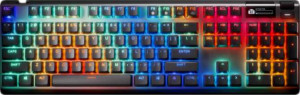
The SteelSeries Apex Pro Gen 3 is a full-size wired mechanical gaming keyboard built around a standard 100% layout with an aluminum and plastic chassis finished in black. It ships with a wrist rest and adjustable feet, and the backlit keycaps paired with RGB lighting give the board a distinctive look at any desk setup. A small integrated display sits on the board itself, adding quick access to settings or status readouts without needing companion software open at all times.

At the core of the Apex Pro Gen 3 are OmniPoint 3.0 Hall effect switches, which use magnetic actuation to allow a fully adjustable actuation point anywhere between 0.1 mm and 4 mm, paired with an actuation force of 43 g and a linear feel. The keyboard supports rapid trigger, dual actuation, analog input, and full N-key rollover, covering the full range of advanced input features common in competitive gaming peripherals. Keycaps are double-shot PBT in an OEM profile following a standard ANSI layout, and a rotary dial handles media or system functions alongside Fn-layer media key access. The detachable USB cable connects at 1000 Hz polling rate, though there is no USB passthrough port on the board.

Pros
  • The adjustable actuation point on the Hall effect switches can be set anywhere between 0.1 mm and 4 mm, giving users direct control over keystroke sensitivity
  • Rapid trigger, dual actuation, and analog input are all supported, covering a wide range of advanced input options in a single board
  • Double-shot PBT keycaps in an OEM profile are durable and resistant to shine over prolonged use
  • A wrist rest is included in the box, supporting ergonomic comfort without requiring a separate purchase
  • The detachable cable simplifies cable management and makes replacement straightforward
  • An onboard display allows direct access to settings without relying solely on companion software
Cons
  • At 1403 g, the keyboard is notably heavy, which limits portability and may be inconvenient for users who travel with their setup
  • Switches are not hot-swappable, so the OmniPoint 3.0 units cannot be replaced or changed without more involved work
  • Media functions are only accessible through the Fn layer rather than dedicated keys, which adds an extra step during use
  • There is no USB passthrough port, so additional devices cannot be connected directly through the keyboard
  • The keyboard is not designed for Mac use, limiting its compatibility out of the box
Who is this for?

This keyboard is well-suited to PC gamers who want granular control over their input experience, particularly those who benefit from adjustable actuation and rapid trigger for fast-paced or precision-demanding titles. The full-size ANSI layout with standard keycap compatibility, included wrist rest, and sturdy aluminum-reinforced chassis make it a practical long-term choice for users who spend extended hours at a fixed desk setup. Those who value advanced input features like dual actuation and analog input alongside a built-in display for on-the-fly adjustments will find the feature set directly aligned with their needs.

Who is this NOT for?

Users who frequently move their setup or game on the go will likely find the 1403 g weight a significant inconvenience, as the board is not designed with portability in mind. Mac users are also not well-served here, since the keyboard lacks Mac-specific key support. Additionally, those who prefer to customize or experiment with different switch types over time will be limited by the non-hot-swappable switches, and users who rely on dedicated media keys for quick audio or playback control may find the Fn-layer-only media access less convenient during everyday use.

General info:

Keyboard type Gaming, Mechanical
Keyboard layout size Full (100%)
Profile Standard
connectivity Wired
connection type USB
polling rate 1000 Hz
designed for Mac
has a detachable cable
height 139 mm
width 437 mm
thickness 41 mm
weight 1403 g

The SteelSeries Apex Pro Gen 3 is a full-size mechanical gaming keyboard with a standard profile and a wired USB connection running at a 1000 Hz polling rate. The cable is detachable, which simplifies storage and replacement, though the keyboard is not designed for Mac use. Physically, it measures 437 mm wide, 139 mm tall, and 41 mm thick, with a weight of 1403 g that gives it a notably solid, substantial feel on the desk.

Design:

has RGB lighting
Has a backlit keyboard
Case material Aluminum, Plastic
Case colors Black
has adjustable feet
includes a wrist rest

The Apex Pro Gen 3 is built from a combination of aluminum and plastic and comes exclusively in black. Both RGB lighting and per-key backlighting are present, allowing for customizable illumination across the board. Practical touches include adjustable feet for tilting the keyboard to a preferred typing angle, and a wrist rest is included in the box, rounding out a design that accounts for longer sessions at the desk.

Switches:

Switch type Hall effect
Switch feel Linear
Hot-swappable switches
Switch name OmniPoint 3.0
Actuation distance (min) 0.1 mm
Actuation distance (max) 4 mm
Actuation force 43 g

The Apex Pro Gen 3 uses OmniPoint 3.0 Hall effect switches with a linear feel and an actuation force of 43 g. One of their defining characteristics is a fully adjustable actuation point that can be set anywhere between 0.1 mm and 4 mm, giving users precise control over how sensitive each keypress feels. The switches are not hot-swappable, so the installed OmniPoint 3.0 units are a permanent part of the board's construction.

Features:

has analog input
has rapid trigger
has dual actuation
has adjustable actuation
has NKRO
has USB passthrough
Has a display

The Apex Pro Gen 3 covers a broad set of input features, including rapid trigger, dual actuation, adjustable actuation, and analog input, giving users fine-grained control over how keypresses are registered. Full N-key rollover ensures that every simultaneous keypress is recognized without conflict. An onboard display is built into the keyboard for direct access to settings or status information. The board does not include a USB passthrough port, so additional peripherals cannot be connected through it directly.

Keys & layout:

Keyboard layout ANSI (United States)
Keycap type PBT, Double-shot
Keycap profile OEM
uses a standard key layout
Media keys Via Fn key
has a rotary dial

The Apex Pro Gen 3 follows a standard ANSI (United States) key layout using an OEM keycap profile, with double-shot PBT keycaps that maintain legibility and durability over extended use. Media functions are accessible via the Fn key rather than dedicated standalone keys, and a rotary dial is included on the board for additional control input. The layout adheres to a standard arrangement, meaning aftermarket keycap sets designed for standard boards will fit without compatibility issues.

Final Verdict

The SteelSeries Apex Pro Gen 3 is a feature-dense full-size mechanical keyboard built around the strengths of its OmniPoint 3.0 Hall effect switches, which deliver a level of actuation flexibility — from 0.1 mm to 4 mm — that few boards in this category can match. Paired with rapid trigger, dual actuation, analog input, N-key rollover, and an onboard display, it caters clearly to competitive PC gamers who want deep input customization from a single, desk-bound setup. Its weight and non-hot-swappable switches mean it asks for a degree of commitment from the user, making it best suited to those who have settled on their switch preference and are not looking to move the board around. For that fixed, performance-oriented desktop audience, the Apex Pro Gen 3 represents a comprehensive and well-specified option.

Popular Comparisons

SteelSeries Apex Pro Gen 3
VS
Razer Blackwidow V4 Pro 75%
SteelSeries Apex Pro Gen 3
VS
Asus ROG Strix Scope II 96 RX Wireless
SteelSeries Apex Pro Gen 3
VS
Razer Huntsman V3 Pro
SteelSeries Apex Pro Gen 3
VS
Corsair K70 Max RGB
Corsair K70 Max RGB
SteelSeries Apex Pro Gen 3
VS
Asus ROG Azoth
Asus ROG Azoth
SteelSeries Apex Pro Gen 3
VS
Razer Huntsman V3 Pro Mini