Trust Bayo II specifications and in-depth review

Trust Bayo II

Manufacturer: Trust

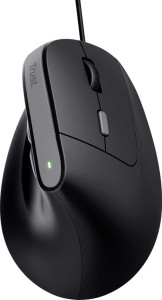
The Trust Bayo II is a wired productivity mouse from Trust, built around a straightforward right-handed design suited to everyday office and desk use. It connects via USB and keeps things uncomplicated, with six buttons including two side buttons and a dedicated DPI switching button for quick sensitivity adjustments. There is no RGB lighting or software-dependent customisation, which keeps the setup simple and the focus squarely on day-to-day usability. A two-year warranty is included.

The Bayo II offers an adjustable DPI range running from 800 up to 2400 DPI, giving users a degree of flexibility in tracking sensitivity without overcomplicating the experience. None of the buttons are programmable, and there is no onboard memory for profile storage, nor a profile switching button. The mouse measures 120 mm in length, 73 mm wide, and 77 mm thick, weighing in at 121 g. A 1.5 m cable connects it to the host device, and the design omits a tilting scroll wheel, thumb scroll wheel, and adjustable weights.

Pros
  • A dedicated DPI switching button allows tracking sensitivity to be adjusted on the fly without any software
  • Six buttons including two side buttons provide a practical input layout for everyday productivity tasks
  • The wired USB connection removes any dependency on batteries or charging, ensuring consistent availability
  • A two-year warranty provides reasonable coverage for a productivity peripheral
Cons
  • None of the six buttons are programmable, leaving no room to customise the button layout for specific workflows
  • The mouse stores no onboard memory profiles, so there is nothing to carry settings between different machines
  • The design is right-handed only, excluding left-handed users entirely
  • At 121 g, the mouse sits on the heavier side for a wired productivity mouse, which may cause fatigue during extended sessions
  • There is no tilting scroll wheel, limiting horizontal scrolling to button-based input only
  • Gesture support is absent, which restricts certain navigation workflows that rely on it
Who is this for?

The Trust Bayo II is a practical fit for users who want a no-fuss, wired USB productivity mouse that requires no setup beyond plugging in. Its straightforward six-button layout with a dedicated DPI switching button suits office workers and general desktop users who need reliable day-to-day input without dealing with software, profiles, or wireless pairing. The two-year warranty also makes it a reasonable choice for those who prioritise a degree of long-term reliability from a basic peripheral.

Who is this NOT for?

Users who regularly switch between machines or need to carry personalised settings will find the lack of onboard memory profiles a genuine limitation, as nothing can be stored on the device itself. Left-handed users are excluded by the right-handed-only design, and anyone who relies on programmable buttons for workflow shortcuts will find no support for that here. The 121 g weight and absence of a tilting scroll wheel may also make it a poor fit for users who require horizontal scrolling or prefer a lighter mouse during extended sessions.

Performance:

maximum DPI 2400 DPI
minimum DPI 800 DPI
has adjustable DPI

The Trust Bayo II features adjustable DPI with a range spanning from 800 to 2400 DPI, allowing users to tune tracking sensitivity to suit different tasks or surface types. The adjustment range is modest but covers the essentials for general productivity use.

General info:

Type Productivity
connection type USB
onboard memory profiles 0
has gesture support
warranty period 2 years

The Trust Bayo II is a productivity mouse that connects via USB and is designed for straightforward wired use without wireless or multi-device options. It stores no onboard memory profiles and does not support gesture input, keeping the feature set focused on basic desktop operation. The product is covered by a two-year warranty.

Buttons:

number of buttons 6
number of side buttons 2
number of programmable buttons 0
has a DPI switching button
has a profile switching button

The Trust Bayo II has six buttons in total, two of which are side buttons placed for thumb access. A dedicated DPI switching button is included for adjusting tracking sensitivity without entering any software. None of the buttons are programmable, and there is no profile switching button on the mouse.

Design:

Orientation Right-handed
weight 121 g
has RGB lighting
has a tilting scroll wheel
has a thumb scroll wheel
has extra weights
cable length 1.5 m
volume 674.52 cm³
thickness 77 mm
height 120 mm
width 73 mm

The Trust Bayo II is shaped for right-handed use and measures 120 mm in length, 73 mm wide, and 77 mm thick, with a volume of 674.52 cm³. It weighs 121 g and connects via a 1.5 m cable. The design is utilitarian in nature — there is no RGB lighting, no tilting or thumb scroll wheel, and no provision for additional weights.

Final Verdict

The Trust Bayo II is a wired productivity mouse that keeps its proposition simple and consistent — a right-handed, USB-connected peripheral with a clean six-button layout and on-the-fly DPI switching between 800 and 2400 DPI. It asks nothing of the user in terms of software, pairing, or battery management, and the two-year warranty adds a layer of reassurance for everyday office use. Its scope is intentionally limited, and users seeking programmable buttons, onboard profiles, or left-handed support will need to look elsewhere. For those whose needs align with what it offers, however, the Trust Bayo II is a dependable and uncomplicated desktop mouse that does exactly what it sets out to do.

Popular Comparisons

Trust Bayo II
Trust Bayo II
VS
Trust Bayo Plus
Trust Bayo Plus